



Qleany
Define your entities in YAML. Get a complete, tested architecture in C++20/Qt6 or Rust: controllers, repositories, undo/redo, reactive models, and ready-to-compile UIs.
No framework. No runtime. No Qleany dependencies in your code.
The generated code is yours: plain C++ classes and Rust structs using standard libraries (Qt, QCoro for C++). Modify it, extend it, delete Qleany afterward. You’re not adopting a framework that will haunt your codebase for years or burn you when the maintainer moves on: because the generated code carries no Qleany dependency at all.
Try it now
Run:
pipx install qleany && qleany demo
And follow the instructions.
Deps: clang-format for C++/Qt, or cargo-fmt for Rust.
Or type qleany to launch the GUI and click on the green “Run demo” button.
Intro
Qt provides excellent widgets and signals, but little guidance on organizing a 30,000-line application. Rust’s GUI ecosystem is growing fast, but there’s nothing to help you structure what sits behind the UI. Qleany fills that gap. Write a YAML manifest describing your entities, relationships, and features. Qleany generates the rest: the database layer, the repository infrastructure, the event system, the controller wiring, and — if you need it — a multi-stack undo/redo system with cascade snapshot/restore for entity trees. For C++/Qt, it also generates reactive QML models that update themselves, and JavaScript mock controllers so your UI developer can work without waiting for the backend.
Once the code is generated, your work is two things: fill in the use case bodies where the TODOs are, and build your UI. The rest is done. Think of it as getting the framework without adopting one.
Qleany is not a scaffolding tool, it’s an architecture materializer.
For a 17-entity project, that’s roughly 410 files in C++/Qt or 175 in Rust, all compiling, all internally consistent, with a generated test suite that validates the infrastructure before you write a single line of business logic. The generated code is deliberately straightforward, readable and modifiable by a developer with a few years of experience, not a showcase of advanced language features.
Qleany follows Package by Feature (Vertical Slice Architecture) principles. Define your entities and features once, generate consistent architecture across Rust and C++/Qt with baked-in (empty) UIs. Qleany’s own Slint-based tool is built using the same patterns it generates.
Key Features
- Complete CRUD infrastructure: Controllers, DTOs, use cases, repositories per entity
- Undo/redo system (optional): Command-based with multi-stack scoping, composite grouping, and failure strategies; async execution with QCoro coroutines in C++/Qt, synchronous in Rust; cascade snapshot/restore for entity trees
- GUI skeleton generation: Ready-to-compile frontend code for Teksilo, QtQuick, QtWidgets, Slint, or CLI
- Mobile bridge: UniFFI-based iOS (Swift) and Android (Kotlin) support with generated async wrappers, event callbacks, and platform READMEs
- Models: C++/Qt and Teksilo: auto-updating list models and single-entity wrappers with event-driven refresh, each with a mock twin for backend-free UI work
- Reactive QML models: Same than above, but with QML integration, so they can be used directly in the UI without manual wiring (C++/Qt)
- QML mocks: JavaScript stubs that simulate async behavior, enabling UI development without a backend (C++/Qt)
- Relationship management: Uniform junction tables with ordering, two-layer caching, bidirectional navigation, and cascade deletion
- Event system: Thread-safe, decoupled communication between features
- Event Buffer: Send events only if the command succeeds
- Generated test suite: Junction table operations, undo/redo behavior, and async integration tests
AI ready
Qleany generates a consistent, well-structured codebase that coding LLMs can navigate without guesswork and ships two CLI commands to make that easy:
qleany docs all --md > qleany_docs.md: full reference as a single Markdown file you can drop into your LLM’s context. Narrow it withqleany docs manifest,qleany docs undo-redo-architecture, etc.qleany prompt: generate contextualized, guardrailed prompts for coding tasks against your manifest:
qleany prompt --context              # project context for .claude/CLAUDE.md and friends
qleany prompt --list                 # list use cases (and which are unimplemented)
qleany prompt --use-case feature:my_feature_name
Not interested in LLMs? Ignore this section — prompt just prints text, and nothing else in Qleany depends on it.
Documentation
| Document | Purpose |
|---|---|
| Quick Start - Rust | Step-by-step tutorial building a complete application |
| Quick Start - C++/Qt | Step-by-step tutorial building a complete application |
| Manifest Reference | Entity options, field types, relationships, features and use cases |
| Design Philosophy | Clean Architecture background, package by feature, Rust module structure |
| How Operations Flow | How data flows through the application, events |
| Regeneration Workflow | How file generation works, what gets overwritten, files that must stay in sync |
| Undo-Redo Architecture | Entity tree structure, undoable vs non-undoable, configuration patterns |
| Migration Guide | Manifest changes and migration strategies |
| QML Integration | Reactive models, mocks, and event system for C++/Qt |
| Generated Infrastructure - C++/Qt | Database layer, repositories, and file organization details |
| Generated Infrastructure - Rust | Database layer, repositories, and file organization details |
| API Reference - C++/Qt | Entity controller, feature controller, and custom UoW macros |
| API Reference - Rust | Entity controller, feature controller, and custom UoW proc macros |
| Mobile Bridge Development | UniFFI bridge for iOS (Swift) and Android (Kotlin) |
| Troubleshooting | Common issues and how to fix them |
New to Qleany? Start with the Quick Start Guide - C++/Qt or Quick Start Guide - Rust. Then return here for reference.
Is Qleany the Right Fit?
When Qleany Makes Sense
Data-centric applications that will grow in complexity over time. Think document editors, project management tools, creative applications, or anything where users manipulate structured data and expect undo/redo to work reliably. This applies equally to desktop and mobile: a note-taking app on Plasma Mobile has the same architectural needs as one on desktop Linux.
Complex CLI tools in Rust: tools like git that manage structured data, have multiple subcommands, and need consistent internal architecture. Qleany itself is built this way: type qleany -h to see a CLI interface backed by the same architecture that powers its Slint GUI.
Applications targeting multiple platforms: if you’re building for desktop Linux and want to support Plasma Mobile or Ubuntu Touch with the same codebase, Qleany’s generated backend works identically across all of them. Write your business logic once, swap UI frontends as needed.
Mobile apps with a Rust backend: if you are targeting iOS (Swift) or Android (Kotlin), enable rust_ios and/or rust_android in your manifest. Qleany generates a complete UniFFI bridge with platform-native async wrappers. See the Mobile Bridge Development guide. This solution is especially valuable if you want to share the backend between desktop and mobile.
Applications needing multiple Qt frontends: if you need QtQuick, QtWidgets (or any combination of them simultaneously), Qleany generates a ready-to-compile backend architecture that any of these frontends can consume. The generated controllers, repositories, and event system work identically regardless of which UI toolkit you choose.
Solo developers or small teams without established architectural patterns. Qt provides excellent widgets and signals, but little guidance on organizing a 30,000-line application (or I couldn’t find it). Qleany gives you that structure immediately, with patterns validated through real-world use in Skribisto.
Projects that will grow incrementally: the manifest-driven approach means you can define a new entity, regenerate the architecture, and immediately have a working controller, repository, DTOs, and use cases. The consistency this brings across your codebase is hard to achieve manually.
When to Reconsider
For simple utilities or single-purpose tools, Qleany introduces more infrastructure than you need. If your application doesn’t have complex entity relationships, doesn’t need undo/redo, and won’t grow significantly, a hand-written architecture may serve you better. Yet since you only have to fill a few blank spots, using Qleany can save you time.
If you’re working with a team that already has established patterns, introducing Qleany means everyone needs to learn its conventions. The generated code is readable and follows clear patterns, but it represents a specific way of doing things. Discuss with your team before adopting it. Do not antagonize existing workflows. A more professional approach may be to present Qleany’s patterns with some open-minded senior devs of your team. Even if they don’t want to use Qleany - which is fairly expected - they may appreciate some of its ideas and adapt them to their existing architecture. They may even want to use Qleany for prototyping or side projects, or scaffold new subsystems of an existing project without disrupting the main architecture.
Qleany targets native applications. If you’re building for the web, using Electron, this isn’t the right tool. Similarly, if you need high-throughput server-side processing, the patterns here are optimized for user interaction, not request-per-second performance.
Special Considerations
For Flutter or React Native, the Rust backend option can still be an interesting choice, but the C++/Qt generation is not recommended.
You can also have a Rust backend and a C++/Qt frontend in the same codebase, using cxx-qt as a bridge. This is only an idea. Qleany does not support this.
The Practical Test
If your project matches the profile, start by generating the architecture for a small subset of your entities and spend time reading through the generated code. Understand how the controllers wire to use cases, how the event system propagates changes, how the undo commands work. This investment of a few hours will tell you whether the patterns feel natural to your way of thinking.
The “generate and disappear” philosophy means you’re not locked in. If you decide halfway through that you’d prefer a different approach, the generated code is yours to modify or replace.
Why Qleany
I wrote Skribisto, a novel-writing application in Qt. Four times. In different languages. Each time, I hit the same wall: spaghetti code and structural dead-ends that made adding features painful and eventually impossible without rewriting half the codebase.
After the third rewrite, I studied architecture patterns seriously. Clean Architecture (Robert C. Martin) clicked: the separation of concerns, the dependency rules, the testability. But implementing it by hand meant writing the same boilerplate over and over: repositories, DTOs, use cases, controllers. So I wrote templates. The templates grew into a generator. The generator needed a manifest file.
Qleany v0 was Python/Jinja2 generating C++/Qt code following pure Clean Architecture. It worked, but the tradeoffs were hard to miss: a 17-entity project produced 1700+ files across 500 folders. Some of my early design choices were dubious in hindsight.
Qleany v1 is a ground-up rewrite in Rust, aiming to fix those problems while adopting a more robust and easier-to-maintain language. Less sophisticated, more pragmatic, architecture. It adopts Package by Feature (a.k.a. Vertical Slice Architecture) instead of strict layer separation. Same Clean Architecture principles (SOLID), but organized by what the code does rather than what layer it belongs to. The same manifest now generates both C++/Qt and Rust code.
This is the tool I needed when I started Skribisto. If it saves someone else from their fourth rewrite, it’s done its job.
Target Platforms
| Language | Standard | internal database | Frontend Options |
|---|---|---|---|
| C++ | C++20 / Qt6 | SQLite | QtQuick, QtWidgets |
| Rust | Rust 2024 | in-memory HashMap | Teksilo, CLI, Slint, iOS (Swift), Android (Kotlin) |
Supported deployment targets for C++/Qt:
- Desktop Linux (KDE Plasma, GNOME, etc.)
- Windows, macOS (Qt’s cross-platform support)
- Mobile (Android, iOS) via Qt’s mobile support
Supported deployment targets for Rust:
- All the usual Rust targets (Linux, Windows, macOS, etc.)
- iOS and Android via the generated
mobile_bridgecrate (UniFFI)
The generated backend is platform-agnostic. Your business logic, repositories, and controllers work identically whether you’re building a desktop app, a mobile app, or both from the same codebase. Only the UI layer differs.
Also, the internal storage choice (SQLite for C++/Qt, in-memory HashMap store for Rust) is abstracted behind repositories. You can swap out the storage implementation if needed.
Rust frontend examples:
- Teksilo UI: the recommended Rust desktop target. Generates singles, list models, mocks and a demo window over the shared
frontendcrate — see Quick Start Guide - Rust - Slint UI: qleany/crates/slint_ui (Qleany’s current GUI frontend)
- Tauri/React: qleany/crates/qleany-app (abandoned prototypes but still working references)
I’m no web developer, and Tauri/React is not my forte. But if you want to build a web-based frontend with Rust backend generated by Qleany, this is a starting point.
Where to Get Qleany
| Source | Status |
|---|---|
| GitHub Releases | See here |
| Cargo | cargo install --git https://github.com/ferntech-eu/qleany qleany or cargo binstall qleany |
| PyPI (pip) with pipx | pipx install qleany from Pypi |
Or build from source (see below).
License
Qleany (the generator) is licensed under MPL-2.0. See the LICENSE file for details. It is compatible with both open source and proprietary projects.
Generated code: This license does not cover the code generated by Qleany. You are free to use, modify, and distribute generated code under any license of your choice, including proprietary licenses.
For more details, see this fine summary
Building and Running
Prerequisites
- Rust (install via rustup)
Building Qleany
git clone https://github.com/ferntech-eu/qleany
cd qleany
cargo build --release
Running the UI
cargo run --release
The Slint-based UI provides:
- Form-based manifest editing
- Entity and relationship management
- Feature/use case orchestration
- Selective file generation
- Code preview and diff before generation
For more details, see the Quick Start Guide - C++/Qt or Quick Start Guide - Rust.
CLI Usage
# Show help
qleany -h

# Create, generate a demo project in a qleany-demo folder
qleany demo

# Show an option help
qleany generate -h

# show the list of available documentation
qleany docs -h

# show all documentation in Markdown format
qleany docs all --md

# new qleany.yaml manifest, questions will guide you through the process
qleany new

# Generate modified and new files (default)
qleany generate (or gen)

# Generate to ./temp/ folder (recommended)
qleany generate --temp

# Dry run (list files that would be generated without writing)
qleany generate --dry-run

# Dry run for a specific entity
qleany generate --dry-run entity MyEntity

# Generate specific feature
qleany generate feature my_feature_name

# List files that would be generated  (only modified and new by default)
qleany list

# Filter by status
qleany list --modified          # only modified files (-M)
qleany list --new               # only new files (-N)
qleany list --unchanged         # only unchanged files (-U)
qleany list --all-status        # all statuses

# Filter by nature
qleany list --infra             # infrastructure files only (-i)
qleany list --aggregates        # aggregate files only (-g)
qleany list --scaffolds         # scaffold files only (-s)
qleany list --all-natures       # all natures

# Show everything
qleany list --all               # equivalent to --all-status --all-natures

# List features that would be generated
qleany list features

# Verify the manifest
qleany check

# Display the enforced rules
qleany check --rules

# Diff the generated code for a file against the existing code
qleany diff file_path/file.rs

# Create a context for LLM-based code generation
qleany prompt --context

# List the use cases and the unimplemented ones
qleany prompt --list

# generate a task prompt tailored for a use case
qleany prompt --use-case feature:my_feature_name
Reference Implementation
Skribisto (develop branch) is a novel-writing application built with Qleany-generated C++/Qt code. It demonstrates:
- Full entity hierarchy (Root → Work → Binder → BinderItem → Content)
- Complex relationships (ordered children, many-to-many tags)
- Feature orchestration (LoadWork, SaveWork with file format transformation)
- Reactive QML UI with auto-updating models
- Undo/redo across structural and content operations
Skribisto serves as both proof-of-concept and template source for C++/Qt generation.
Migration from v0
Qleany v0 (Python/Jinja2), the prototype, generated pure Clean Architecture with strict layer separation. A 17-entity project produced 1700+ files across 500 folders.
v1 generates Package by Feature with pragmatic organization. The same project produces ~600 files across ~80 folders with better discoverability. Its manifest version begins with version 2.
Breaking changes:
- Manifest format changed (schema version 2)
- Output structure reorganized by feature
- Reactive models are new (list models, singles)
Bottom line: from v0 to v1, there is no automated migration path. You must regenerate from your manifest and manually port any custom code.
Starting from the newer version 2 of the manifest (i.e., Qleany v1), the new architecture offers a smoother transition to future versions, doing it automatically at load time, or using qleany upgrade.
See the Migration Guide for more details.
Contributing
To contribute:
- Open an issue to discuss changes
- Ensure changes work for both Rust and C++/Qt
- Remember to sign off your commits (
commit -s)
Please read the CONTRIBUTING.md file.
Support
GitHub Issues is the only support channel: github.com/ferntech-eu/qleany/issues
Qleany is a project licensed under MPL-2.0. It is actively used in Skribisto’s development, among other projects from FernTech, so improvements flow from real-world needs. Bug reports and contributions are welcome.
FernTech offers professional support for Qleany.
Contact: cyril.jacquet@ferntech.eu
AI use
Qleany isn’t a tool made by AI. It is a human-driven tool using templates and smart (I can hope) algorithms.
In this era where too much code comes from AI, and too much “slop” code, I feel that I must be honest with my use of these semi-smart tools. I am an IT professional for 14 years (started in 2011). I was Linux sysadmin, DevOps engineer, and now a senior C++ and Rust developer/tech lead/architect. I learned my trade before all this AI stuff. For me, LLMs are capricious smart tools. My take: never trust a LLM, always check the answers because they tend to trick you, LLMs never learn from their mistakes, unlike a human. It’s a tool, not a crutch.
In Qleany, AI was used in only three cases:
- basic auto-completion, thanks to the LLM integrated into JetBrains IDEs (especially in very repetitive patterns), less “magical” than GitHub Copilot, but still helpful.
- English sentences in the documentation were smoothed with the AI, nothing more. And it helped to create tables with all these asterisks. I wrote this documentation.
- The AI added some comments and inline documentation, especially in the C++ undo redo system. It was fun.
That’s it. I honestly feel that Qleany is the work of a human being (me), not a machine.
That being said, while Qleany wasn’t born as an AI tool, today’s reality is that LLMs are here to stay, and they can be useful for developers. So I made sure that Qleany’s CLI has a prompt command that generates contextualized prompts for coding tasks, based on the manifest and the current state of the codebase. This way, you can use Qleany to get better results from your coding LLMs, with safer guardrails and more relevant prompts.
About
Qleany is developed and maintained by FernTech.
Copyright (c) 2025-2026 FernTech Licensed under MPL-2.0
Qleany Quick Start - Rust
This guide walks you through creating a complete desktop application for a car dealership using Qleany. By the end, you’ll have generated architecture with entities, repositories, controllers, and undo/redo infrastructure. After generation, the only code you write is inside the use cases (your business logic) and the UI. Everything else compiles and works out of the box.
For C++ / Qt, see Qleany Quick Start - C++/Qt. The differences are minor.
The qleany.yaml of this example is available here.
Step 1: Think About Your Domain
Before touching any tool, grab paper or open a diagramming tool. This is the most important step.
Ask yourself:
- What are the core “things” in my business? These become entities.
- What actions do users perform? These become use cases.
- Which use cases belong together? These become features.
Example: CarLot — A Car Dealership App
Entities (the nouns):
| Entity | Purpose | Key Fields |
|---|---|---|
| EntityBase | Base class for all entities | id, created_at, updated_at |
| Root | Application entry point, owns everything | cars, customers, sales |
| Car | Vehicle in inventory | make, model, year, price, status |
| Customer | Potential or actual buyer | name, email, phone |
| Sale | Completed transaction | sale_date, final_price, car, customer |
Relationships:
- Root owns many Cars (inventory)
- Root owns many Customers (contacts)
- Root owns many Sales (history)
- Sale references one Car (what was sold)
- Sale references one Customer (who bought it)
Features and Use Cases (the verbs):
| Feature | Use Case | What it does |
|---|---|---|
| inventory_management | import_inventory | Parse CSV file, populate Car entities |
| inventory_management | export_inventory | Generate CSV from current inventory |
Draw It First
Sketch your entities and relationships before using Qleany. Use paper, whiteboard, or Mermaid.
Deeper explanations about relationships are available in the Manifest Reference.
erDiagram
    EntityBase {
        EntityId id
        datetime created_at
        datetime updated_at
    }

    Root {
        EntityId id
        datetime created_at
        datetime updated_at
        # relationships:
        Vec<EntityId> cars
        Vec<EntityId> customers
        Vec<EntityId> sales
    }

    Car {
        EntityId id
        datetime created_at
        datetime updated_at
        string make
        string model
        int year
        float price
        enum status
    }

    Customer {
        EntityId id
        datetime created_at
        datetime updated_at
        string name
        string email
        string phone
    }

    Sale {
        EntityId id
        datetime created_at
        datetime updated_at
        datetime sale_date
        float final_price
        int car_id
        int customer_id
        # relationships:
        EntityId car
        EntityId customer
    }

    EntityBase ||--o{ Root : "inherits"
    EntityBase ||--o{ Car : "inherits"
    EntityBase ||--o{ Customer : "inherits"
    EntityBase ||--o{ Sale : "inherits"
    Root ||--o{ Car : "owns (strong)"
    Root ||--o{ Customer : "owns (strong)"
    Root ||--o{ Sale : "owns (strong)"
    Sale }o--|| Car : "optionally references"  # Many-to-One (a sale may exist without a car, e.g., if the car was deleted)
    Sale }o--|| Customer : "optionally references" # Many-to-One
Why draw first? Changing a diagram is free. Changing generated code is work. Get the model right before generating.
EntityBase is a common pattern: it provides shared fields like id, created_at, and updated_at, like an inheritance. Other entities can explicitly inherit from it. This is not an entity. It will never be generated. All your entities can inherit from it to avoid repetition.
Note: You can note the relationships on the diagram too. Qleany supports various relationship types (one-to-one, one-to-many, many-to-one, many-to-many) and cascade delete (strong relationships). Defining these upfront helps you configure them correctly in the manifest. Unlike typical ER diagrams, the relationships appear as fields. Forget the notion of foreign keys here. Qleany’s relationships are directional and can be configured with additional options (e.g., ordered vs unordered, strong vs weak, optional or not (only for some relationship types)). Plan these carefully to ensure the generated code matches your intended data model.
WRONG: I only need a few entities without any “owner” relationships. I can just create them in Qleany and skip the Root entity.
RIGHT: I want a clear ownership structure. Root owns all Cars, Customers, and Sales. This makes it easy to manage the lifecycle of entities. It avoids orphan entities and simplifies the generated code. Even if Root has few fields, it provides a clear parent-child structure. Think like a tree: Root is the trunk, Cars/Customers/Sales are branches. This is a common pattern in Qleany projects.
Step 2: Create a New Manifest
Using the GUI
Launch Qleany. You’ll land on the Home tab.
- Click New Manifest — a creation wizard opens
- Step 1 — Language: Select Rust
- Step 2 — Project: Enter your application name (PascalCase, e.g.
CarLot) and organisation name (e.g.MyCompany) - Step 3 — Template: Choose a starting template:
- Blank — EntityBase + empty Root (start from scratch)
- Minimal — Root with one entity (Item). Hello world equivalent
- Document Editor — Documents > Sections with load/save use cases
- Data Management — Items, Categories, Tags with import/export use cases
- Step 4 — UI Options: Enable Teksilo (Desktop GUI, recommended), CLI, and/or Slint (Desktop GUI)
- Click Create, then choose where to save
qleany.yaml(your project root)
Using the CLI
qleany new /path/to/project \
  --language rust \
  --name CarLot \
  --org-name MyCompany \
  --template blank \
  --options rust_cli
All flags are optional — if omitted, the CLI prompts interactively. Use --force to overwrite an existing manifest.
What gets created
Qleany creates a manifest pre-configured with:
- Your chosen language, application name, and organisation
EntityBase(provides id, created_at, updated_at)Rootentity inheriting from EntityBase (plus more entities if you chose a template other than Blank)- Your selected UI options
Step 3: Configure Project Settings
Click Project in the sidebar to review and adjust settings. The wizard already filled in the language, application name, and organisation name. You can still change:
| Field | Value |
|---|---|
| Organisation Domain | com.mycompany |
| Prefix Path | crates |
Organisation Domain is used for some installed file names, like the icon name.
Changes save. The header shows “Save Manifest” when there are unsaved changes.
Step 4: Define Entities
Click Entities in the sidebar. You’ll see a three-column layout.
4.1 Create the Car Entity
- Click the + button next to “Entities”
- A new entity appears — click it to select
- In the details panel:
- Name:
Car - Inherits from:
EntityBase
- Name:
Now add fields. In the “Fields” section:
- Click + to add a field
- Select the new field, then configure:
| Name | Type | Notes |
|---|---|---|
| make | String | — |
| model | String | — |
| year | Integer | — |
| price | Float | — |
| status | Enum | Enum Name: CarStatus, Values: Available, Reserved, Sold (one per line) |
4.2 Create the Customer Entity
- Click + next to “Entities”
- Name:
Customer - Inherits from:
EntityBase - Add fields:
| Name | Type |
|---|---|
| name | String |
| String | |
| phone | String |
4.3 Create the Sale Entity
- Click + next to “Entities”
- Name:
Sale - Inherits from:
EntityBase - Add fields:
| Name | Type | Configuration |
|---|---|---|
| sale_date | DateTime | — |
| final_price | Float | — |
| car | Entity | Referenced Entity: Car, Relationship: many_to_one |
| customer | Entity | Referenced Entity: Customer, Relationship: many_to_one |
4.4 Configure Root Relationships
Select the Root entity. Add relationship fields:
| Name | Type | Configuration |
|---|---|---|
| cars | Entity | Referenced Entity: Car, Relationship: ordered_one_to_many, Strong: ✓ |
| customers | Entity | Referenced Entity: Customer, Relationship: ordered_one_to_many, Strong: ✓ |
| sales | Entity | Referenced Entity: Sale, Relationship: ordered_one_to_many, Strong: ✓ |
Key concepts:
- Strong relationship: Deleting Root cascades to delete all Cars, Customers, Sales
Step 5: Define Features and Use Cases
Click Features in the sidebar. You’ll see a four-column layout.
5.1 Create the Feature
- Click + next to “Features”
- Select it and set Name:
inventory_management
5.2 Create the Import Use Case
- Click + next to “Use Cases”
- Configure:
| Field | Value |
|---|---|
| Name | import_inventory |
| Undoable | ✗ (file imports typically aren’t undoable) |
| Read Only | ✗ (it will update the internal database) |
| Long Operation | ✓ (parsing files can take time) |
-
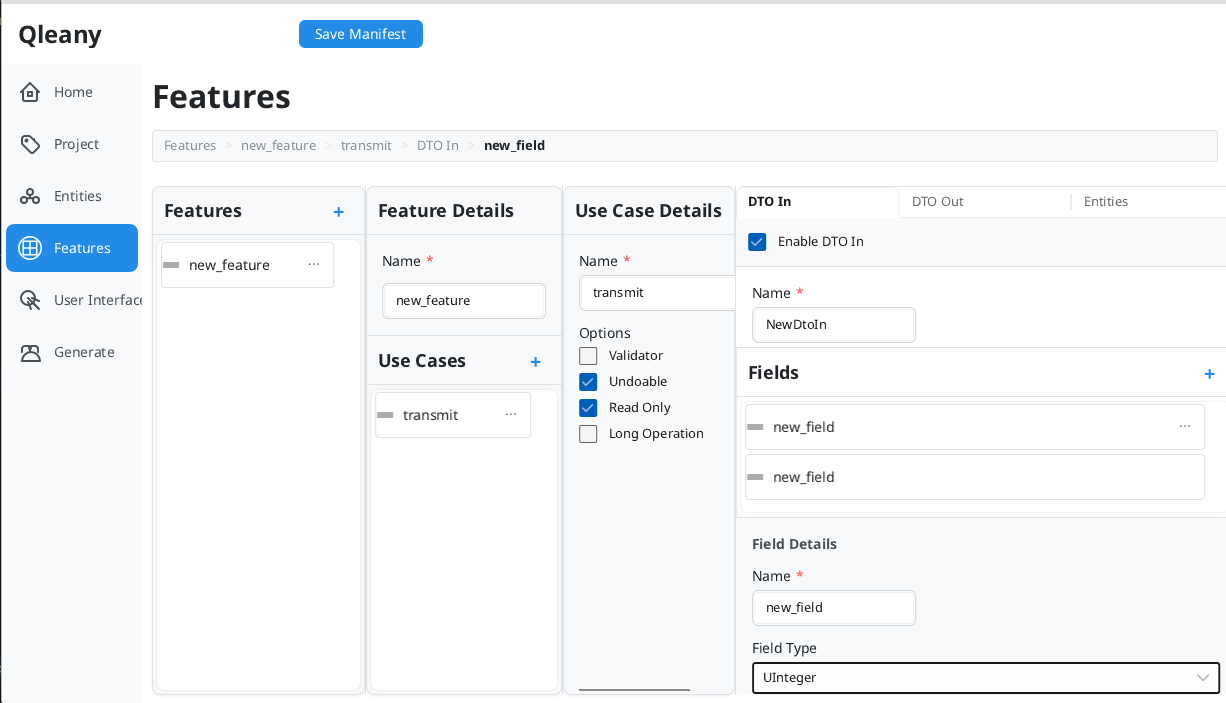
Switch to the DTO In tab:
- Enable the checkbox
- Name:
ImportInventoryDto - Add field:
file_path(String)
-
Switch to the DTO Out tab:
- Enable the checkbox
- Name:
ImportReturnDto - Add fields:
imported_count(Integer),error_messages(String, List: ✓)
-
Switch to the Entities tab:
- Check:
Root,Car
- Check:
5.3 Create the Export Use Case
- Click + next to “Use Cases”
- Configure:
| Field | Value |
|---|---|
| Name | export_inventory |
| Undoable | ✗ |
| Read Only | ✓ (just reading internal data) |
| Long Operation | ✗ |
-
DTO In:
- Name:
ExportInventoryDto - Field:
output_path(String)
- Name:
-
DTO Out:
- Name:
ExportReturnDto - Field:
exported_count(Integer)
- Name:
-
Entities: Check
Root,Car
5.4 UI Options
You already chose your UI frontends (Teksilo, CLI, Slint, or several) during manifest creation. You can change these later in the User Interface tab.
Teksilo is the recommended Rust desktop target. Qleany generates a complete,
compiling application: a reactive single per entity marked single_model, a
reactive list model per relationship marked list_model, a mock twin of each
behind the crate’s mocks feature, the bridge that delivers backend events on
the UI thread, and a demo window wiring them together.
Slint gets a basic UI, event-system integration and command files binding the UI to the generated controllers. CLI uses clap.
Teksilo and Slint can both be enabled; each becomes its own crate over the same
backend. The Teksilo binary takes the plain application name, the Slint one is
suffixed -slint.
5.5 Save the Manifest
Click Save Manifest in the header (or Ctrl+S).
5.6 Take a break, drink a coffee, sleep a bit
I mean it. A fresher mind sees things more clearly. You already saved a lot of time by using Qleany instead of writing all the boilerplate yourself. Don’t rush the design phase, it’s where you get the most value from Qleany.
Designing your domain and use cases is the most important part. The generated code is a complete architecture, not mere scaffolding. If the model is wrong, the code won’t help much. Take your time to get it right before generating.
Yes, you can change the manifest and regenerate later. But it’s better to get a solid design upfront. The more you change the model after generating, the more work you create for yourself. It’s not a problem to evolve your design, but try to avoid major changes that require rewriting large parts of the generated code.
Step 6: Save and Generate
Commit to Git
Before generating, commit your current state to Git. This isn’t optional advice — it’s how Qleany is meant to be used. If you accidentally overwrite files you’ve modified, you can restore them.
git add .
git commit -m "Before Qleany generation"
Generate Code
- Click Generate in the sidebar
- Review the groups and files. Use the status filters (Modified, New, Unchanged) and nature filters (Infra, Aggregate, Scaffold) to narrow the list
- (Optional) Check in temp/ to generate to a temporary folder first
- Click a file to preview the generated code
- Click Generate (N) where N is the number of selected files
The progress modal shows generation status. Files are written to your project.
The files are formatted with cargo fmt.
Step 7: What You Get
After a generation, your project contains:
Cargo.toml
crates/
├── cli/
│   ├── src/
│   │   ├── main.rs                 # ← write your UI here
│   └── Cargo.toml
├── common/
│   ├── src/
│   │   ├── entities.rs             # Car, Customer, Sale structs
│   │   ├── database.rs
│   │   ├── database/
│   │   │   ├── db_context.rs
│   │   │   ├── db_helpers.rs
│   │   │   └── transactions.rs
│   │   ├── direct_access.rs
│   │   ├── direct_access/         # Holds the repository and table implementations for each entity
│   │   │   ├── use_cases/         # Generics for direct access use cases
│   │   │   ├── car.rs
│   │   │   ├── car/
│   │   │   │   ├── car_repository.rs
│   │   │   │   └── car_table.rs
│   │   │   ├── customer.rs
│   │   │   ├── customer/
│   │   │   │   ├── customer_repository.rs
│   │   │   │   └── customer_table.rs
│   │   │   ├── sale.rs
│   │   │   ├── sale/
│   │   │   │   ├── sale_repository.rs
│   │   │   │   └── sale_table.rs
│   │   │   ├── root.rs
│   │   │   ├── root/
│   │   │   │   ├── root_repository.rs
│   │   │   │   └── root_table.rs
│   │   │   ├── repository_factory.rs
│   │   │   └── setup.rs
│   │   ├── event.rs             # event system for reactive updates
│   │   ├── lib.rs
│   │   ├── long_operation.rs    # infrastructure for long operations
│   │   ├── types.rs
│   │   └── undo_redo.rs        # undo/redo infrastructure
│   └── Cargo.toml
├── direct_access/                   # a direct access point for UI or CLI to interact with entities
│   ├── src/
│   │   ├── car.rs
│   │   ├── car/
│   │   │   ├── car_controller.rs   # Exposes CRUD operations to UI or CLI
│   │   │   ├── dtos.rs
│   │   │   └── units_of_work.rs
│   │   ├── customer.rs
│   │   ├── customer/
│   │   │   └── ...
│   │   ├── sale.rs
│   │   ├── sale/
│   │   │   └── ...
│   │   ├── root.rs
│   │   ├── root/
│   │   │   └── ...
│   │   └── lib.rs
│   └── Cargo.toml
├── inventory_management/
│   ├── src/
│   │   ├── inventory_management_controller.rs     # Exposes operations to UI or CLI
│   │   ├── dtos.rs
│   │   ├── units_of_work.rs
│   │   ├── units_of_work/          # ← adapt the macros here
│   │   │   └── ...
│   │   ├── use_cases.rs
│   │   ├── use_cases/              # ← You implement the logic here
│   │   │   └── ...
│   │   └── lib.rs
│   └── Cargo.toml
├── frontend/                    # entry point for UI or CLI to interact with entities and features
│   ├── src/
│   │   ├── lib.rs
│   │   ├── event_hub_client.rs         # event hub client
│   │   ├── app_context.rs              # holds the instances needed by the backend
│   │   ├── commands.rs
│   │   └── commands/                   # convenient wrappers for controller APIs
│   │       ├── undo_redo_commands.rs
│   │       ├── car_commands.rs
│   │       ├── customer_commands.rs
│   │       ├── sale_commands.rs
│   │       └── root_commands.rs
│   └── Cargo.toml
└── teksilo_ui
    ├── Cargo.toml
    └── src
        ├── main.rs
        ├── lib.rs                      # builds and runs the app
        ├── event_source.rs             # backend events → the UI thread
        ├── session.rs                  # every single and model, wired
        ├── undo_redo.rs
        ├── app.rs                      # ← the demo window; replace with your UI
        ├── singles
        │   └── single_car.rs           # one per single_model entity
        └── models
            ├── coalesced_reload.rs
            └── root_cars_list_model.rs # one per list_model relationship
What’s generated:
- Complete CRUD for all entities (create, get, update, remove, …)
- Controllers exposing operations
- DTOs for data transfer
- Repository pattern for database access
- Undo/redo infrastructure for undoable operations
- Tests suites for the database and undo redo infrastructure
- Event system for reactive updates
- Basic CLI (if selected during project setup)
- A complete Teksilo desktop UI — singles, list models, mocks, demo window (if selected)
- Basic empty Slint UI (if selected during project setup)
What you implement:
- Your custom use case logic (import_inventory, export_inventory)
- Your UI or CLI on top of the controllers or their adapters.
Step 8: Run the Generated Code
Let’s assume that you have Rust installed.
In a terminal,
cargo run
cargo run with no arguments builds the workspace’s default-members, which the
generator sets to one frontend in the order Teksilo > Slint > CLI. To run a
different one, name its binary:
cargo run --bin my_app          # Teksilo
cargo run --bin my_app-slint    # Slint
cargo run --bin my-app-cli      # CLI
The Slint binary carries the -slint suffix so it cannot collide with the
Teksilo one when both targets are enabled.
Next Steps
- Run the generated code — it compiles and provides working CRUD
- Implement your custom use cases (
import_inventory,export_inventory) - Build your UI on top of the controllers
- Add more features as your application grows
The generated code is yours. Modify it, extend it, or regenerate when you add new entities. Qleany gets out of your way.
Tips
Understanding the Internal Store
Entities are stored in an in-memory HashMap store. This store is internal, users and UI devs don’t interact with it directly.
Typical pattern:
- User opens a file (e.g.,
.carlotproject file) - Your
load_projectuse case parses the file and populates entities - User works — all changes go to the internal database
- User saves — your
save_projectuse case serializes entities back to file
The internal database is ephemeral. It enables fast operations, undo/redo. The user’s file is the permanent storage.
Undo/Redo
Every generated CRUD operation supports undo/redo automatically. You don’t have to display undo/redo controls in your UI if you don’t want to, but the infrastructure is there when you need it.
If you mark a use case as Undoable, Qleany generates the command pattern scaffolding. You fill in what “undo” means for your specific operation.
For more information, see Undo-Redo Architecture.
Relationships
| Relationship | Use When |
|---|---|
| one_to_one | Exclusive 1:1 (User → Profile) |
| many_to_one | Child references parent (Sale → Car) |
| one_to_many | Parent owns unordered children |
| ordered_one_to_many | Parent owns ordered children (chapters in a book) |
| many_to_many | Shared references (Items ↔ Tags) |
Strong means cascade delete — deleting the parent deletes children.
For more details, see Manifest Reference.
Regenerating
Made a mistake? The manifest is just YAML. You can:
- Edit it directly in a text editor or from the GUI tool
- Delete entities/features in the UI and recreate them
- Generate to a temp folder, review, then regenerate to the real location
For more details, see Regeneration Workflow.
The generated code is yours. Modify it, extend it, or regenerate when you add new entities. Qleany gets out of your way.
Further Reading
- README — Overview, building and running, reference implementation
- Manifest Reference — Entity options, field types, relationships, features
- Design Philosophy — Clean Architecture background, package by feature
- Regeneration Workflow — How file generation works, what gets overwritten
- Undo-Redo Architecture — Entity tree structure, undoable vs non-undoable
- QML Integration — Reactive models and mocks for C++/Qt
- Generated Infrastructure - C++/Qt — Database layer, event system, file organization
- Generated Infrastructure - Rust — Database layer, event system, file organization
- Troubleshooting — Common issues and how to fix them
Qleany Quick Start - C++/Qt
This guide walks you through creating a complete desktop application for a car dealership using Qleany. By the end, you’ll have generated architecture with entities, repositories, controllers, and undo/redo infrastructure. After generation, the only code you write is inside the use cases (your business logic) and the UI. Everything else compiles and works out of the box.
For Rust, see Qleany Quick Start - Rust. The differences are minor.
The qleany.yaml of this example is available here.
Mandatory step:
If not already done, create a git repository and commit the initial manifest, and tag in the pattern vX.X.X:
git init && git add . && git commit -m"initial commit" && git tag v0.0.1
Step 1: Think About Your Domain
Before touching any tool, grab paper or open a diagramming tool. This is the most important step.
Ask yourself:
- What are the core “things” in my business? These become entities.
- What actions do users perform? These become use cases.
- Which use cases belong together? These become features.
Example: CarLot — A Car Dealership App
Entities (the nouns):
| Entity | Purpose | Key Fields |
|---|---|---|
| EntityBase | Base class for all entities | id, created_at, updated_at |
| Root | Application entry point, owns everything | cars, customers, sales |
| Car | Vehicle in inventory | make, model, year, price, status |
| Customer | Potential or actual buyer | name, email, phone |
| Sale | Completed transaction | sale_date, final_price, car, customer |
Relationships:
- Root owns many Cars (inventory)
- Root owns many Customers (contacts)
- Root owns many Sales (history)
- Sale references one Car (what was sold)
- Sale references one Customer (who bought it)
Features and Use Cases (the verbs):
| Feature | Use Case | What it does |
|---|---|---|
| inventory_management | import_inventory | Parse CSV file, populate Car entities |
| inventory_management | export_inventory | Generate CSV from current inventory |
Draw It First
Sketch your entities and relationships before using Qleany. Use paper, whiteboard, or Mermaid.
Deeper explanations about relationships are available in the Manifest Reference.
erDiagram
    EntityBase {
        EntityId id
        datetime created_at
        datetime updated_at
    }

    Root {
        EntityId id
        datetime created_at
        datetime updated_at
        # relationships:
        QList<EntityId> cars
        QList<EntityId> customers
        QList<EntityId> sales
    }

    Car {
        EntityId id
        datetime created_at
        datetime updated_at
        string make
        string model
        int year
        float price
        enum status
    }

    Customer {
        EntityId id
        datetime created_at
        datetime updated_at
        string name
        string email
        string phone
    }

    Sale {
        EntityId id
        datetime created_at
        datetime updated_at
        datetime sale_date
        float final_price
        int car_id
        int customer_id
        # relationships:
        EntityId car
        EntityId customer
    }

    EntityBase ||--o{ Root : "inherits"
    EntityBase ||--o{ Car : "inherits"
    EntityBase ||--o{ Customer : "inherits"
    EntityBase ||--o{ Sale : "inherits"
    Root ||--o{ Car : "owns (strong)"
    Root ||--o{ Customer : "owns (strong)"
    Root ||--o{ Sale : "owns (strong)"
    Sale }o--|| Car : "optionally references"  # Many-to-One (a sale may exist without a car, e.g., if the car was deleted)
    Sale }o--|| Customer : "optionally references" # Many-to-One
Why draw first? Changing a diagram is free. Changing generated code is work. Get the model right before generating.
EntityBase is a common pattern: it provides shared fields like id, created_at, and updated_at, like an inheritance. Other entities can explicitly inherit from it. This is not an entity. It will never be generated. All your entities can inherit from it to avoid repetition.
Note: You can note the relationships on the diagram too. Qleany supports various relationship types (one-to-one, one-to-many, many-to-one, many-to-many) and cascade delete (strong relationships). Defining these upfront helps you configure them correctly in the manifest. Unlike typical ER diagrams, the relationships appear as fields. Forget the notion of foreign keys here. Qleany’s relationships are directional and can be configured with additional options (e.g., ordered vs unordered, strong vs weak, optional or not (only for some relationship types)). Plan these carefully to ensure the generated code matches your intended data model.
WRONG: I only need a few entities without any “owner” relationships. I can just create them in Qleany and skip the Root entity.
RIGHT: I want a clear ownership structure. Root owns all Cars, Customers, and Sales. This makes it easy to manage the lifecycle of entities. It avoids orphan entities and simplifies the generated code. Even if Root has few fields, it provides a clear parent-child structure. Think like a tree: Root is the trunk, Cars/Customers/Sales are branches. This is a common pattern in Qleany projects.
Step 2: Create a New Manifest
Using the GUI
Launch Qleany. You’ll land on the Home tab.
- Click New Manifest — a creation wizard opens
- Step 1 — Language: Select C++/Qt
- Step 2 — Project: Enter your application name (PascalCase, e.g.
CarLot) and organisation name (e.g.MyCompany) - Step 3 — Template: Choose a starting template:
- Blank — EntityBase + empty Root (start from scratch)
- Minimal — Root with one entity (Item). Hello world equivalent
- Document Editor — Documents > Sections with load/save use cases
- Data Management — Items, Categories, Tags with import/export use cases
- Step 4 — UI Options: Enable Qt Quick (QML) and/or Qt Widgets
- Click Create, then choose where to save
qleany.yaml(your project root)
Using the CLI
qleany new /path/to/project \
  --language cpp-qt \
  --name CarLot \
  --org-name MyCompany \
  --template blank \
  --options cpp_qt_qtquick
All flags are optional — if omitted, the CLI prompts interactively. Use --force to overwrite an existing manifest.
What gets created
Qleany creates a manifest pre-configured with:
- Your chosen language, application name, and organisation
EntityBase(provides id, created_at, updated_at)Rootentity inheriting from EntityBase (plus more entities if you chose a template other than Blank)- Your selected UI options
Step 3: Configure Project Settings
Click Project in the sidebar to review and adjust settings. The wizard already filled in the language, application name, and organisation name. You can still change:
| Field | Value |
|---|---|
| Organisation Domain | com.mycompany |
| Prefix Path | src |
Organisation Domain is used for some installed file names, like the icon name.
Changes save. The header shows “Save Manifest” when there are unsaved changes.
Step 4: Define Entities
Click Entities in the sidebar. You’ll see a three-column layout.
4.1 Create the Car Entity
- Click the + button next to “Entities”
- A new entity appears — click it to select
- In the details panel:
- Name:
Car - Inherits from:
EntityBase
- Name:
You can also enable the Single Model checkbox to generate a helper class for the entity and its QML wrapper.
Now add fields. In the “Fields” section:
- Click + to add a field
- Select the new field, then configure:
| Name | Type | Notes |
|---|---|---|
| make | String | — |
| model | String | — |
| year | Integer | — |
| price | Float | — |
| status | Enum | Enum Name: CarStatus, Values: Available, Reserved, Sold (one per line) |
4.2 Create the Customer Entity
- Click + next to “Entities”
- Name:
Customer - Inherits from:
EntityBase - Add fields:
| Name | Type |
|---|---|
| name | String |
| String | |
| phone | String |
4.3 Create the Sale Entity
- Click + next to “Entities”
- Name:
Sale - Inherits from:
EntityBase - Add fields:
| Name | Type | Configuration |
|---|---|---|
| sale_date | DateTime | — |
| final_price | Float | — |
| car | Entity | Referenced Entity: Car, Relationship: many_to_one |
| customer | Entity | Referenced Entity: Customer, Relationship: many_to_one |
4.4 Configure Root Relationships
Select the Root entity. Add relationship fields:
| Name | Type | Configuration |
|---|---|---|
| cars | Entity | Referenced Entity: Car, Relationship: ordered_one_to_many, Strong: ✓ |
| customers | Entity | Referenced Entity: Customer, Relationship: ordered_one_to_many, Strong: ✓ |
| sales | Entity | Referenced Entity: Sale, Relationship: ordered_one_to_many, Strong: ✓ |
You can also enable the List Model checkbox to generate reactive QAbstractListModel and its QML wrappers. Set Displayed Field to specify which field appears in list views (e.g.,
makefor cars,namefor customers).
Key concepts:
- Strong relationship: Deleting Root cascades to delete all Cars, Customers, Sales
Step 5: Define Features and Use Cases
Click Features in the sidebar. You’ll see a four-column layout.
5.1 Create the Feature
- Click + next to “Features”
- Select it and set Name:
inventory_management
5.2 Create the Import Use Case
- Click + next to “Use Cases”
- Configure:
| Field | Value |
|---|---|
| Name | import_inventory |
| Undoable | ✗ (file imports typically aren’t undoable) |
| Read Only | ✗ (it will update the internal database) |
| Long Operation | ✗ |
-
Switch to the DTO In tab:
- Enable the checkbox
- Name:
ImportInventoryDto - Add field:
file_path(String)
-
Switch to the DTO Out tab:
- Enable the checkbox
- Name:
ImportReturnDto - Add fields:
imported_count(Integer),error_messages(String, List: ✓)
-
Switch to the Entities tab:
- Check:
Root,Car
- Check:
5.3 Create the Export Use Case
- Click + next to “Use Cases”
- Configure:
| Field | Value |
|---|---|
| Name | export_inventory |
| Undoable | ✗ |
| Read Only | ✓ (just reading internal data) |
| Long Operation | ✗ |
-
DTO In:
- Name:
ExportInventoryDto - Field:
output_path(String)
- Name:
-
DTO Out:
- Name:
ExportReturnDto - Field:
exported_count(Integer)
- Name:
-
Entities: Check
Root,Car
5.4 UI Options
You already chose your UI frontends (Qt Quick, Qt Widgets, or both) during manifest creation. You can change these later in the User Interface tab.
For C++/Qt, the controllers, models, and “singles” (like in “Single model”) C++ wrappers for integration with QML are generated for you. Also, mock implementations for each of these files are generated for you to allow developing the UI without the backend.
5.5 Save the Manifest
Click Save Manifest in the header (or Ctrl+S).
5.6 Take a break, drink a coffee, sleep a bit
I mean it. A fresher mind sees things more clearly. You already saved a lot of time by using Qleany instead of writing all the boilerplate yourself. Don’t rush the design phase, it’s where you get the most value from Qleany.
Designing your domain and use cases is the most important part. The generated code is a complete architecture, not mere scaffolding. If the model is wrong, the code won’t help much. Take your time to get it right before generating.
Yes, you can change the manifest and regenerate later. But it’s better to get a solid design upfront. The more you change the model after generating, the more work you create for yourself. It’s not a problem to evolve your design, but try to avoid major changes that require rewriting large parts of the generated code.
Step 6: Generate
Commit to Git
Before generating, commit your current state to Git. This isn’t optional advice — it’s how Qleany is meant to be used. If you accidentally overwrite files you’ve modified, you can restore them.
For a C++/Qt project, the generated CMakeLists.txt needs a git tag “vX.X.X”. It is mandatory (or modify yourself the CMakeLists.txt to remove the tag system)
git add .
git commit -m "Before Qleany generation"
Generate Code
- Click Generate in the sidebar
- Review the groups and files. Use the status filters (Modified, New, Unchanged) and nature filters (Infra, Aggregate, Scaffold) to narrow the list
- (Optional) Check in temp/ to generate to a temporary folder first
- Click a file to preview the generated code
- Click Generate (N) where N is the number of selected files
The progress modal shows generation status. Files are written to your project.
The files are formatted with clang-format (Microsoft style).
Step 7: What You Get
After a generation, your project contains:
├── cmake
│   ├── InstallHelpers.cmake
│   └── VersionFromGit.cmake
├── CMakeLists.txt
└── src
    ├── common
    │   ├── CMakeLists.txt
    │   ├── controller_command_helpers.h
    │   ├── service_locator.h/.cpp
    │   ├── controller_command_helpers.h
    │   ├── signal_buffer.h
    │   ├── database
    │   │   ├── db_builder.h
    │   │   ├── db_context.h
    │   │   ├── junction_table_ops
    │   │   │   ├── junction_cache.h
    │   │   │   ├── many_to_one.cpp
    │   │   │   ├── many_to_one.h
    │   │   │   ├── one_to_one.cpp
    │   │   │   ├── one_to_one.h
    │   │   │   ├── ordered_one_to_many.cpp
    │   │   │   ├── ordered_one_to_many.h
    │   │   │   ├── unordered_many_to_many.cpp
    │   │   │   ├── unordered_many_to_many.h
    │   │   │   ├── unordered_one_to_many.cpp
    │   │   │   └── unordered_one_to_many.h
    │   │   └── table_cache.h
    │   ├── direct_access                    # Holds the repositories and table implementations
    │   │   ├── use_case_helpers/...          # Template classes for direct access use cases
    │   │   ├── car
    │   │   │   ├── car_events.h
    │   │   │   ├── car_repository.cpp
    │   │   │   ├── car_repository.h
    │   │   │   ├── car_table.cpp
    │   │   │   ├── car_table.h
    │   │   │   ├── CMakeLists.txt
    │   │   │   ├── i_car_repository.h
    │   │   │   └── table_definitions.h
    │   │   ├── CMakeLists.txt
    │   │   ├── converter_registration.h
    │   │   ├── customer
    │   │   │   ├── CMakeLists.txt
    │   │   │   ├── customer_events.h
    │   │   │   ├── customer_repository.cpp
    │   │   │   ├── customer_repository.h
    │   │   │   ├── customer_table.cpp
    │   │   │   ├── customer_table.h
    │   │   │   ├── i_customer_repository.h
    │   │   │   └── table_definitions.h
    │   │   ├── event_registry.h                # event system for reactive updates
    │   │   ├── mapper_tools.h
    │   │   ├── operators.h
    │   │   ├── repository_factory.cpp
    │   │   ├── repository_factory.h
    │   │   ├── root
    │   │   │   ├── CMakeLists.txt
    │   │   │   ├── i_root_repository.h
    │   │   │   ├── root_events.h
    │   │   │   ├── root_repository.cpp
    │   │   │   ├── root_repository.h
    │   │   │   ├── root_table.cpp
    │   │   │   ├── root_table.h
    │   │   │   └── table_definitions.h
    │   │   └── sale
    │   │       ├── CMakeLists.txt
    │   │       ├── i_sale_repository.h
    │   │       ├── sale_events.h
    │   │       ├── sale_repository.cpp
    │   │       ├── sale_repository.h
    │   │       ├── sale_table.cpp
    │   │       ├── sale_table.h
    │   │       └── table_definitions.h
    │   ├── entities
    │   │   ├── car.h
    │   │   ├── CMakeLists.txt
    │   │   ├── customer.h
    │   │   ├── root.h
    │   │   └── sale.h
    │   ├── features
    │   │   ├── CMakeLists.txt
    │   │   ├── feature_event_registry.h           # event system for reactive updates
    │   │   └── inventory_management_events.h
    │   ├── service_locator.cpp
    │   ├── service_locator.h
    │   ├── undo_redo
    │   │   ├── group_command_builder.cpp
    │   │   ├── group_command_builder.h
    │   │   ├── group_command.cpp
    │   │   ├── group_command.h
    │   │   ├── query_handler.cpp
    │   │   ├── query_handler.h
    │   │   ├── undo_redo_command.cpp
    │   │   ├── undo_redo_command.h
    │   │   ├── undo_redo_manager.cpp
    │   │   ├── undo_redo_manager.h
    │   │   ├── undo_redo_stack.cpp
    │   │   ├── undo_redo_stack.h
    │   │   ├── undo_redo_system.cpp
    │   │   └── undo_redo_system.h
    │   └── unit_of_work
    │       ├── unit_of_work.h
    │       ├── uow_base.h
    │       ├── uow_macros.h
    │       └── uow_ops.h
    ├── direct_access
    │   ├── car
    │   │   ├── car_controller.cpp        # Exposes CRUD operations to UI
    │   │   ├── car_controller.h
    │   │   ├── car_unit_of_work.h
    │   │   ├── CMakeLists.txt
    │   │   ├── dtos.h
    │   │   ├── dto_mapper.h
    │   │   └── i_car_unit_of_work.h
    │   ├── CMakeLists.txt
    │   ├── customer
    │   │   └── ...
    │   ├── root
    │   │   └── ...
    │   └── sale
    │       ├── CMakeLists.txt
    │       ├── dtos.h
    │       ├── sale_controller.cpp
    │       ├── sale_controller.h
    │       ├── sale_unit_of_work.h
    │       ├── dto_mapper.h
    │       └── i_sale_unit_of_work.h
    ├── inventory_management
    │   ├── CMakeLists.txt
    │   ├── inventory_management_controller.cpp    # Exposes operations to UI
    │   ├── inventory_management_controller.h
    │   ├── inventory_management_dtos.h
    │   ├── units_of_work                 # adapt the macros here
    │   │   ├── export_inventory_uow.h
    │   │   └── import_inventory_uow.h
    │   └── use_cases
    │       ├── export_inventory_uc          # adapt the macros here
    │       │   └── i_export_inventory_uow.h
    │       ├── export_inventory_uc.cpp      # You implement the logic here
    │       ├── export_inventory_uc.h
    │       ├── import_inventory_uc          # adapt the macros here
    │       │   └── i_import_inventory_uow.h
    │       ├── import_inventory_uc.cpp      # You implement the logic here
    │       └── import_inventory_uc.h
    ├── tests
    │   ├── CMakeLists.txt
    │   ├── database
    │   │   ├── CMakeLists.txt
    │   │   ├── tst_many_to_one_junction.cpp
    │   │   ├── tst_one_to_one_junction.cpp
    │   │   ├── tst_ordered_one_to_many_junction.cpp
    │   │   ├── tst_unordered_many_to_many_junction.cpp
    │   │   └── tst_unordered_one_to_many_junction.cpp
    │   └── undo_redo
    │       ├── CMakeLists.txt
    │       ├── tst_enhanced_undo_redo.cpp
    │       ├── tst_qcoro_integration.cpp
    │       ├── tst_root_undo_redo.cpp
    │       └── tst_undo_redo.cpp
    │
    └── qtwidgets_ui
        ├── CMakeLists.txt
        ├── main.cpp
        ├── main_window.cpp                                  # ← write your UI here
        └── main_window.h

And/Or

    ├── presentation                                        # generated for all QML-based UIs
    │   ├── CMakeLists.txt
    │   ├── mock_imports                                    # QML mocks
    │   │   └── Car
    │   │       ├── Controllers
    │   │       │   ├── CarController.qml
    │   │       │   ├── CarEvents.qml
    │   │       │   ├── CustomerController.qml
    │   │       │   ├── CustomerEvents.qml
    │   │       │   ├── EventRegistry.qml
    │   │       │   ├── InventoryManagementController.qml
    │   │       │   ├── QCoroQmlTask.qml
    │   │       │   ├── qmldir
    │   │       │   ├── RootController.qml
    │   │       │   ├── RootEvents.qml
    │   │       │   ├── SaleController.qml
    │   │       │   ├── SaleEvents.qml
    │   │       │   └── UndoRedoController.qml
    │   │       ├── Models
    │   │       │   ├── qmldir
    │   │       │   └── RootCustomersListModel.qml
    │   │       └── Singles
    │   │           ├── qmldir
    │   │           ├── SingleCar.qml
    │   │           ├── SingleCustomer.qml
    │   │           ├── SingleRoot.qml
    │   │           └── SingleSale.qml
    │   └── real_imports                                 # QML real imports
    │       ├── controllers
    │       │   ├── CMakeLists.txt
    │       │   ├── foreign_car_controller.h
    │       │   ├── foreign_customer_controller.h
    │       │   ├── foreign_event_registry.h
    │       │   ├── foreign_feature_event_registry.h
    │       │   ├── foreign_inventory_management_controller.h
    │       │   ├── foreign_root_controller.h
    │       │   ├── foreign_sale_controller.h
    │       │   └── foreign_undo_redo_controller.h
    │       ├── models
    │       │   ├── CMakeLists.txt
    │       │   └── foreign_root_customers_list_model.h
    │       └── singles
    │           ├── CMakeLists.txt
    │           ├── foreign_single_car.h
    │           ├── foreign_single_customer.h
    │           ├── foreign_single_root.h
    │           └── foreign_single_sale.h
    └── qtquick_app
        ├── Car                                    # Car: 3 first letters of CarLot.   ← write your UI here
        │   └── CMakeLists.txt
        ├── CMakeLists.txt
        ├── content                                 # ← write your UI here
        │   ├── App.qml
        │   └── CMakeLists.txt
        ├── main.cpp
        ├── main.qml
        └── qtquickcontrols2.conf
What’s generated:
- Complete CRUD for all entities (create, get, update, remove, …)
- Controllers exposing operations
- DTOs for data transfer
- Repository pattern for database access
- Undo/redo infrastructure for undoable operations
- Tests suites for the database and undo redo infrastructure
- Macros for unit of work
- Event system for reactive updates
- Basic CLI (if selected during project setup)
- Basic empty UI (if selected during project setup)
What you implement:
- Your custom use case logic (import_inventory, export_inventory)
- Your UI or CLI on top of the controllers or their adapters.
Step 8: Run the Generated Code
Let’s assume that you have Qt6 dev libs and QCoro-qt6 dev libs installed in the system. Also, install cmake and extra-cmake-modules.
You need the project to sit on a Git repository to generate code. The CMakeLists.txt checks for the latest version tag (vX.Y.Z) and fails if it’s not found. So, if you need a new repository:
git init
git add .
git commit -m "Initial commit"
git tag v0.1.0
You can use an IDE like Qt Creator or VS Code and build/run the project from there.
Or in a terminal,
mkdir build && cd build
cmake ..
cmake --build . --target all -j$(nproc)
Run the app (in case of QtWidgets):
./src/qtwidgets_app/CarLot
Next Steps
- Run the generated code — it compiles and provides working CRUD
- Implement your custom use cases (
import_inventory,export_inventory) - Build your UI on top of the controllers
- Add more features as your application grows
Tips
Understanding the Internal Database
Entities are stored in an internal database (SQLite). This database is internal, users and UI devs don’t interact with it directly.
Typical pattern:
- User opens a file (e.g.,
.carlotproject file) - Your
load_projectuse case parses the file and populates entities - User works — all changes go to the internal database
- User saves — your
save_projectuse case serializes entities back to file
The internal database is ephemeral. It enables fast operations, undo/redo. The user’s file is the permanent storage.
Undo/Redo
Every generated CRUD operation supports undo/redo automatically. You don’t have to display undo/redo controls in your UI if you don’t want to, but the infrastructure is there when you need it.
If you mark a use case as Undoable, Qleany generates the command pattern scaffolding. You fill in what “undo” means for your specific operation.
For more information, see Undo-Redo Architecture.
Relationships
| Relationship | Use When |
|---|---|
| one_to_one | Exclusive 1:1 (User → Profile) |
| many_to_one | Child references parent (Sale → Car) |
| one_to_many | Parent owns unordered children |
| ordered_one_to_many | Parent owns ordered children (chapters in a book) |
| many_to_many | Shared references (Items ↔ Tags) |
Strong means cascade delete — deleting the parent deletes children.
For more details, see Manifest Reference.
Regenerating
Made a mistake? The manifest is just YAML. You can:
- Edit it directly in a text editor or from the GUI tool
- Delete entities/features in the UI and recreate them
- Generate to a temp folder, review, then regenerate to the real location
For more details, see Regeneration Workflow.
The generated code is yours. Modify it, extend it, or regenerate when you add new entities. Qleany gets out of your way.
Further Reading
- README — Overview, building and running, reference implementation
- Manifest Reference — Entity options, field types, relationships, features
- Design Philosophy — Clean Architecture background, package by feature
- Regeneration Workflow — How file generation works, what gets overwritten
- Undo-Redo Architecture — Entity tree structure, undoable vs non-undoable
- QML Integration — Reactive models and mocks for C++/Qt
- Generated Infrastructure - C++/Qt — Database layer, event system, file organization
- Generated Infrastructure - Rust — Database layer, event system, file organization
- Troubleshooting — Common issues and how to fix them
Design Philosophy
This document explains the architectural principles behind Qleany and why it generates code the way it does.
What is Clean Architecture?
Clean Architecture, introduced by Robert C. Martin, organizes code into concentric layers with strict dependency rules:
┌─────────────────────────────────────────┐
│            Frameworks & UI              │  ← Outer: Qt, QML, SQLite
├─────────────────────────────────────────┤
│          Controllers & Gateways         │  ← Interface adapters
├─────────────────────────────────────────┤
│              Use Cases                  │  ← Application business rules
├─────────────────────────────────────────┤
│              Entities                   │  ← Core: Enterprise business rules
└─────────────────────────────────────────┘
The Dependency Rule: Source code dependencies point inward. Inner layers know nothing about outer layers. Entities don’t know about use cases. Use cases don’t know about controllers. This makes the core testable without frameworks.
Key concepts Qleany retains:
- Entities — Domain objects with identity and business rules
- Features — Groupings of related use cases and entities
- Use Cases — Single-purpose operations encapsulating business logic
- DTOs — Data transfer objects crossing layer boundaries
- Repositories — Abstractions over data access
- Dependency Inversion — High-level modules don’t depend on low-level modules
The Problem with Pure Clean Architecture
Strict Clean Architecture organizes code by layer:
src/
├── domain/
│   └── entities/
│       ├── work.h
│       ├── car.h
│       └── car_item.h
├── application/
│   └── use_cases/
│       ├── work/
│       ├── car/
│       └── car_item/
├── infrastructure/
│   └── repositories/
│       ├── work_repository.h
│       └── car_repository.h
└── presentation/
    └── controllers/
        ├── work_controller.h
        └── car_controller.h
To modify “Car,” you touch four directories. For a 17-entity project, Qleany v0 generated 1700+ C++ files across 500 folders. Technically correct, practically unmaintainable.
Package by Feature (a.k.a. Vertical Slice Architecture)
Package by Feature groups code by what it does, not what layer it belongs to:
src/
├── common/                      # Truly shared infrastructure
│   ├── entities/
│   ├── database/
│   └── undo_redo/
└── direct_access/
    └── car/                  # Everything about Car in one place
        ├── car_controller.h
        ├── car_repository.h
        ├── dtos.h
        ├── unit_of_work.h
        └── use_cases/
            ├── create_uc.h
            ├── get_uc.h
            ├── update_uc.h
            └── remove_uc.h
To modify “Car,” you only touch one folder. It’s easier to find code, understand features, and make changes. For the same 17-entity project, Qleany v1.0.13 generated 700 C++ files across 80 folders. Roughly, 33 files per entity instead of 90.
Now, since v1.0.35, 64 directories, 410 files..
Benefits:
- Discoverability — Find all Car code in one place
- Cohesion — Related code changes together
- Fewer files — Same 17-entity project produces 410 files across 64 folders
- Easier onboarding — New developers understand features, not layers
Why Vertical Slices?
The term comes from visualizing your application as a layered cake. A horizontal slice would be one entire layer (all controllers, or all repositories). A vertical slice cuts through all layers for one feature — from UI down to database, but only for that specific capability.
Each slice is relatively self-contained. You can understand, modify, and test the Car feature without understanding how Events or Tags work internally. This isolation makes onboarding easier and reduces the blast radius of changes.
What We Keep from Clean Architecture
- Dependency direction (UI → Controllers → Use Cases → Repositories → Database)
- Use cases as the unit of business logic
- DTOs at boundaries
- Repository pattern for data access
- Testability through clear interfaces
What We Drop
- Strict layer-per-folder organization
- Separate “domain” module (entities live in
common) - Interface-for-everything (only where it aids testing)
Why This Matters for Desktop Apps
Web frameworks often provide architectural scaffolding (Rails, Django, Spring). Desktop frameworks like Qt provide widgets and signals, but little guidance on organizing a 50,000-line application.
Qleany fills that gap with an architecture that:
- Scales from small tools to large applications
- Integrates naturally with Qt’s object model
- Supports undo/redo, a desktop-specific requirement
- Keeps related code together for solo developers and small teams
- Supports multiple UIs (Qt Widgets, QML, CLI) sharing the same core logic
For the complete file organization, see Generated Infrastructure - C++/Qt or Generated Infrastructure - Rust.
Why this Matters for Mobile Apps
Mobile apps share many characteristics with desktop apps (see above), but have additional constraints:
- Rich UIs with complex interactions
- Need for offline functionality
- Local data storage with sync capabilities
- Performance constraints requiring efficient architecture
For the performance, since Qleany generates C++ and Rust, it can be called performant enough for mobile apps. Mobile apps often require efficient memory usage and responsiveness, which C++ and Rust can provide.
A Rust backend could be plugged into a mobile app developed with native technologies (Swift for iOS, Kotlin for Android) or cross-platform frameworks (Flutter, React Native). This way, the core logic benefits from Rust’s performance and safety, while the UI is built with tools optimized for mobile platforms.
Generate and Disappear
Qleany generates code, then gets out of your way. The output has no dependency on Qleany itself. Modify, extend, or delete the generated code freely. The generated code is yours — there’s no runtime, no base classes to inherit from, no framework to learn.
No Framework, No Runtime
Qleany generates plain Rust structs and C++ classes. There’s no:
- Base class you must inherit from
- Trait you must implement for Qleany
- Runtime library to link against
The generated code uses standard libraries (Qt for C++) and plain Rust data structures, but has no Qleany-specific dependencies. If you decide to stop using Qleany, the generated code continues to work unchanged.
Manifest as Source of Truth
The qleany.yaml manifest defines your architecture. It’s:
- Human-readable — Edit it directly when the UI is inconvenient
- Version-controllable — Diff changes, review in PRs
- Portable — Share between team members, regenerate on any machine
The manifest describes what you want. Qleany figures out how to generate it. When templates improve, regenerate from the same manifest to get updated code.
Rust Module Structure
Qleany generates Rust code using the modern module naming convention. Instead of:
direct_access/
└── car/
    └── mod.rs      # Old style
Qleany generates:
direct_access/
├── car.rs          # Module file
└── car/            # Submodules folder
    ├── controller.rs
    ├── dtos.rs
    └── use_cases.rs
This follows Rust’s recommended practice since the 2018 edition, avoiding the proliferation of mod.rs files that makes navigation difficult.
Code quality and “purity”
Qleany deliberately generates straightforward code. A developer with only a few years of experience in C++ or Rust should be able to understand and modify it.
In practice, for Rust this means:
- lifetimes only where the compiler requires them (no complex multi-lifetime scenarios), mostly deep inside the infrastructure
- no async/await
- generics only from standard library types (Result, Option, Vec) — no custom generic abstractions
- no unsafe code
- more cloning than strictly necessary
- generated traits stay simple
Exceptions: (this is infrastructure code not destined to be modified by the user)
- the only macro exists to help the developer with custom units of work
- complex generics are used for the entity use cases to avoid the generation of hundreds of nearly identical files. Thirteen repetitive files per entity were removed.
For C++/Qt:
- some C++20 aggregates and std::optional
- exceptions used for error handling
- async operations handled through QCoro where the event loop requires it
- no raw pointers, only smart pointers
- no multi-level inheritance, be it virtual or polymorphic
- more copying than strictly necessary, though std::move is used deeper inside the infrastructure
Exceptions: (this is infrastructure code not destined to be modified by the user)
- helper functions to avoid repetitive boilerplate for controllers.
- complex helper templates (with C++20 concepts) are used for the entity use cases to avoid the generation of hundreds of nearly identical files. Twenty-two use case .h/.cpp files per entity would be a nightmare to maintain, and the code would be mostly boilerplate. The helper templates reduce this to eleven shared use case .h/.cpp files, which are much more manageable.
This is a deliberate trade-off between approachability and performance. Qleany prioritizes code that intermediate developers can confidently modify over code that squeezes every last microsecond from the CPU. The generated code is clean, readable, and maintainable. You are using Rust or C++, two fast languages, and you are not writing a game engine.
In most desktop and mobile applications, the time spent waiting for user input or database access dwarfs any overhead from an extra clone. The few microseconds lost to cloning a DTO are rarely the bottleneck, but code that’s too clever for the team to maintain can be.
If you need every optimization, write your hot paths by hand. Profile first, then optimize what matters. The generator gives you a solid, maintainable baseline to build on.
Plugins
I add this little section about plugins too while I’m at it. Qt plugins especially. To paraphrase Uncle Bob: “UI is a detail, database is a detail”, … and plugins are details too. They can change without affecting the core business rules. The entities, use cases, don’t care whether you’re using a SQLite database or a JSON file. They don’t care whether the UI is QML or something else. This is the same idea with plugins. Plugin realm is outside the core (entities and business rules).
In concrete terms, this means that the plugin system is implemented in the outermost layer (Frameworks & UI). The core application logic doesn’t depend on plugins. Instead, plugins depend on the core application logic. This way, you can add, remove, or change plugins without affecting the core functionality of your application.
If I had to create an application using plugins, I would design entities dedicated to managing plugins and their data, a feature dedicated to plugins. Maybe a feature by plugin type to be compartmentalized. Consider these features/use cases as the API for plugins to interact with the core application. The core application would provide services and data to the plugins through these use cases, ensuring that plugins can operate independently of the core logic.
Also, I’d separate the plugins extending the UI from the plugins extending the backend logic. The UI plugins would be loaded and managed by the UI layer, while the backend plugins would exist in their own section, always in the outermost layer, separate from the UI. And all plugins can have access to the features/use cases dedicated to plugins.
User settings and UI configuration
This part may be obvious to most developers. Does the user settings/configuration belong to the core application logic? No, it doesn’t. It belongs to the outermost layer (Frameworks & UI). The core application logic should be agnostic of how settings are stored or managed. The settings/configuration system should be implemented in the outer layer, allowing the core logic to remain unaffected by changes in how settings are handled.
You don’t want the window geometry to be held in entities. Its place is in the UI layer. You don’t want the theme preference to be held in use cases. Its place is in the UI layer too. The core application logic should focus on business rules and data management, while settings and configuration are handled separately in the outer layer.
The business rules (= entities + use cases) can manage UI-agnostic settings, like user preferences that affect the behavior of the application but are not directly related to the UI. For example, the core logic can manage a setting that determines how data is processed or how certain features behave. But anything directly related to the UI should be kept in the UI layer.
In a perfect world, the use cases would stay pure and repeatable. They should not depend on user-specific settings or configurations. If a use case needs to behave differently based on user settings, it should receive those settings as input parameters, rather than accessing them directly. This keeps the use cases decoupled from the settings system, maintains their reusability, and keeps them testable.
This is not a perfect world. In practice, you can add a ISettings interface to the use case, the same way that the unit of work interface is made accessible to the use case. This way, the use case can access the settings it needs without being tightly coupled to the settings implementation. The settings system can be implemented in the outer layer, and the use cases can interact with it through a well-defined interface, maintaining separation of concerns and keeping the core logic clean.
Online APIs, databases, and other external services
Consider the application’s internal database as local and private. How do you handle data that needs to be synced with an external API or a remote database?
If the application needs to interact with an external API or a remote database, it should be done through a dedicated service or repository layer. This layer should handle the communication with the external system and provide a clean interface IRemoteWhatever for the use cases to interact with (like it’s already done with the units of work).
Need to check any update from this API? Create a dedicated use case to fetch the data from the API and update the internal database and/or act on the answer. This use case would be called periodically to check for updates. Typically, the UI layer would handle the timed loop that calls this use case every few seconds or minutes.
Example: a calendar application that syncs with an external calendar API.
- the RemoteWhatever service is instantiated in the UI layer (typically instantiated in main.cpp and stored inside ServiceLocator or directly instantiated in the controller, just before calling the use case if it’s stateless)
- the UI calls the use case every few seconds to check for updates
- the use case calls the service from IRemoteWhatever to fetch the data from the API
- the service updates the local database with the new data
- the UI is notified of the changes and updates its UI accordingly
- the use case can also trigger notifications or reminders based on the new data
Examples of services:
- calling terminal commands
- fetching data from an API
- sending emails
- sending push notifications
- communicate with another application
Thread safety considerations
Stateless services can be instantiated directly in the controller, right before calling the use case. No shared state, no threading concern.
Stateful services (persistent connections, caches, auth sessions) live in ServiceLocator, created at app start. Since multiple use cases — potentially on different threads (especially long operations) — may access the same service instance concurrently, the service must be thread-safe.
If the underlying library is not thread-safe, wrap it in a mutex adapter that implements the same IRemoteWhatever interface. The use case stays unaware of threading concerns — that is an outer-layer responsibility. For read-heavy services, prefer std::shared_mutex (read-write lock) over a plain std::mutex to avoid unnecessary contention.
In Qt/C++ specifically, if the service wraps a QObject-based library, beware of thread affinity: signals/slots across threads use queued connections (already safe), but direct method calls on a QObject from another thread are not — another reason the mutex wrapper is the right approach.
As a rule of thumb: if the service is lightweight to instantiate, prefer per-use-case instantiation (stateless pattern) to avoid the problem entirely. Reserve ServiceLocator + mutex for truly stateful resources.
Abstracting external libraries
When a use case is bound to use a specialized library, avoid putting the library-specific code directly in the use case. Instead, create an interface that abstracts away the library, and implement that interface in a separate class. This way, the use case remains decoupled from the specific library, making it easier to test and maintain. The implementation of the interface can be done in the outer layer, allowing you to swap out libraries or change implementations without affecting the core logic of the use case.
Entity Tree and Undo-Redo Architecture
Undo-redo systems are harder than they first appear. A robust implementation must handle complex scenarios like nested entities, cascading changes, and maintaining data integrity during undos and redos. Qleany’s undo-redo architecture is designed to simplify these challenges by enforcing clear rules on how entities relate to each other in the context of undo-redo operations.
Entities in Qleany form a tree structure based on strong (ownership) relationships. This tree organization directly influences how undo-redo works across your application.
Quick Reference
Before diving into the details, here is a summary of the two approaches Qleany supports:
| Aspect | Approach A: Document-Scoped | Approach B: Panel-Scoped |
|---|---|---|
| Stack lifecycle | Created when document opens, destroyed when it closes | Created when panel gains focus, cleared on focus loss or after undo |
| History depth | Unlimited | One command |
| Redo behavior | Full redo history until new action | Single-use, lost on focus change |
| Deletion handling | Optional stack-based or soft-delete with toast | Soft-delete with timed toast |
| User expectation | “Undo my last change to this document” | “Undo my immediate mistake” |
| Best for | IDEs, creative suites, document editors | Form-based apps, simple tools |
Qleany itself uses Approach B. Skribisto uses Approach A.
My Recommendations
Do not use a single, linear undo-redo stack for the entire application except in the most basic cases. As Admiral Ackbar said: “It’s a trap!”
Think about interactions from the user’s perspective: they expect undo and redo to apply to specific contexts rather than globally. A monolithic stack leads to confusion and unintended consequences. If a user is editing a document and undoes an action, they do not expect that to also undo changes in unrelated settings or other documents.
Instead, each context should have its own undo-redo stack. The question is how to define “context.” Qleany supports two approaches, described below, suited to different application types. Both use the same generated infrastructure; they differ only in when and where stacks are created and destroyed.
For destructive operations such as deleting entities, Qleany supports cascading deletions and their undoing. If you delete a parent entity, all its strongly-owned children are also deleted, and you can undo that. At first, I used a database savepoint to be restored on undo, but the savepoint impacted non-undoable data as well, leading to confusion and unexpected behavior. Now, the create, createOrphans, remove, setRelationshipsIds and moveRelationshipIds commands use cascading snapshots of the individual tables to restore the database state before the operation.
Yet this behavior may be not what the user expects. Instead, you can use soft-deletion with timed recovery, described in the Soft Deletion section below.
Two Approaches to Undo-Redo
Approach A: Document-Scoped Stack
The stack is created when a document, workspace, or undoable trunk is loaded and destroyed when it closes. All UI panels editing entities within that trunk share the same stack.
This approach provides full undo history across the entire document. When the user presses Ctrl+Z, the application undoes the most recent change to the document regardless of which panel made it. This matches the behavior of professional tools like Qt Creator, Blender, and Adobe applications.
Redo works symmetrically: the user can redo any undone action until they perform a new action, which clears the redo stack.
Lifecycle. Create the stack when the document opens. Destroy it when the document closes. All panels resolve the same stack_id by looking up the document they are editing.
User expectation. “Undo my last change to this document.”
Best suited for. Complex applications, professional tools, creative suites, IDEs, and any application where users expect deep undo history and work on persistent documents over extended sessions.
Approach B: Panel-Scoped Stack, Length 1
The stack is created when a panel becomes active and cleared or destroyed when the panel loses focus or after a single undo executes. Each panel manages its own short-lived stack holding at most one command.
This approach provides immediate mistake recovery without maintaining history. When the user presses Ctrl+Z, the application undoes only their most recent action in that panel. After one undo, the stack is empty. This matches modern application patterns where undo is an “oops” button rather than a time-travel mechanism.
Redo is effectively single-use in this approach. After undoing, the user can redo immediately, but switching focus or performing any new action clears the redo slot. This is an acceptable trade-off for the simplicity gained.
Lifecycle. Create the stack when the panel gains focus. Clear or destroy it when the panel loses focus or after undo executes.
User expectation. “Undo my immediate mistake.”
Best suited for. Simpler applications, form-based interfaces, and applications where deep undo history would cause more confusion than benefit.
Entity Properties
With the approach chosen, configure your entities using these properties relevant to undo-redo:
| Property | Type | Default | Effect |
|---|---|---|---|
undoable | bool | false | Adds undo/redo support to the entity’s controller |
single_model | bool | false | Generates a Single{Entity} wrapper (C++/Qt and Teksilo) |
Undo-Redo Rules
The undo-redo system follows strict inheritance rules through the entity tree:
- A non-undoable entity cannot have an undoable entity as parent (strong relationship)
- All children of an undoable entity must also be undoable
- Weak relationships (references) can point to any entity regardless of undo status
These rules ensure that when you undo an operation on a parent entity, all its strongly-owned children can be consistently rolled back.
Qleany enforces these rules, among other rules, at loading time generation time and in the GUI.
Type
qleany check --rulesto see the full list of rules.What happens if you violate these rules? Undo/redo stacks will become inconsistent. For example, if you place non-undoable persistent settings as a child of an undoable entity, those settings could be unexpectedly undone by cascade when the user undoes the parent. You do not want application settings disappearing because the user undid an unrelated action.
Follow these rules strictly. If data should not participate in undo (like settings), place it in a separate non-undoable trunk — do not nest it under undoable entities.
Entity Tree Configurations
Depending on your application’s complexity, you can organize your entity tree in three ways.
Configuration 1: No Undo-Redo
For simple applications where undo-redo is not needed, all entities are non-undoable.
Root (undoable: false)
├── Settings
├── Project
│   ├── Document
│   └── Asset
└── Cache
entities:
  - name: Root
    inherits_from: EntityBase
    undoable: false
    fields:
      - name: settings
        type: entity
        entity: Settings
        relationship: one_to_one
        strong: true
      - name: projects
        type: entity
        entity: Project
        relationship: ordered_one_to_many
        strong: true
Even without user-facing undo-redo, the undo system must be initialized internally as it is used for transaction management.
Configuration 2: Single Undoable Trunk
For applications where all user data should support undo-redo, the root is non-undoable with a single undoable trunk beneath it.
Root (undoable: false)
└── Workspace (undoable: true)     ← All user data under this trunk
    ├── Project (undoable: true)
    │   ├── Document (undoable: true)
    │   └── Asset (undoable: true)
    └── Tag (undoable: true)
entities:
  - name: Root
    inherits_from: EntityBase
    undoable: false
    fields:
      - name: workspace
        type: entity
        entity: Workspace
        relationship: one_to_one
        strong: true

  - name: Workspace
    inherits_from: EntityBase
    undoable: true
    fields:
      - name: projects
        type: entity
        entity: Project
        relationship: ordered_one_to_many
        strong: true
      - name: tags
        type: entity
        entity: Tag
        relationship: one_to_many
        strong: true

  - name: Project
    inherits_from: EntityBase
    undoable: true
    fields:
      - name: documents
        type: entity
        entity: Document
        relationship: ordered_one_to_many
        strong: true
With Approach A, create one stack when the Workspace loads. All panels share this stack, and the user has full undo history across the entire workspace.
With Approach B, each panel creates and manages its own stack independently. The user has immediate undo within each panel, with deletions handled via toast notifications.
Configuration 3: Multiple Trunks
For applications that need both undoable user data and non-undoable system data, or for multi-document applications where each document should have independent undo history, the root has multiple trunks.
Root (undoable: false)
├── System (undoable: false)       ← Non-undoable trunk
│   ├── Settings (undoable: false)
│   ├── RecentFiles (undoable: false)
│   └── SearchResults (undoable: false)
│
└── Workspace (undoable: true)     ← Undoable trunk
    ├── Event (undoable: true)
    │   └── Attendee (undoable: true)
    └── Calendar (undoable: true)
For multi-document applications:
Root (undoable: false)
├── System (undoable: false)
├── Document A (undoable: true)    ← Stack A
├── Document B (undoable: true)    ← Stack B
└── Document C (undoable: true)    ← Stack C
entities:
  - name: EntityBase
    only_for_heritage: true
    fields:
      - name: id
        type: uinteger
      - name: created_at
        type: datetime
      - name: updated_at
        type: datetime
  - name: Root
    inherits_from: EntityBase
    undoable: false
    fields:
      - name: system
        type: entity
        entity: System
        relationship: one_to_one
        strong: true
      - name: workspace
        type: entity
        entity: Workspace
        relationship: one_to_one
        strong: true

  - name: System
    inherits_from: EntityBase
    undoable: false
    fields:
      - name: settings
        type: entity
        entity: Settings
        relationship: one_to_one
        strong: true
      - name: recentFiles
        type: entity
        entity: RecentFile
        relationship: ordered_one_to_many
        strong: true
      - name: searchResults
        type: entity
        entity: SearchResult
        relationship: one_to_many
        strong: true

  - name: Settings
    inherits_from: EntityBase
    undoable: false
    fields:
      - name: theme
        type: string
      - name: language
        type: string

  - name: SearchResult
    inherits_from: EntityBase
    undoable: false
    fields:
      - name: query
        type: string
      - name: matchedItem
        type: entity
        entity: Event
        relationship: many_to_one

  - name: Workspace
    inherits_from: EntityBase
    undoable: true
    fields:
      - name: events
        type: entity
        entity: Event
        relationship: ordered_one_to_many
        strong: true
      - name: calendars
        type: entity
        entity: Calendar
        relationship: one_to_many
        strong: true

  - name: Event
    inherits_from: EntityBase
    undoable: true
    single_model: true
    fields:
      - name: title
        type: string
      - name: attendees
        type: entity
        entity: Attendee
        relationship: one_to_many
        strong: true
        list_model: true
With Approach A, each document gets its own stack. Ctrl+Z in Document A’s editor undoes only Document A’s changes. This provides natural contextual undo at the document level.
With Approach B, the multi-document structure is less relevant since each panel manages its own immediate-undo stack regardless of which document it edits.
Here is the section, written to sit between Configuration 3 and Cross-Trunk References:
Breaking the Mold
The three configurations above are the patterns I recommend and use myself. They are not the only ones the infrastructure supports.
Qleany’s generated code does not enforce a single Root entity. It does not enforce tree-structured ownership at all. The repository layer provides createOrphans alongside create. The undo/redo system keys its stacks by integer ID, not by position in a tree. The snapshot/restore system captures whatever entity graph it finds. Nothing checks that your entities form a coherent tree at runtime.
This means you can do things the configurations above don’t show:
Multiple independent roots. You can create several root-like entities, each owning a separate subtree with its own undo stack. Think of a multi-workspace IDE where each workspace is truly independent — its own entities, its own undo history, no shared state. This works. I haven’t needed it in Skribisto or Qleany, but the infrastructure won’t stop you.
Flat orphan entities. You can skip the tree model entirely and use createOrphans for everything, managing relationships through weak references. For a simple utility with a handful of entities and no undo/redo, this is less ceremony than setting up a Root → Workspace hierarchy you don’t need.
Hybrid approaches. A tree for your main domain model, orphan entities for transient data that doesn’t belong in the tree. The infrastructure doesn’t care.
So why do I recommend the tree model so insistently?
Because the tree model gives you things for free that you must handle manually without it. Cascade deletion follows ownership: delete a parent, all strongly-owned children are deleted. Snapshot/restore captures the full subtree: undo a deletion, everything comes back including nested children and their junction relationships. Undo stack scoping maps naturally to tree branches: one stack per document, one stack per workspace.
Without the tree, you take on these responsibilities yourself. Orphan entities have no owner to cascade from, you must track and delete them explicitly. A parent’s snapshot does not capture entities outside a tree, you must manage their lifecycle in your use case logic. Undo stack assignment becomes your problem rather than a natural consequence of the data structure.
None of this is impossible. It’s just work that the tree model handles for you.
If you deviate from the prescribed configurations, the undo/redo rules from the previous section still apply. A non-undoable entity should not be strongly owned by an undoable entity, regardless of your tree topology. The infrastructure won’t warn you. The undo stacks will just become inconsistent, and you’ll spend an afternoon figuring out why.
My advice: start with the tree model. If you later find it too rigid for a specific part of your application, relax it locally — use orphans for that part, keep the tree for the rest. Don’t start with a flat model and try to add structure later. It’s easier to remove structure than to add it.
Cross-Trunk References
Non-undoable entities can hold weak references (many_to_one, many_to_many) to undoable entities. This is useful for search results, recent items, or bookmarks that point to user data without owning it.
- name: SearchResult
  undoable: false
  fields:
    - name: matchedEvent
      type: entity
      entity: Event
      relationship: many_to_one
The reverse is also true: undoable entities can reference non-undoable entities, such as referencing a Settings entity for default values.
Soft Deletion
Definition: deletions are handled outside the undo stack using soft-deletion with timed hard-deletion.
To implement soft deletion, add an activated boolean field to your entities. When “deleting” an entity, set this flag to false instead of removing it from the database. Your UI filters out entities where activated is false, effectively hiding them from the user.
For immediate recovery, display a toast notification with an “Undo” action for a few seconds after deletion, typically three seconds. Maintain a timer for each soft-deleted entity. If the user clicks “Undo” within the timeout window, restore the entity by setting activated back to true and cancel the timer. If the timeout expires, perform the hard-delete.
This pattern is time-bounded rather than focus-bounded. The user can switch panels, notice the toast still visible, and click “Undo” within the window. It matches user expectations from applications like Gmail, Slack, and Notion.
For longer-term recovery, you can implement a trash bin with a dedicated entity that holds references to soft-deleted items:
| Id | trashed_date | entity_type | entity_id |
|---|---|---|---|
| 1 | 2024-01-01 | Document | 42 |
| 2 | 2024-01-02 | Car | 7 |
Users can then restore items from the trash bin or permanently delete them. Permanently emptying the trash clears all undo-redo stacks, which is acceptable since permanent deletion is a non-undoable action from the user’s perspective as well.
For Approach A, you may alternatively implement deletion undo through the stack if your application requires full undo history for deletions, but the soft-deletion pattern remains simpler and avoids cascade-reversal complexity.
Note : Soft deletion isn’t baked-in to Qleany’s generated code. You must implement the
activatedfield, filtering logic, toast UI, and timer management yourself. I only provide this pattern as a recommended best practice. To only display non-deleted entities, you can use QAbstractProxyModel in C++/Qt or filter models in QML.
Choosing Your Approach
The key questions to ask are: Do you have data that should not participate in undo? Do users expect deep history or just immediate mistake recovery? Will users work on multiple independent documents simultaneously?
| Application Type | Entity Configuration | Recommended Approach |
|---|---|---|
| Simple utility | No undo-redo | Neither |
| Form-based app | Single undoable trunk | Approach B |
| Document editor | Single undoable trunk | Approach A |
| Multi-document IDE | Multiple undoable trunks | Approach A |
| Creative suite | Multiple undoable trunks | Approach A |
Settings, preferences, search results, and caches belong in non-undoable trunks. User-created content belongs in undoable trunks. Temporary UI state belongs outside the entity tree entirely or in non-undoable trunks.
Naming, identifying and bounding an entry
Everything above is about which stack. These are about which entry, and they exist because an application that offers one Undo command over the whole app needs answers the manager could not give.
A toast’s Undo must name its operation. undo() pops whatever is on top, and between
offering the button and the user clicking it anything may have pushed — an autosave, a second
window, a background job. The button then reverses that instead, silently, while the user
believes they took back what the toast named. So each push mints a sequence:
#![allow(unused)]
fn main() {
manager.add_command_to_stack(Box::new(uc), stack_id)?;
let seq = manager.last_pushed_seq();          // the entry it landed in
…
match manager.undo_if_head(stack_id, seq)? {
    UndoStatus::Undone     => { /* done */ }
    UndoStatus::Superseded => { /* say so; do not undo something else */ }
    UndoStatus::Empty      => { /* nothing left */ }
}
}
A merged push reports the sequence of the entry it merged into, which is what a caller holding it wants: for a burst of coalesced typing, the burst is the operation.
A menu row should say what it will undo. UndoRedoCommand::label() returns an
UndoLabel { subject, action } — a machine key, never a sentence, because generated code
knows nothing about locales. The application maps ("binder_item", "remove") onto its own
translation. Read the head’s with undo_label(stack_id) / redo_label(stack_id). A group
names itself with begin_composite_labeled(…): its constituents describe its parts, so a
menu built from them says “Undo update” for what the user did as one act.
Some writes must happen and must not be history. A buffer mirrored to the store on a
timer, a cache line, an index rebuilt on open. stack_id: None does not opt out — it means
stack 0 — so the doctrine above (“a throwaway stack, cleared after execution”) relies on a
clear that nobody remembers. UNTRACKED_STACK_ID drops the command at the door instead, so
there is nothing left to clear. Opening a composite on it is an error.
History needs a ceiling. set_undo_limit(Some(n)) drops the oldest entries past n;
None is the old unbounded behaviour. Worth setting: every entry can pin an
EntityTreeSnapshot, so a day-long session has no bound at all. For scale, LibreOffice
defaults to 100 steps and caps at 1000.
And a way to end a merge run. Merging looks only at the shape of two commands — adjacent,
close in time — and cannot see that something unrelated happened between them. A caller that
knows a dividing line was crossed calls seal_head(stack_id), and the next command starts a
new entry.
Events. UndoRedoEvent::StackChanged fires when history is created (a push, a merge) or
cleared, not only when it is consumed, and every variant carries the stack id in
Event::data. Without both, a UI has to poll, and a process holding one stack per open
document cannot tell whose history moved. The hub is injected into the manager by
AppContext::new, not by the first undo — inject it later than that and the push events, the
whole reason the variant exists, are emitted into nothing.
A record-nothing path reports nothing. last_pushed_seq() is None after any call that
did not create an entry: an untracked write, a command folded into a still-open composite, a
group that closed empty or whose stack had gone, a cancelled group. This matters more than it
looks. A stale register does not merely misreport — the number it returns names an earlier
entry that is still the head, so undo_if_head finds a match and undoes it. The mechanism
built to stop a toast reversing the wrong thing would be the thing doing it.
A composite owns its stack only while it is open. begin_composite refuses a stack other
than the one already in progress, so end_composite, cancel_composite and
clear_all_stacks all release the target. Forget it in any one of them and that manager is
pinned to a single stack for compositing forever after — which, in a process holding one
stack per open document, means every document after the first quietly loses grouping.
Snapshots
Delete a Calendar and you don’t just delete one row. You delete its CalendarEvents, their Reminders, and every junction table entry connecting those events to Tags. Now undo that. You need to put back the entire tree, exactly as it was, relationships and all. That’s what snapshots do.
Before a destructive command runs, the use case walks the ownership tree downward and serializes everything it finds into an EntityTreeSnapshot — entity rows, junction table entries, ordering data. On undo(), the snapshot is replayed. The tree reappears as if nothing happened.
How expensive is this? A Calendar with 200 events, each having 2 reminders and 3 tags, produces a snapshot of 1,801 rows. One calendar row, 200 event rows, 200 ordering entries, 400 reminder rows, 400 reminder junction entries, 600 event-tag junction entries. All serialized into memory before the deletion even starts. Weak references (the Tag entities themselves) are not captured — only the junction entries pointing to them.
The generated CRUD use cases handle all of this for you. create snapshots after insertion so undo can delete. remove snapshots before deletion so undo can restore. setRelationshipIds and moveRelationshipIds snapshot affected relationships before modification. update is scalar-only — it cannot change relationships, so it just stores a before/after pair of scalar fields. Cheaper. updateWithRelationships writes both scalars and junction tables; its undo stores a before/after pair of full entities (including relationship data).
Your feature use cases get none of this. The snapshot methods are available on the unit of work (snapshotCalendar(ids), restoreCalendar(snap)), but nobody calls them for you. If your feature use case is undoable and you skip the snapshot calls, undo will do nothing. Silently. I’ve been there. Non-undoable use cases and long operations don’t need snapshots — the transaction rollback handles failures.
Keep snapshot cost in mind when setting undoable: true on entities that accumulate large numbers of children. Single-entity updates are free. Deleting a parent with thousands of children is proportional to the subtree size. If that’s your situation, either make it non-undoable or accept the latency.
Savepoints
In the land of persistence, this is the nuclear option. Be cautious.
A savepoint captures the state of the entire database at a given point in time, without any distinction between undoable and non-undoable entities. Nice in theory, less nice with an undo/redo system.
Why did I implement it? At first, I thought about using savepoints instead of snapshots to undo cascade-deletions. Simpler logic, no tree walking. However, I quickly ran into the problem: non-undoable entities get reverted to an earlier state too. Application settings, caches, anything stored in the same database. I switched to the snapshot system, which is more complex but gives precise control over what gets undone and what doesn’t.
Why keep it? If you are not using the undo/redo system, if you have a basic application with orphan entities and no undoable/non-undoable distinction, a savepoint can be a quick way to revert the entire database to a previous state. A very specific situation.
My recommendation: keep your finger away from the big red button.
Command Composition
Command composition groups multiple operations into a single undo/redo unit. The user presses Ctrl+Z once and all grouped operations are undone together.
Two-Tier Architecture
The undo/redo system has two tiers with different composition capabilities:
Tier 1 — QML-facing APIs are always pre-composed and atomic. Each controller method exposed to QML (a Q_INVOKABLE returning QCoro::QmlTask) is a complete operation: one call equals one undo unit. The monolithic create (which bundles createOrphan + relationship attachment with snapshot-based undo) is the correct design for QML. QML developers get one call that does the right thing. QmlTask::then(QJSValue) returns void — there is no way to chain calls, pass values between steps, or intercept commands from JavaScript.
Tier 2 — C++ feature controllers can compose operations. When writing a custom feature use case (like import_inventory or load_work), use executeDeferredCommand to run multiple entity operations and collect the resulting commands. Assemble them into a GroupCommand and push the group as a single undo unit. The QML caller sees this as one atomic operation.
Rust: begin_composite / end_composite
In Rust, controllers execute synchronously. Command composition uses a bracket pattern on UndoRedoManager:
#![allow(unused)]
fn main() {
undo_redo_manager.begin_composite(Some(stack_id))?;

// All commands added here go into the composite
workspace_controller::create(..., undo_redo_manager, Some(stack_id), ...)?;
feature_controller::update(..., undo_redo_manager, Some(stack_id), ...)?;

undo_redo_manager.end_composite();
// Single undo() now reverses both operations
}
begin_composite returns Result<()> — it fails if a composite is already in progress for a different stack. The end_composite call finalizes the composite and pushes it as a single command.
If something goes wrong mid-composite, call cancel_composite() instead of end_composite(). This will undo any sub-commands that were already executed within the composite (in reverse order), then discard the composite entirely. The undo stacks remain clean.
The begin_composite / end_composite pattern works because Rust controller calls are blocking — each completes before the next starts. The UndoRedoManager routes commands to the in-progress composite instead of the main stack.
C++/Qt: executeDeferredCommand + GroupCommand
In C++/Qt, the QCoro coroutine model means each co_await suspends the coroutine and returns to the event loop. A global beginGroupCommand / endGroupCommand flag on UndoRedoSystem would be unsafe — between suspension points, other coroutines can run and their commands would be routed to the wrong group.
Instead, C++/Qt uses an explicit command-collection pattern: the executeDeferredCommand helper executes a use case on a background thread (same as normal commands) and returns both the result and the command object without pushing to any stack. The caller collects commands locally and assembles a GroupCommand.
The three helpers in controller_command_helpers.h:
| Helper | Purpose |
|---|---|
executeDeferredCommand<T>(...) | Execute use case, return {result, command} |
executeDeferredCommandVoid(...) | Same for void use cases, return {success, command} |
rollbackDeferredCommands(commands) | Undo a list of commands in reverse order |
C++/Qt: Full Implementation Example
This example shows a feature controller method that imports cars with their tag relationships as a single undo unit. If any step fails, previous steps are rolled back.
QCoro::Task<bool> InventoryManagementController::importInventory(
    const ImportInventoryDto &importInventoryDto)
{
    namespace Helpers = Common::ControllerHelpers;
    namespace UndoRedo = Common::UndoRedo;

    auto onError = [this](const QString &cmd, const QString &msg) {
        if (m_featureEventRegistry)
            m_featureEventRegistry->publishError(cmd, msg);
    };

    // Collect executed commands for GroupCommand assembly or rollback
    QList<std::shared_ptr<UndoRedo::UndoRedoCommand>> executed;

    // ── Step 1: Create car entities ──────────────────────────────

    auto carUow = std::make_unique<CarUnitOfWork>(*m_dbContext, m_eventRegistry);
    auto createCarsUC = std::make_shared<CreateCarsUseCase>(std::move(carUow));

    auto [cars, createCmd] = co_await Helpers::executeDeferredCommand<QList<CarDto>>(
        u"Create cars"_s,
        createCarsUC,
        kDefaultCommandTimeoutMs,
        onError,
        importInventoryDto.cars(),
        importInventoryDto.ownerId(),
        -1 /* append */);

    if (!createCmd)
    {
        // Step 1 failed — nothing to roll back
        co_return false;
    }
    executed.append(createCmd);

    // ── Step 2: Set tag relationships (depends on step 1 results) ─

    for (const auto &car : cars)
    {
        if (car.tagIds().isEmpty())
            continue;

        auto tagUow = std::make_unique<CarUnitOfWork>(*m_dbContext, m_eventRegistry);
        auto setTagsUC = std::make_shared<SetRelationshipIdsUseCase>(std::move(tagUow));

        auto [ok, tagCmd] = co_await Helpers::executeDeferredCommandVoid(
            u"Set car tags"_s,
            setTagsUC,
            kDefaultCommandTimeoutMs,
            onError,
            car.id(),
            CarRelationshipField::Tags,
            car.tagIds());

        if (!tagCmd)
        {
            // Step 2 failed — roll back all previous steps
            co_await Helpers::rollbackDeferredCommands(executed);
            co_return false;
        }
        executed.append(tagCmd);
    }

    // ── All steps succeeded — register as a single undo unit ─────

    auto group = std::make_shared<UndoRedo::GroupCommand>(u"Import inventory"_s);
    for (auto &cmd : executed)
        group->addCommand(cmd);

    // Push to the undo stack without executing — children already ran
    m_undoRedoSystem->manager()->pushCommand(group, m_undoRedoStackId);

    co_return true;
}
Key points:
- Each
executeDeferredCommandruns on a background thread viaQtConcurrent::run, identical to the normal command path. The UI stays responsive. - Results flow between steps. Step 2 uses
carsfrom step 1 to set relationships. This is natural with sequentialco_await. - Rollback on failure. If any step fails,
rollbackDeferredCommandsundoes all previous steps in reverse order. Each undo also runs on a background thread. - No global state. The
executedlist is local to the coroutine. Multiple feature controllers can run grouped operations concurrently without interference. - The
GroupCommandis pushed without executing. The children were already executed byexecuteDeferredCommand. When the user undoes,GroupCommand::asyncUndo()undoes all children in reverse order. Redo replays them forward. - QML sees one atomic operation. The foreign controller wraps this method as a single
Q_INVOKABLEreturningQCoro::QmlTask. From QML, it is indistinguishable from any other controller call.
How GroupCommand Handles Undo/Redo
After pushCommand(group, stackId), the GroupCommand sits on the undo stack. Here is what happens on undo and redo:
- User presses Undo —
UndoRedoStack::undo()pops theGroupCommand, callsGroupCommand::asyncUndo(). asyncUndo()iterates children in reverse order: for each child, connects to itsfinishedsignal, callschild->asyncUndo().- Each child’s undo runs via
QtConcurrent::run(the use case’sundo()function). When done, the child emitsfinished. GroupCommandadvances to the next child (reverse). After all children complete, emits its ownfinished.- Stack moves the
GroupCommandto the redo stack.
Redo is the mirror image: children are re-executed in forward order via asyncRedo().
If any child’s undo fails, GroupCommand’s failure strategy kicks in. The default is StopOnFailure — it stops and reports failure. You can set RollbackAll (undo all successfully undone children back to their pre-undo state) or ContinueOnFailure via GroupCommandBuilder:
auto group = GroupCommandBuilder(u"Import inventory"_s)
    .onFailure(FailureStrategy::RollbackAll)
    .build();
For implementation details of the undo/redo system including command infrastructure, async execution, and composite commands, see Generated Infrastructure - C++/Qt or Generated Infrastructure - Rust.
How Operations Flow
This document outlines the data flow within a Qleany-generated application, detailing how data is processed and transferred between components. Both the C++/Qt and Rust targets follow the same architecture, with language-appropriate implementations. If you’re lost in the generated code, start here.
The Big Picture
Every operation in a Qleany application, whether creating a Calendar, updating a CalendarEvent, or running a custom feature use case, follows the same pipeline:
UI → Controller → Use Case → Unit of Work → Repository → Table → Database
And on the way back:
Database → Table → Repository (events queued) → Unit of Work → Use Case (produces return DTO) → Controller → UI receives result. Events are flushed.
The key invariant: events are never sent until the transaction commits. If anything goes wrong, the transaction rolls back, the events are discarded, and the UI never sees a thing. No half-baked state, no confused models, no fun debugging sessions at 2 AM.
Commands
Commands are operations that modify data. There are two flavors:
-
Undoable commands: modify entities marked
undoable: truein the manifest. They are executed through the undo/redo system, which keeps them on a named stack for later undo/redo. Each use case captures enough state to reverse itself. -
Not-undoable commands: same machinery, same pipeline, but they live on a dedicated throwaway stack (size 1 in C++/Qt,
stack_id: Nonemaps to global stack 0 in Rust). After execution, the stack is cleared. You get the transactional safety without the history.
C++/Qt Command Flow
Let’s trace a scalar-only update of a Calendar entity, from button press to UI refresh. (For updates that also modify relationships, use updateWithRelationships — same flow but writes junction tables in step 3c.)
── Controller setup ──────────────────────────────────────────────

1.  UI action
2.  CalendarController::update(QList<UpdateCalendarDto>)
      2a. creates CalendarUnitOfWork (owns DbSubContext + SignalBuffer)
      2b. creates UpdateCalendarUseCase (owns the UoW)
      2c. wraps the use case in an UndoRedoCommand
      2d. co_awaits UndoRedoSystem::executeCommandAsync()

── Worker thread (inside the undo/redo system) ───────────────────

3.  UseCase::execute(calendars)

      3a. UoW::beginTransaction()
            DbSubContext begins SQLite transaction
            SignalBuffer starts buffering

      3b. UoW::get(ids)
            fetch originals for undo

      3c. UoW::update(entities)                        // scalar fields only
            Repository::update()
                Table::updateMany()                  // writes entity table, NOT junction tables
            Repository::emitUpdated(ids)
                SignalBuffer::push(callback)       // queued, not delivered yet

      3d. UoW::commit()
            DbSubContext commits SQLite transaction
            SignalBuffer::flush()                   // NOW the events fire
                CalendarEvents::publishUpdated(ids) via Qt::QueuedConnection

── Return to controller ──────────────────────────────────────────

4.  UseCase returns QList<CalendarDto>
5.  Command pushed onto undo stack
6.  co_return result to UI
The use case stores the original entities before updating them. On undo(), it replays the originals. On redo(), it replays the updated values. Each undo/redo opens its own transaction and flushes its own signal buffer.
The SignalBuffer is the mechanism for deferred events. It sits between the repository and Qt’s signal system. During a transaction, emitCreated/Updated/Removed calls don’t emit signals directly. Instead, they push callbacks into the buffer. On commit(), the buffer flushes (=sends) all callbacks. On rollback(), it discards them. Simple, effective, and prevents the UI from seeing phantom state from a failed transaction.
Commands are asynchronous thanks to QCoro coroutines. The controller co_awaits the undo/redo system, which does the actual work on its thread and signals back when done. The UI thread is never blocked. But coroutines are cooperative, and this matters: if your use case does CPU-intensive work inside execute(), the coroutine won’t magically make it non-blocking. That’s what long operations are for (see below).
Rust Command Flow
Same architecture, different execution model. Rust is synchronous:
── Controller setup ──────────────────────────────────────────────

1.  UI action
2.  calendar_controller::update(db_context, event_hub, undo_redo_manager, stack_id, &update_dto)
      2a. creates CalendarUnitOfWorkFactory
      2b. creates UpdateCalendarUseCase (owns the factory)

── Execution (same thread, synchronous) ──────────────────────────

3.  uc.execute(&dto)

      3a. uow = factory.create()
      3b. uow.begin_transaction()
            write transaction begins

      3c. uow.get_calendar(id)
            fetch original for undo

      3d. uow.update_calendar(&entity)                   // scalar fields only
            CalendarRepository::update(event_buffer, &entity)
                CalendarTable::update(&entity)            // writes entity table, NOT junction tables
                event_buffer.push(Calendar(Updated))     // queued, not delivered yet

      3e. uow.commit()
            transaction committed
            EventBuffer::flush()                          // NOW the events fire
                event_hub.send_event(Calendar(Updated)) via flume channel

── Return to controller ──────────────────────────────────────────

4.  undo_redo_manager.add_command_to_stack(Box::new(uc), stack_id)
5.  returns CalendarDto
In Rust, events are deferred via an EventBuffer owned by each write unit of work. Repositories push events into the buffer during a transaction. On commit(), the buffer flushes (=sends) all events to the central EventHub (a flume channel). On rollback(), the buffer is discarded. The event loop runs on a dedicated thread, receiving events from the hub and pushing them into a shared Queue (Arc<Mutex<Vec<Event>>>). The UI polls this queue to pick up changes.
The UndoRedoManager is simpler than the C++/Qt version: no async, no worker thread. Commands implement the UndoRedoCommand trait (undo(), redo(), as_any()), and the manager maintains multiple stacks with HashMap<u64, StackData>. Each stack has an undo and redo Vec. The manager also supports composite commands for grouping multiple operations as one undoable unit (via begin_composite() / end_composite() / cancel_composite()), and command merging for operations like continuous typing. begin_composite() returns Result<()> and fails if a composite is already in progress for a different stack. cancel_composite() undoes any already-executed sub-commands before clearing the composite state.
The key difference: in C++/Qt, the undo/redo system executes the command. In Rust, the use case executes first, then the resulting command object is pushed to the undo/redo stack. Same result, different choreography.
Queries
Queries only read data. They never modify state, so they don’t need undo/redo history.
C++/Qt
Queries still go through the undo/redo system, not for undo, but for serialization. The system guarantees that queries execute between commands, never concurrently with one. This prevents dirty reads.
QCoro::Task<QList<CalendarDto>> CalendarController::get(const QList<int> &calendarIds) const
{
    co_return co_await Helpers::executeReadQuery<QList<CalendarDto>>(
        m_undoRedoSystem,
        u"Get calendars Query"_s,
        [this, calendarIds]() -> QList<CalendarDto> {
            auto uow = std::make_unique<CalendarUnitOfWork>(*m_dbContext, m_eventRegistry);
            auto useCase = std::make_unique<GetUC>(std::move(uow));
            return useCase->execute(calendarIds);
        });
}
The query lambda creates its own UoW and use case, executes synchronously inside the undo/redo system’s thread, and returns the result. No events, no signal buffer, no undo stack.
Rust
Queries use a read-only unit of work (CalendarReadUoW) that opens a read transaction on the in-memory store. No event hub is needed, no undo manager involved.
#![allow(unused)]
fn main() {
pub fn get(db_context: &DbContext, id: &EntityId) -> Result<Option<CalendarDto>> {
    let uow_factory = CalendarReadUoWFactory::new(db_context);
    let uc = use_cases::GetUseCase::new(uow_factory);
    Ok(uc.execute(id)?.map(|e| e.into()))
}
}
Straightforward. The read transaction provides a consistent snapshot of the data.
Feature Use Cases
Feature use cases are the custom business logic defined in the features: section of the manifest. They look like entity CRUD use cases, but with one important difference: each feature use case gets its own unit of work. Entity CRUD use cases within direct_access share a unit of work per entity. Feature use cases don’t share. Each one is self-contained with access to whichever repositories it needs.
C++/Qt
Feature use cases that are not long operations follow the same command or query patterns as entity CRUD. For example, get_upcoming_reminders (which is read_only: true and not a long operation) executes as a read query through the undo/redo system:
QCoro::Task<UpcomingRemindersDto> CalendarManagementController::getUpcomingReminders(
    const GetUpcomingRemindersDto &dto)
{
    co_return co_await Common::ControllerHelpers::executeReadQuery<UpcomingRemindersDto>(
        m_undoRedoSystem,
        u"get_upcoming_reminders Query"_s,
        [this, dto]() -> UpcomingRemindersDto {
            auto uow = std::make_unique<GetUpcomingRemindersUnitOfWork>(
                *m_dbContext, m_eventRegistry, m_featureEventRegistry);
            auto useCase = std::make_shared<GetUpcomingRemindersUseCase>(std::move(uow));
            return useCase->execute(dto);
        });
}
Feature use cases also have their own event registry (FeatureEventRegistry / CalendarManagementEvents), separate from the entity event registry. This keeps entity-level events (Calendar created, updated, removed) distinct from feature-level events (GetEventsInRange completed). The UI can subscribe to exactly what it cares about.
Rust
Same pattern. Non-long-operation feature use cases execute directly. The controller delegates to the use case, which emits the feature event internally via the UoW:
#![allow(unused)]
fn main() {
// Controller — no event sending here, it's handled by the use case
pub fn get_upcoming_reminders(
    db_context: &DbContext,
    event_hub: &Arc<EventHub>,
    dto: &GetUpcomingRemindersDto,
) -> Result<UpcomingRemindersDto> {
    let uow_context = GetUpcomingRemindersUnitOfWorkFactory::new(db_context, event_hub);
    let mut uc = GetUpcomingRemindersUseCase::new(Box::new(uow_context));
    let return_dto = uc.execute(dto)?;
    Ok(return_dto)
}

// Inside the use case's execute(), after commit:
uow.publish_get_upcoming_reminders_event(vec![], None);

// The UoW implementation sends the event directly:
fn publish_get_upcoming_reminders_event(&self, ids: Vec<EntityId>, data: Option<String>) {
    self.event_hub.send_event(Event {
        origin: Origin::CalendarManagement(GetUpcomingReminders),
        ids,
        data,
    });
}
}
This mirrors the C++/Qt pattern where the UoW publishes the signal (m_uow->publishGetUpcomingRemindersSignal()). The ids and data parameters let the use case attach context to the event.
In Rust, there’s no separate feature event registry. Entity events and feature events all flow through the same EventHub with an Origin enum that discriminates between DirectAccess(Calendar(Updated)) and CalendarManagement(GetUpcomingReminders). One hub, one queue, one subscription point.
Long Operations
Long operations are those that take a long time to complete. Yes, the name is self-explanatory. I’m proud of this.
Typical examples include big database operations, heavy network requests, file generation (like Qleany’s own code generation), or any task where you want a progress bar and a cancel button.
A use case marked long_operation: true in the manifest gets a completely different controller API:
run_[use_case_name](DtoIn)      → returns an operation ID (string)
get_[use_case_name]_progress(id) → returns progress (percentage + message)
get_[use_case_name]_result(id)   → returns the output DTO
To cancel, call cancel_operation(id) on the long operation manager.
C++/Qt
Long operations bypass the coroutine pipeline entirely. The controller creates the use case, hands it to the LongOperationManager, which runs it on a background thread via QtConcurrent::run:
QString CalendarManagementController::getEventsInRange(const GetEventsInRangeDto &dto)
{
    auto uow = std::make_unique<GetEventsInRangeUnitOfWork>(
        *m_dbContext, m_eventRegistry, m_featureEventRegistry);
    auto operation = std::make_shared<GetEventsInRangeUseCase>(std::move(uow), dto);
    return m_longOperationManager->startOperation(std::move(operation));
}
The controller returns the operation ID synchronously (no co_await). The UI then polls getGetEventsInRangeProgress(operationId) to update a progress bar, and calls getGetEventsInRangeResult(operationId) when done to retrieve the result DTO (deserialized from JSON internally).
The LongOperationManager emits Qt signals (progressChanged, operationCompleted, operationFailed, operationCancelled) so the UI can also use signal/slot connections instead of polling.
Rust
Since Rust is synchronous, long operations run on a spawned thread. The operation implements the LongOperation trait:
#![allow(unused)]
fn main() {
pub trait LongOperation: Send + 'static {
    type Output: Send + Sync + 'static + serde::Serialize;

    fn execute(
        &self,
        progress_callback: Box<dyn Fn(OperationProgress) + Send>,
        cancel_flag: Arc<AtomicBool>,
    ) -> Result<Self::Output>;
}
}
The LongOperationManager spawns a thread, passes in a progress callback and a cancel flag, and manages status tracking through Arc<Mutex<...>> shared state. The result is serialized to JSON and stored for later retrieval.
Progress events flow through the EventHub with Origin::LongOperation(Progress/Completed/Failed/Cancelled), carrying the operation ID and progress data as serialized JSON in the data field.
Scenarios
Long operations are not undoable. What happens around them depends on what they touch:
The operation modifies undoable entities (e.g., bulk-importing events into a calendar): clear the impacted undo stacks after the operation completes, or all of them if you’re feeling cautious. The entity events fire on success, the UI refreshes, and the user starts with a clean undo history. Trying to interleave a long operation with existing undo history is asking for trouble.
The operation modifies non-undoable entities (e.g., updating cache or search indices): nothing special. Entity events fire on success, the UI picks them up.
The operation only reads entities and produces output (read_only: true): this is the “generate files” pattern. Qleany’s own file generation is a long operation that reads entities from the internal database, writes files to disk, and reports progress. It never modifies the database. “Read-only” means read-only with respect to entities. It can write files, call APIs, whatever it needs.
The operation crunches data and returns results for user approval (read_only: true): think “search & replace across 2000 files.” The long operation finds all matches and returns a preview. The user reviews, then a second use case applies the accepted changes. That second step can be a regular undoable use case if you want the user to be able to revert it.
Events
Events are the backbone of UI reactivity. When a Calendar is updated, the UI needs to know. Not “eventually,” not “when it feels like it,” but precisely when the transaction commits and never before.
C++/Qt
Entity events and feature events live in separate registries:
-
Entity events: Each entity has a dedicated
[Entity]Eventsclass (e.g.,CalendarEvents) with signals:created(QList<int>),updated(QList<int>),removed(QList<int>), andrelationshipChanged(int, RelationshipField, QList<int>). These are centralized inEventRegistry, which also provideserrorOccurred(commandName, errorMessage)for command failures. -
Feature events: Each feature group has a
[Feature]Eventsclass (e.g.,CalendarManagementEvents) with a signal per use case. Centralized inFeatureEventRegistry, which also provideserrorOccurred(commandName, errorMessage).
Both registries forward their errorOccurred signal to ServiceLocator::errorOccurred, giving the UI a single subscription point for all command errors.
Events are deferred via the SignalBuffer. The flow:
- Repository calls
emitUpdated(ids). SignalBuffer::push()captures the callback (it’s a lambda wrappingQMetaObject::invokeMethodwithQt::QueuedConnection).- On
commit(),SignalBuffer::flush()executes all callbacks. - On
rollback(),SignalBuffer::discard()drops them all.
The Qt::QueuedConnection ensures signals are delivered on the events object’s thread (typically the main thread), not the worker thread where the command executed. Cross-thread signal delivery is handled by Qt’s meta-object system, with metatypes registered at construction time.
Rust
No separate registries here. Entity events, feature events, undo/redo events, long operation events,they all flow through a single EventHub:
#![allow(unused)]
fn main() {
pub struct Event {
    pub origin: Origin,      // which subsystem produced this
    pub ids: Vec<EntityId>,  // affected entity IDs
    pub data: Option<String>, // optional JSON payload
}

pub enum Origin {
    DirectAccess(DirectAccessEntity),  // Calendar(Created), Tag(Updated), ...
    UndoRedo(UndoRedoEvent),           // Undone, Redone, ...
    LongOperation(LongOperationEvent), // Started, Progress, Completed, ...
    CalendarManagement(CalendarManagementEvent), // one variant per feature group
    // ... additional feature groups from the manifest ...
}
}
The EventHub uses a flume channel internally. Events are sent from any thread via send_event(), received by a dedicated event loop thread, and pushed into a shared Queue (Arc<Mutex<Vec<Event>>>). The UI polls this queue to pick up changes. One hub, one queue, one subscription point. The Origin enum tells you who sent what.
Events are deferred via the EventBuffer, the Rust equivalent of the C++/Qt SignalBuffer. Each write unit of work owns one (wrapped in RefCell for single-threaded UoWs, Mutex for long-operation UoWs). The flow:
- Repository calls
event_buffer.push(event). - The buffer holds it in a
Vec<Event>. Not delivered yet. - On
commit(), the UoW callsevent_buffer.flush(), drains all pending events, and sends each one to theEventHub. - On
rollback(), the UoW callsevent_buffer.discard(). Gone. The UI never knows.
#![allow(unused)]
fn main() {
pub struct EventBuffer {
    buffering: bool,
    pending: Vec<Event>,
}
}
Deliberately simple. begin_buffering() arms it and clears stale events from a previous cycle. push() queues an event (silently dropped if not buffering). flush() drains via std::mem::take() and hands you back the Vec. discard() clears everything and stops buffering.
One edge case worth knowing: restore_to_savepoint() discards the buffer (the database state it described is gone), then sends a Reset event directly to the EventHub, bypassing the buffer entirely. The UI must refresh immediately, that Reset cannot sit around waiting for a future commit().
Thread safety lives at the UoW level, not the repository level. The repositories just take &mut EventBuffer.
Transaction Boundaries
Both targets use transactions to guarantee atomicity:
-
C++/Qt: SQLite transactions with WAL mode. The
DbSubContextmanagesBEGIN/COMMIT/ROLLBACK. Savepoints are available in the API just in case the developer really needs them, but Qleany doesn’t use them internally (see below). Snapshots are better. -
Rust: in-memory
im::HashMapstore (persistent data structure with structural sharing). TheTransactionstruct wraps a sharedArc<HashMapStore>.begin_write_transaction()automatically creates a savepoint (O(1) thanks toim::HashMap). Mutations are applied immediately to the store.commit()discards the savepoint, making mutations permanent.rollback()restores the savepoint, undoing all mutations. If the transaction is dropped without commit or rollback,Droprestores the savepoint as a safety net. Additional explicit savepoints are available viacreate_savepoint()/restore_to_savepoint().
In both cases, the unit of work owns the transaction lifecycle. beginTransaction() opens it (and arms the event buffer), commit() closes it successfully (and flushes buffered events), rollback() aborts it (and discards buffered events).
Why Snapshots, Not Savepoints
Early versions of Qleany used database savepoints to handle undo for destructive operations. This turned out to be a trap: savepoints restore everything, including non-undoable data. Now, create, createOrphans, remove, setRelationshipIds, and moveRelationshipIds use cascading table-level snapshots that only touch the affected entities.
For the full story, see the Undo-Redo Architecture documentation.
Error Control Flow
This section describes what happens when things go wrong: a repository call throws, a transaction fails to commit, an undo operation blows up. Both targets follow the same principle – failed operations must leave no observable trace (no events emitted, no stale undo history, no half-committed data) – but the mechanics differ.
C++/Qt
Use case level: try/catch + explicit rollback
Every generated use case method (execute(), undo(), redo()) wraps its work in the same pattern:
try
{
    if (!m_uow->beginTransaction())
        throw std::runtime_error("Failed to begin transaction");

    // ... repository calls ...

    if (!m_uow->commit())
        throw std::runtime_error("Failed to commit transaction");
}
catch (...)
{
    m_uow->rollback();
    throw;
}
beginTransaction() and commit() return bool. A false return is promoted to an exception so it enters the catch(...) block. In the catch block, rollback() calls SignalBuffer::discard(), which drops all queued entity events. Then the exception is re-thrown.
On successful commit(), the UnitOfWorkBase calls SignalBuffer::flush(), which delivers all queued events. If commit() returns false, the UoW itself calls discard() before returning. Either way, the invariant holds: events fire if and only if the transaction commits.
// UnitOfWorkBase (uow_base.h)
bool commit() override
{
    bool ok = m_dbSubContext.commit();
    if (ok)
        m_signalBuffer->flush();     // success: deliver all events
    else
        m_signalBuffer->discard();   // commit failed: drop all events
    return ok;
}
bool rollback() override
{
    m_dbSubContext.rollback();
    m_signalBuffer->discard();       // rollback: drop all events
    return true;
}
UndoRedoCommand: exceptions become Result values
Use cases execute on a background thread via QtConcurrent::run. The UndoRedoCommand wraps each call in a try/catch:
auto future = QtConcurrent::run([safeThis, executeFunction]() -> Result<void> {
    try
    {
        QPromise<Result<void>> promise;
        executeFunction(promise);     // calls useCase->execute()
        return Result<void>();
    }
    catch (const std::exception &e)
    {
        return Result<void>(QString::fromStdString(e.what()), ErrorCategory::ExecutionError);
    }
    catch (...)
    {
        return Result<void>("Unknown exception"_L1, ErrorCategory::UnknownError);
    }
});
The exception thrown by the use case (after it has already rolled back its own transaction) is caught here and converted to a Result<void>. When the future completes, onExecuteFinished() (or onUndoFinished() / onRedoFinished()) checks the result and emits finished(bool success). This signal is what the undo/redo stack and the controller coroutine both listen to.
Undo/redo stack: failure recovery
The UndoRedoStack moves commands between stacks before the async operation runs. On failure, onCommandFinished(false) restores the stacks:
-
Execute fails: The command was left at the top of
m_undoStack(it was already pushed there). On failure, the stack pops and drops it. The command is gone, a failed execute should leave no trace. -
Undo fails: The command was moved from
m_undoStacktom_redoStackbeforeasyncUndo(). On failure, the command is moved back from redo to undo, restoring the stack to its pre-undo state. The use case’s catch block already rolled back the transaction, so the database is unchanged. The user can retry the undo. -
Redo fails: The command was moved from
m_redoStacktom_undoStackbeforeasyncRedo(). On failure, the stack pops and drops it. Same as execute failure.
void UndoRedoStack::onCommandFinished(bool success)
{
    if (!success)
    {
        if (!m_redoStack.isEmpty() && m_redoStack.top() == m_currentCommand)
        {
            // Undo failed: move command back from redo to undo stack
            auto cmd = m_redoStack.pop();
            m_undoStack.push(cmd);
        }
        else if (!m_undoStack.isEmpty() && m_undoStack.top() == m_currentCommand)
        {
            // Execute or redo failed: drop command from undo stack
            m_undoStack.pop();
        }
    }
    m_currentCommand.reset();
    updateState();
    Q_EMIT commandFinished(success);
}
Controller level: defaults on failure + error signals
The controller coroutine co_awaits the undo/redo system with a timeout. Each command helper takes an onError callback that the controller wires to the appropriate event registry:
std::optional<bool> success = co_await undoRedoSystem->executeCommandAsync(
    command, timeoutMs, undoRedoStackId);

if (!success.has_value()) [[unlikely]]        // timeout
{
    QString msg = commandName + " timed out"_L1;
    qWarning() << msg;
    if (onError) onError(commandName, msg);   // signal-based error reporting
    co_return ResultT{};                      // default-constructed result
}
if (!success.value()) [[unlikely]]            // execution failed
{
    QString msg = "Failed to execute "_L1 + commandName;
    qWarning() << msg;
    if (onError) onError(commandName, msg);   // signal-based error reporting
    co_return ResultT{};                      // default-constructed result
}
co_return result;                             // success
On timeout or failure, the controller returns a default-constructed result (empty list, default DTO) and invokes the onError callback. The callback is a lambda that calls publishError() on the appropriate event registry (EventRegistry for entity controllers, FeatureEventRegistry for feature controllers), which emits errorOccurred(commandName, errorMessage). Both registries forward this signal to ServiceLocator::errorOccurred, giving the UI a single subscription point for all command errors:
Controller onError lambda
    → EventRegistry::publishError() / FeatureEventRegistry::publishError()
        → errorOccurred signal
            → ServiceLocator::errorOccurred signal  (connected in setters)
The return value stays simple (default-constructed) so the controller API remains easy to use from QML. The errorOccurred signal provides the structured error details for UIs that need to display error messages, show toasts, or log failures.
Long operations: failure via signals
Long operations run on a QtConcurrent::run thread. If ILongOperation::execute() throws, the QFutureWatcher::finished handler catches it:
try {
    const QJsonObject result = watcher->result();  // re-throws if execute() threw
    m_completedResults.insert(operationId, result);
    Q_EMIT operationCompleted(operationId, result);
}
catch (const std::exception &e) {
    Q_EMIT operationFailed(operationId, QString::fromUtf8(e.what()));
}
On failure, operationFailed(operationId, errorMessage) is emitted. No result is stored. The controller’s get_*_result() returns std::nullopt in that case. On QML, it will be seen, as an invalid QVariant. The UI must listen to the operationFailed signal or poll getResult() and handle nullopt.
Rust
Use case level: ? operator + implicit rollback via Drop
Rust use cases use the ? operator throughout. Any failure causes an immediate Err return:
#![allow(unused)]
fn main() {
pub fn execute(&mut self, dto: &CalendarDto) -> Result<CalendarDto> {
    let mut uow = self.uow_factory.create();
    uow.begin_transaction()?;               // fails? Err returned, uow dropped
    if uow.get_calendar(&dto.id)?.is_none() {
        return Err(anyhow!("..."));         // uow dropped without commit
    }
    let old_entity = uow.get_calendar(&dto.id)?.unwrap();
    let entity = uow.update_calendar(&dto.into())?;
    uow.commit()?;                          // fails? Err returned, but transaction
                                            //   was already consumed by commit()

    // only reached on full success:
    self.undo_stack.push_back(old_entity);
    Ok(entity.into())
}
}
There is no explicit rollback in the error path. If the use case returns Err, the ? operator propagates the error and the Transaction is dropped without commit(). The Drop implementation automatically restores the auto-savepoint, undoing all partial mutations. The EventBuffer is similarly safe: if it is dropped without flush(), the buffered events are simply freed. No events are ever delivered for uncommitted work.
The undo stack push happens after commit(). If any step before commit fails, the old entity is never stored in the undo stack and is simply dropped with the local variable. This prevents stale entries from accumulating on failed operations.
Controller level: ? propagation
The controller uses the ? operator to chain the use case execution and the undo/redo registration:
#![allow(unused)]
fn main() {
pub fn update(
    db_context: &DbContext,
    event_hub: &Arc<EventHub>,
    undo_redo_manager: &mut UndoRedoManager,
    stack_id: Option<u64>,
    entity: &CalendarDto,
) -> Result<CalendarDto> {
    let uow_factory = CalendarUnitOfWorkFactory::new(db_context, event_hub);
    let mut uc = UpdateCalendarUseCase::new(Box::new(uow_factory));
    let result = uc.execute(entity)?;                                    // fails? uc dropped
    undo_redo_manager.add_command_to_stack(Box::new(uc), stack_id)?;     // fails? mutation committed
                                                                         //   but not in undo history
    Ok(result)
}
}
If execute() fails, the use case is dropped and never added to the undo stack. If execute() succeeds but add_command_to_stack() fails (e.g., invalid stack ID), the mutation is committed to the database but the command is not tracked. The caller gets an Err, which is misleading since the data change persisted. In practice this edge case does not arise because stack IDs are set up at initialization time.
Undo/redo manager: pop-then-try, re-push on failure
The UndoRedoManager pops the command from the stack before running undo() or redo(). If the operation fails, the command is re-pushed to its original stack to preserve it for retry:
#![allow(unused)]
fn main() {
pub fn undo(&mut self, stack_id: Option<u64>) -> Result<()> {
    // ...
    if let Some(mut command) = stack.undo_stack.pop() {
        if let Err(e) = command.undo() {
            log::error!("Undo failed, re-pushing command: {e}");
            stack.undo_stack.push(command);   // preserve for retry
            return Err(e);
        }
        stack.redo_stack.push(command);   // only on success
    }
    Ok(())
}
}
This matches C++/Qt behavior: a failed undo moves the command back to the undo stack for retry. The rationale: the store snapshot was not applied, so the store is in the pre-undo state. The command’s internal state remains valid. Re-pushing allows the user to retry the operation.
The redo() path is symmetric: on failure, the command is re-pushed to the redo stack.
Composite commands: partial rollback on cancel, re-push on failure
CompositeCommand::undo() iterates sub-commands in reverse with ?:
#![allow(unused)]
fn main() {
fn undo(&mut self) -> Result<()> {
    for command in self.commands.iter_mut().rev() {
        command.undo()?;   // short-circuits on first failure
    }
    Ok(())
}
}
If commands [A, B, C] are being undone in order C, B, A and B fails: C’s undo has already committed (each sub-command opens its own transaction). A’s undo never runs. The composite is in a partially undone state. Since the UndoRedoManager then re-pushes the entire composite to its original stack, the user can retry.
Cancelling a composite in progress (via cancel_composite()) undoes any already-executed sub-commands in reverse order before clearing the composite state. This ensures the database returns to its pre-composite state even if the composite was only partially built.
In practice, composites group closely related operations (e.g., create entity + set relationship) where failure of one implies the other would also fail.
Long operations: status enum + event
When a long operation’s execute() returns Err, the manager sets the status and emits an event:
#![allow(unused)]
fn main() {
match &operation_result {
    Ok(result) => {
        results.insert(id.clone(), serde_json::to_string(result)?);
        OperationStatus::Completed
    }
    Err(e) => OperationStatus::Failed(e.to_string()),
};
// ...
event_hub.send_event(Event {
    origin: Origin::LongOperation(LongOperationEvent::Failed),
    data: Some(json!({"id": id, "error": error_string}).to_string()),
    ..
});
}
On failure, no result is stored. The controller’s get_*_result() returns Ok(None), which is ambiguous: it also returns Ok(None) when the operation is still running. Callers must check the operation status separately via get_operation_status() to distinguish “not finished yet” from “failed.” The error message is available through the status enum and through the event’s JSON payload.
Summary
| Scenario | C++/Qt | Rust |
|---|---|---|
| Repository call fails mid-transaction | catch(...) calls rollback() + SignalBuffer::discard() | ? returns Err; UoW dropped; EventBuffer freed |
beginTransaction() fails | Throws std::runtime_error, caught by same catch(...) | ? returns Err; no transaction was opened |
commit() fails | Throws std::runtime_error; UnitOfWorkBase already discards the signal buffer | ? returns Err; transaction dropped, auto-savepoint restored |
execute() fails at controller level | Command dropped from undo stack; default result returned to UI; errorOccurred signal emitted via registry → ServiceLocator | Use case dropped; never added to undo stack; Err propagated |
| Undo fails | Command moved back from redo to undo stack (retryable) | Command re-pushed to undo stack (retryable) |
| Redo fails | Command dropped from undo stack | Command re-pushed to redo stack (retryable) |
| Composite undo partially fails | N/A (composites are Rust-only) | Short-circuits; already-undone sub-commands stay committed; composite dropped |
| Long operation fails | operationFailed signal emitted; no result stored | Failed status set; Failed event emitted; get_*_result() returns None |
Where the Code Lives
C++/Qt (file count varies by manifest)
src/
├── direct_access/
│   └── calendar/                    # per-entity package
│       ├── calendar_controller.cpp  # entry point for UI
│       ├── calendar_unit_of_work.h  # UoW with transaction + signal buffer
│       ├── dtos.h                   # CalendarDto, CreateCalendarDto
│       ├── models/                  # reactive QML list models
│       └── use_cases/               # CRUD use cases with undo/redo
├── calendar_management/             # feature package
│   ├── calendar_management_controller.cpp
│   ├── calendar_management_dtos.h
│   ├── units_of_work/               # feature-specific UoWs
│   └── use_cases/                   # feature use cases
└── common/
    ├── direct_access/               # repositories, tables, events per entity
    │   ├── event_registry.h         # centralizes all entity event objects
    │   └── calendar/
    │       ├── calendar_repository.cpp  # CRUD + event emission via SignalBuffer
    │       ├── calendar_events.h        # Qt signals for created/updated/removed
    │       └── calendar_table.cpp       # SQLite operations + cache
    ├── features/
    │   ├── feature_event_registry.h     # centralizes feature event objects
    │   └── calendar_management_events.h # Qt signals per feature use case
    ├── undo_redo/                    # command pattern + async execution
    ├── unit_of_work/                 # base classes, CRTP helpers
    ├── long_operation/               # threaded execution with progress
    ├── signal_buffer.h               # deferred event delivery
    └── database/                     # DbContext, junction tables, caches
Rust (file count varies by manifest)
src/
├── direct_access/src/
│   └── calendar/                    # per-entity package
│       ├── calendar_controller.rs   # free functions, entry point
│       ├── dtos.rs                  # CalendarDto, CreateCalendarDto
│       ├── units_of_work.rs         # UoW + UoWRO with HashMap store transactions
│       └── use_cases/               # CRUD use cases with UndoRedoCommand trait
├── calendar_management/src/
│   ├── calendar_management_controller.rs  # feature controller
│   ├── dtos.rs
│   ├── units_of_work/               # feature-specific UoWs
│   └── use_cases/                   # feature use cases
├── common/src/
│   ├── direct_access/               # repositories, tables per entity
│   │   ├── calendar/
│   │   │   ├── calendar_repository.rs  # CRUD + event emission via EventBuffer
│   │   │   └── calendar_table.rs       # HashMap store operations
│   │   └── repository_factory.rs       # creates repositories within transactions
│   ├── event.rs                     # EventHub, Event, Origin enums (all events)
│   ├── undo_redo.rs                 # UndoRedoManager, multi-stack, composites
│   ├── long_operation.rs            # threaded execution with progress
│   └── database/                    # DbContext, transactions
├── macros/src/                      # procedural macros for UoW boilerplate
├── frontend/src/                    # entry point for UI or CLI to interact with entities and features
│   ├── src/
        ├── event_hub_client.rs         # event hub client
        ├── app_context.rs              # holds the instances needed by the backend
        ├── commands.rs
        └── commands/                   # convenient wrappers for controller APIs
            ├── undo_redo_commands.rs
            ├── calendar_commands.rs
            ├── calendar_management_commands.rs
            ├── event_commands.rs
            └── root_commands.rs
Summary of Differences
| Aspect | C++/Qt | Rust |
|---|---|---|
| Execution model | Async (QCoro coroutines) | Synchronous |
| Command execution | Undo/redo system executes the command | Use case executes, then pushed to stack |
| Event deferral | SignalBuffer (explicit buffer/flush/discard) | EventBuffer (explicit buffer/flush/discard) |
| Event registries | Separate per entity + separate per feature | Single EventHub with Origin enum |
| Long operations | QtConcurrent::run | std::thread::spawn |
| Database | SQLite (WAL mode) | in-memory HashMap store |
| Cascade snapshots | Yes (table-level snapshot/restore) | Yes (table-level snapshot/restore) |
| UoW boilerplate | CRTP templates (entities), macros (feature use cases) | Procedural macros (#[macros::uow_action]) |
| Read-only queries | Through undo/redo system (serialization) | Direct call with read-only UoW |
Regeneration Workflow
This document explains how Qleany handles file generation and what happens when you regenerate code.
The GUI is a convenient way to generate files selectively.
The Golden Rule
Generated files are overwritten when you regenerate them. Qleany does not merge changes or preserve modifications.
This is intentional. The workflow assumes you control what gets regenerated.
The GUI is helping you by checking the “in temp” checkbox by default to avoid accidental overwrites.
Before You Generate
Commit to Git first. This isn’t optional advice. It’s how the tool is meant to be used. If something goes wrong, you can recover. If you accidentally overwrite modified files, you can restore them. Yes, it happened to me, and it was painful.
Controlling What Gets Generated
In the UI
The Generate tab shows all files that would be generated. You select which ones to actually write:
- Click List Files to populate the file list
- Use group checkboxes to select/deselect categories
- Uncheck any files you’ve modified and want to keep
- Click Generate (N) to write only selected files
In the CLI
Inside the project folder, run:
# See what would change (only modified and new files are shown by default)
qleany list files

# Filter by status
qleany list files --modified       # only modified (-M)
qleany list files --new            # only new (-N)
qleany list files --unchanged      # only unchanged (-U)
qleany list files --all-status     # all statuses

# Filter by nature (infrastructure, aggregate, scaffold)
qleany list files --infra          # infrastructure only (-i)
qleany list files --aggregates     # aggregate only (-g)
qleany list files --scaffolds      # scaffold only (-s)
qleany list files --all-natures    # all natures

# Show everything (all statuses + all natures)
qleany list files --all

# Show output as a tree
qleany list files --format tree

# Show a unified diff for a specific file
qleany diff src/entities.rs

# Generate modified and new files (default)
qleany generate

# Generate to temp folder first (safe)
qleany generate --temp

# Dry run — see what would be written without writing
qleany generate --dry-run

# Generate only files for a specific feature, entity, or group
qleany generate feature MyFeature
qleany generate entity Car
qleany generate group "features"   # `qleany list groups` lists them all

# Generate a specific file by path
qleany generate file src/entities.rs

# Generate all files (all statuses + all natures)
qleany generate --all

# Then compare and merge manually
diff -r ./temp/crates ./crates

# or for VS Code users:
code --diff ./temp/file ./file
What Happens When You Regenerate
- Selected files are overwritten — Your modifications are lost
- Unselected files are untouched — Even if the manifest changed
- No files are deleted — If you rename an entity, the old files remain; clean them up manually
- By default, only modified and new files are written — Use
--allto include unchanged files of all natures
From the GUI (recommended), the “in temp” checkbox is checked by default to avoid accidental overwrites. Filter checkboxes let you control which files are visible by status (Modified, New, Unchanged) and nature (Infra, Aggregate, Scaffold).
In the CLI, qleany generate only writes files whose generated code differs from what’s on disk (status [M] modified or [N] new). Use --all to force-write everything (all statuses and all natures), or --dry-run to preview without writing. You can also combine status and nature filters independently: e.g. --modified --infra shows only modified infrastructure files.
Files That Must Stay in Sync
When you add or remove an entity, certain files reference all entities and must be regenerated together. If you’ve modified one of these files, you’ll need to manually merge the changes.
Rust
These files contain references to all entities:
| File | Contains |
|---|---|
common/event.rs | Event enum variants for all entities |
common/entities.rs | All entity structs |
common/database/hashmap_store.rs | Store table fields for all entities |
common/direct_access/repository_factory.rs | Factory methods for all repositories |
common/direct_access/setup.rs | Factory methods for all repositories |
common/direct_access.rs | Module declarations for all entity repositories |
direct_access/lib.rs | Module declarations for all entity features |
hashmap_store.rs additionally pairs with the per-entity files that read it, common/direct_access/{entity}/{entity}_table.rs and common/direct_access/{entity}/{entity}_repository.rs. The store’s field names and the code reading them are generated from the same entity list, yet they sit in different file groups — base for the store, entities for its readers — so regenerating one group alone leaves the two out of step and the crate stops compiling. Regenerate both groups, or run qleany generate with no target.
C++/Qt
| File | Contains |
|---|---|
common/database/db_builder.h | Database table builder for all entities |
common/direct_access/repository_factory.h/.cpp | Factory methods for all repositories |
common/direct_access/event_registry.h | Event objects for all entities |
common/entities/CMakeLists.txt | Adds all entity source files to build |
direct_access/CMakeLists.txt | Adds all entity source files to build |
If you modify one of these files and later add a new entity, you’ll need to either:
- Regenerate the file and re-apply your modifications, or
- Manually add the new entity references yourself
Using the Temp Folder
It’s recommended to add the “temp/” folder to your .gitignore.
The safest workflow when you’ve modified generated files:
- Check in temp/ checkbox in the UI (or use
--tempor--output ./whatever/in CLI) - Generate all files to the temp location
- Compare temp output against your current files:
# Use the built-in diff command for individual files qleany diff src/entities.rs # Or compare entire directories diff -r ./temp/crates ./crates # or for VS Code users: code --diff ./temp/file ./file - Manually merge changes you want to keep
- Delete the temp folder
This manual merge is the cost of customization. For files you modify heavily, consider whether the customization belongs in a separate file that won’t conflict with generation.
Practical Guidelines
Every generated file has a nature that tells you how to treat it. You can filter by nature in both the CLI (--infra, --aggregates, --scaffolds) and the GUI (checkboxes).
Infrastructure files — regenerate freely
These are pure plumbing with no business logic (nature: Infrastructure):
- Entity structs (
common/entities/) - DTOs (
dtos.rs,dtos.h) - Repository implementations
- Table/cache definitions
- Event classes
- Database helpers, undo/redo infrastructure
Scaffold files — modify and protect
These are starting points for your custom code (nature: Scaffold). After first generation, you’ll typically modify them and avoid regenerating:
- Use case implementations (your business logic)
- Use case unit-of-work trait definitions and implementations
- Controllers (if you add custom endpoints)
- Main entry point (
main.rs,main.cpp)
Aggregate files — handle with care
These reference all entities/features and must be regenerated when you add or remove entities (nature: Aggregate). Be aware they may need manual merging if you’ve modified them:
- Module declarations (
lib.rs, feature exports) - Factory classes
- Event registries
- CMakeLists.txt files that list all entity sources
When You Rename an Entity
Qleany doesn’t track renames. If you rename Car to Vehicle:
- Update the manifest with the new name
- Generate the new
Vehiclefiles - Manually delete the old
Carfiles - Update any code that referenced
Car
The old files won’t be removed automatically because Qleany never deletes files.
When Templates Improve
When Qleany’s templates are updated (new features, bug fixes, better patterns):
- Generate to temp folder with the new version
- Compare against your existing generated files
- Decide which improvements to adopt
- For files you haven’t modified: regenerate directly
- For files you’ve modified: merge manually or regenerate and re-apply your changes
The manifest remains your source of truth. The same manifest with improved templates produces better output.
Manifest Reference
Everything in Qleany is defined in qleany.yaml. This document covers all manifest options. The UI is still the primary
way to create and edit manifests, but this reference helps when you need to edit the file directly. Or if you are curious.
Example Manifests
Real-world manifests you can reference:
| Project | Language | Frontend | Link |
|---|---|---|---|
| Skribisto | C++20 / Qt6 | QtQuick | qleany.yaml |
| Qleany | Rust 2024 | Slint + CLI | qleany.yaml |
Basic Structure
schema:
  version: 6

global:
  language: cpp-qt          # rust, cpp-qt
  application_name: MyApp
  organisation:
    name: myorg
    domain: myorg.com
  prefix_path: src

entities:
  - name: EntityBase
    # ...

features:
  - name: my_feature
    # ...
Required Base Entity
All entities must have
id,created_at, andupdated_atfields. These are essential for identity, caching, and change tracking.
To simplify this, Qleany provides EntityBase — a heritable entity with these three fields pre-defined. When you create a new manifest, Qleany automatically generates:
EntityBasewithid,created_at,updated_at- An empty
Rootentity inheriting fromEntityBase
All your entities should inherit from EntityBase using the inherits_from field.
entities:
  # EntityBase provides the necessary id, created_at, updated_at
  - name: EntityBase
    only_for_heritage: true
    fields:
      - name: id
        type: uinteger
      - name: created_at
        type: datetime
      - name: updated_at
        type: datetime

  - name: Root
    inherits_from: EntityBase
    undoable: false
    fields:
      # Your root-level relationships here
Complete Example
schema:
  version: 6

global:
  language: cpp-qt
  application_name: MyApp
  organisation:
    name: myorg
    domain: myorg.com
  prefix_path: src

entities:
  - name: EntityBase
    only_for_heritage: true
    fields:
      - name: id
        type: uinteger
      - name: created_at
        type: datetime
      - name: updated_at
        type: datetime

  - name: Root
    inherits_from: EntityBase
    undoable: false
    fields:
      - name: works
        type: entity
        entity: Work
        relationship: ordered_one_to_many
        strong: true
        list_model: true
        list_model_displayed_field: title

  - name: Work
    inherits_from: EntityBase
    undoable: true
    single_model: true
    fields:
      - name: title
        type: string
      - name: binders
        type: entity
        entity: Binder
        relationship: ordered_one_to_many
        strong: true
        list_model: true
        list_model_displayed_field: name
      - name: tags
        type: entity
        entity: BinderTag
        relationship: one_to_many
        strong: true

  - name: Binder
    inherits_from: EntityBase
    undoable: true
    fields:
      - name: name
        type: string
      - name: items
        type: entity
        entity: BinderItem
        relationship: ordered_one_to_many
        strong: true
        list_model: true
        list_model_displayed_field: title

  - name: BinderItem
    inherits_from: EntityBase
    undoable: true
    fields:
      - name: title
        type: string
      - name: parentItem
        type: entity
        entity: BinderItem
        relationship: many_to_one
      - name: tags
        type: entity
        entity: BinderTag
        relationship: many_to_many

features:
  - name: work_management
    use_cases:
      - name: load_work
        undoable: false
        entities: [Root, Work, Binder, BinderItem]
        dto_in:
          name: LoadWorkDto
          fields:
            - name: file_path
              type: string
        dto_out:
          name: LoadWorkReturnDto
          fields:
            - name: work_id
              type: integer
Entity Options
| Option | Type | Default | Description |
|---|---|---|---|
name | string | required | Entity name (PascalCase) |
inherits_from | string | none | Parent entity for inheritance |
only_for_heritage | bool | false | Entity used only as base class |
undoable | bool | false | Enable undo/redo for this entity’s controller |
single_model | bool | false | Generate a Single{Entity} wrapper (C++/Qt and Teksilo) |
Field options
| Option | Type | Default | Description |
|---|---|---|---|
name | string | required | Field name (snake_case) |
type | string | required | Field type (see below) |
entity | string | none | For entity type, name of the entity |
relationship | string | none | For entity type, relationship type (see below) |
optional | bool | false | For one_to_one and many_to_one |
is_list | bool | false | Field is a list/array. Cannot be used with entity or enum types, and cannot be combined with optional |
strong | bool | false | For one_to_one, one_to_many, and ordered_one_to_many, enable cascade deletion |
list_model | bool | false | Generate a list model for this relationship field (C++/Qt and Teksilo) |
list_model_displayed_field | string | none | Default display role for the generated list model |
enum_name | string | none | For enum type, name of the enum (PascalCase) |
enum_values | array | none | For enum type, list of enum values (see Enum Fields section for complex variant syntax) |
Field Types
| Type | Description | Example |
|---|---|---|
boolean | True/false value | is_active: true |
integer | Whole number | count: 42 |
uinteger | Unsigned whole number | id: 42 |
float | Decimal number | price: 19.99 |
string | Text | name: "Alice" |
uuid | Unique identifier | id: "550e8400-..." |
datetime | Date and time | created_at: "2024-01-15T10:30:00" |
entity | Relationship to another entity | See relationship section |
enum | Enumerated value | See enum section |
bool, int and uint are accepted as aliases for boolean, integer and
uinteger. The mandatory id field is a uinteger.
Enum Fields
- name: status
  type: enum
  enum_name: CarStatus
  enum_values:
    - Available
    - Reserved
    - Sold
Like entities, the enum name should be PascalCase. Enum variant names should also be PascalCase. And the name must be unique.
Complex Enum Variants (Rust Only)
Rust’s algebraic enums are too good to ignore. This is an escape hatch for when simple flat enums are not enough, typically when you would otherwise need multiple entities or DTOs to model the same concept. Prefer simple enums when they do the job.
Enum values can carry data using tuple or struct syntax. You write actual Rust types directly (i64, String, bool, etc.).
- name: content
  type: enum
  enum_name: ContentBlock
  enum_values:
    - Empty
    - "Text(String)"
    - "Image { name: String, width: i64, height: i64 }"
    - "Tags(Vec<String>)"
    - "OptionalNote(Option<String>)"
Quote complex variant strings in YAML when they contain {} or <>. In the GUI, just type one variant per line.
The first variant must always be simple (no data). If Use None, Empty, or Nothing. The generated code puts #[derive(Default)] with #[default] on it, and Rust only allows that on unit variants.
Three variant forms:
| Form | Syntax | Example |
|---|---|---|
| Simple | Name | Active |
| Tuple | Name(Type, ...) | "Text(String)", "Pair(i64, String)" |
| Struct | Name { field: Type, ... } | "Image { name: String, width: i64 }" |
For inner types you can use:
- Rust scalars:
bool,i8–i128,u8–u128,f32,f64,String - Shorthands:
Uuid→uuid::Uuid,DateTime→chrono::DateTime<chrono::Utc>,EntityId - Wrappers:
Option<T>,Vec<T>(nestable, e.g.Option<Vec<String>>) - Any PascalCase name that matches an existing enum or entity. The check command validates that the name exists.
Only available when the manifest language is rust. The check command will tell you if you try to use them with a C++ target.
If you enabled the mobile bridge (iOS/Android), these work too. UniFFI’s #[derive(uniffi::Enum)] handles tuple and struct variants natively, generating proper Swift/Kotlin bindings. Keep in mind that UniFFI copies enums by value across FFI, so avoid putting large data in variants if performance matters.
List Fields
Entity fields can be declared as lists of primitive values using is_list: true. This works the same way as list fields in DTOs.
- name: labels
  type: string
  is_list: true

- name: scores
  type: float
  is_list: true

- name: version_ids
  type: uuid
  is_list: true
Constraints:
is_listcan only be used with primitive types:boolean,integer,uinteger,float,string,uuid,datetime.is_listcannot be used withentityorenumfield types.is_listandoptionalare mutually exclusive on the same field.
Generated types:
| Field type | Rust type | C++/Qt type |
|---|---|---|
string | Vec<String> | QList<QString> |
integer | Vec<i32> | QList<int> |
uinteger | Vec<u32> | QList<uint> |
float | Vec<f32> | QList<float> |
boolean | Vec<bool> | QList<bool> |
uuid | Vec<Uuid> | QList<QUuid> |
datetime | Vec<DateTime<Utc>> | QList<QDateTime> |
Storage:
- Rust: stored as plain
Vec<T>in the entity struct within the in-memory HashMap store (same as all other fields). - C++/Qt: serialized as JSON arrays in SQLite TEXT columns.
QList<QUuid>andQList<QDateTime>have registeredQMetaTypeconverters for QVariantList round-tripping (QML interop).
Relationship Fields
This section will seem to be a bit repetitive, but for those not familiar with database relationships, it’s important to get all the details right. And some people have different ways of understanding relationships, so I want to be as clear as possible. Bear with me.
When type: entity, additional options define the relationship:
Relationship Types
| Relationship | Junction Type | Return Type (C++ / Rust) |
|---|---|---|
one_to_one | OneToOne | std::optional<int> / Option<i64> |
many_to_one | ManyToOne | std::optional<int> / Option<i64> |
one_to_many | UnorderedOneToMany | QList<int> / Vec<i64> |
ordered_one_to_many | OrderedOneToMany | QList<int> / Vec<i64> |
many_to_many | UnorderedManyToMany | QList<int> / Vec<i64> |
Relationship Flags
| Flag | Valid for | Effect |
|---|---|---|
optional | one_to_one, many_to_one | Validated on create/update (0..1 instead of 1..1) |
strong | one_to_one, one_to_many, ordered_one_to_many | Cascade deletion — removing parent removes children |
List Model Generation Flags
These drive the C++/Qt single and list models, which are generated for every
C++/Qt project rather than only the QML ones, and, when rust_teksilo is
enabled, the Teksilo singles and list models under crates/teksilo_ui/. The
Rust CLI and Slint targets ignore them.
| Flag | Effect |
|---|---|
list_model | Generate an {Entity}{Field}ListModel |
list_model_displayed_field | Default display role for the list model |
Validation Rules
| Flag | one_to_one | many_to_one | one_to_many | ordered_one_to_many | many_to_many |
|---|---|---|---|---|---|
optional | ✓/✗ | ✓/✗ | N.A. | N.A. | N.A. |
strong | ✓/✗ (see note) | N.A. | ✓/✗ | ✓/✗ | N.A. |
N.A.: Not applicable for this relationship type. There will be no change in generated code, or don’t use them. When you write code, an empty list expresses the intent to hold no relationship.
Note: If one_to_one holds a weak relationship (strong: false), it couldn’t be required (so, it must be optional: true). There is the risk of a dangling reference if the entity targeted by the reference is deleted.
The optional column is enforced by qleany check, which also runs before generation: a weak
one_to_one or many_to_one that isn’t optional is rejected by rule C43, and a to-many
relationship marked optional by rule C32. The strong column records what the generator
does with the flag, not something check rejects. Every rule has a stable id; type
qleany check --rules for the full catalogue (49 critical and 4 warning rules at the time of
writing). Any critical error aborts qleany generate.
Understanding Relationships
Database relationships describe how entities connect. Two concepts matter:
Cardinality — How many entities can participate on each side?
- One — At most one entity (0..1 or exactly 1)
- Many — Zero or more entities (0..*)
Direction — Which side “owns” the relationship?
- The parent side holds the list of children
- The child side holds a reference back to its parent (in Qleany case, this reference is hidden from the user)
The reality in Qleany is a bit more nuanced, but this mental model helps understand how to model your data.
┌─────────────────────────────────────────────────────────────┐
│                     RELATIONSHIP TYPES                      │
├─────────────────────────────────────────────────────────────┤
│                                                             │
│   ONE-TO-ONE (1:1)                                          │
│   ┌───────┐         ┌───────┐                               │
│   │ User  │─────────│Profile│   Each user has one profile   │
│   └───────┘         └───────┘   Each profile belongs to     │
│                                 one user                    │
│                                                             │
├─────────────────────────────────────────────────────────────┤
│                                                             │
│   ONE-TO-MANY (1:N)                                         │
│   ┌───────┐         ┌───────┐                               │
│   │Group  │────────<│ Item  │   One group  has many items   │
│   └───────┘         └───────┘   Binder.items: [1, 2, 3]     │
│                                                             │
│   MANY-TO-ONE (N:1)                                         │
│   ┌───────┐         ┌───────┐                               │
│   │ Car   │>────────│Brand  │   Many items belong to one    │
│   └───────┘         └───────┘   brand.  Car.brand: 5        │
│                                                             │
├─────────────────────────────────────────────────────────────┤
│                                                             │
│   MANY-TO-MANY (N:M)                                        │
│   ┌───────┐         ┌───────┐                               │
│   │ Item  │>───────<│  Tag  │   Items have many tags        │
│   └───────┘         └───────┘   Tags apply to many items    │
│                                                             │
└─────────────────────────────────────────────────────────────┘
Reality in Qleany
Like said earlier, the reality is a bit more nuanced:
- Special junction tables are used for all relationships (even the simpler ones) and “sit” between parent and child tables
- These junction tables can be accessed by parent and child tables equally.
- This means that for every relationship, both sides can see each other (no true “back-reference” concept)
- The relationship type defines how the junction table behaves, and how the parent and child entities see each other.
- In the deeper code, there is always the mentions of a left entity and a right entity (parent and child respectively in the mental model).
This may be easier to understand: all relationships are defined from the perspective of the entity holding the field. This means that:
- For
one_to_one, the entity with the field is one side, the referenced entity is the other side.Car.brand: EntityId - For
many_to_one, the entity with the field is the “many” side (several entities of the same type), the referenced entity is the “one” side.Car.brand: EntityId - For
one_to_manyandordered_one_to_many, the entity with the field is the “one” side, the referenced entity is the “many” side.Car.brand: Vec<EntityId> - For
many_to_many, both sides are “many”.Car.brand: Vec<EntityId>
Why this design? The manifest describes meaning: ownership, cardinality, ordering, whether deletion cascades. The generated code handles implementation: junction tables, column schemas, query patterns, cache invalidation. You think about your domain; the generator thinks about the database. These are deliberately separated.
The cost is storage overhead. A one_to_one that could be a single foreign key column gets its own junction table instead. For a desktop or mobile application with hundreds or thousands of entities, you will never notice. For a web backend serving millions of rows, you would care, but that’s not what Qleany targets.
The payoff is uniformity. Every relationship, regardless of type, goes through the same junction table infrastructure. This means one code path for snapshot/restore (which is what makes undo/redo work on entity trees), one code path for bidirectional navigation (both sides can always see each other), and one code path for the generator to produce. No special cases, no “this relationship is simple enough for a foreign key but that one needs a junction table.” The complexity stays in the infrastructure, not in your head.
Yes, database engineers might cringe at this, but this greatly simplifies the code generation and the overall mental model when designing your entities. They can cringe more when I say there is no notion of foreign keys in Qleany internal database.
When to use each:
| Relationship | Use when… | Example |
|---|---|---|
one_to_one | Exactly one related entity, exclusive | User → Profile |
many_to_one | Many entities reference one child | Car → Brand, Comment → Post |
one_to_many | Parent owns a collection of children | Binder → Items, Post → Comments |
ordered_one_to_many | Same as above, but order matters | Book → Chapters, Playlist → Songs |
many_to_many | Entities share references both ways | Items ↔ Tags, Students ↔ Courses |
There is no ordered_many_to_many because I’m not mad enough to handle that complexity.
Relationship Examples
# Exclusive single reference (0..1) — each side has at most one. UserProfile is owned.
- name: profile
  type: entity
  entity: UserProfile
  relationship: one_to_one
  strong: true
  optional: true

# Back-reference to parent (N:1) — many children point to one parent
- name: parentItem
  type: entity
  entity: BinderItem
  relationship: many_to_one

# Required back-reference
- name: binder
  type: entity
  entity: Binder
  relationship: many_to_one
  # implied:
  optional: false

# Unordered children with cascade delete (1:N)
- name: tags
  type: entity
  entity: BinderTag
  relationship: one_to_many
  strong: true

# Ordered children (1:N with order)
- name: chapters
  type: entity
  entity: BinderItem
  relationship: ordered_one_to_many
  strong: true

# Shared references (N:M)
- name: tags
  type: entity
  entity: BinderTag
  relationship: many_to_many
Weak Relationships
Both many_to_one and many_to_many are always weak — they reference entities owned elsewhere. They cannot have strong: true. In Qleany, the owning side (with a strong relationship) controls cascade deletion. For many_to_one and many_to_many, theoretically, it would mean that a child would be deleted only if there was no parent left to “own” it. Too difficult to implement, so no.
Dev note: theoretically, you can play with the junction table code base to support many_to_one with strong ownership, but that would be a nightmare to maintain and reason about.
entities:
  - name: Work
    fields:
      - name: tags                        # Owns the tags (strong one-to-many)
        type: entity
        entity: BinderTag
        relationship: one_to_many
        strong: true

  - name: Binder
    fields:
      - name: items                       # Owns the items (strong ordered)
        type: entity
        entity: BinderItem
        relationship: ordered_one_to_many
        strong: true

  - name: BinderItem
    fields:
      - name: binder                      # Back-reference (weak many-to-one)
        type: entity
        entity: Binder
        relationship: many_to_one

      - name: tags                        # Shared reference (weak many-to-many)
        type: entity
        entity: BinderTag
        relationship: many_to_many
Rule of thumb: Every entity referenced by a weak relationship (
many_to_oneormany_to_many) must be strongly owned somewhere else in your entity graph. Without strong ownership, entities become orphans with no lifecycle management.
Features and Use Cases
Features group related use cases together.
features:
  - name: file_management
    use_cases:
      - name: load_file
        # ...
      - name: save_file
        # ...
Use Case Options
| Option | Type | Default | Description |
|---|---|---|---|
name | string | required | Use case name (snake_case) |
undoable | bool | false | Generate undo/redo command scaffolding |
read_only | bool | false | No data modification (affects generated code) |
long_operation | bool | false | Async execution with progress |
entities | list | [] | Entities this use case works with |
dto_in | object | none | Input DTO for this use case |
dto_out | object | none | Output DTO for this use case |
In Rust, entities are doing a bit of the legwork for you to define which repositories are injected into the use case struct and prepare the use of a special macro macros::uow_action to simplify unit of work handling. These macro lines must be adapted in your use cases files, and the exact same macros must be repeated in these use cases’ unit of work files. Commentary lines will be generated to help you find and adapt these lines.
Similar macros are offered on the C++/Qt side.
DTOs
Each use case can have input and output DTOs, or only one, or none at all.
use_cases:
  - name: import_inventory
    dto_in:
      name: ImportInventoryDto
      fields:
        - name: file_path
          type: string
        - name: skip_header
          type: boolean
        - name: inventory_type
          type: enum
          enum_name: InventoryType
          enum_values:
            - Full
            - Incremental
    dto_out:
      name: ImportReturnDto
      fields:
        - name: imported_count
          type: integer
        - name: error_messages
          type: string
          is_list: true
You can’t put entities in DTOs. Only primitive types are allowed because entities are tied to the database and business logic, while DTOs are simple data carriers. Think of it as a way to control the data flow between the UI and the business logic. You don’t want to expose a password to the user UI just because it’s in an entity.
DTO Field Options
| Option | Type | Default | Description |
|---|---|---|---|
name | string | required | Field name (snake_case) |
type | string | required | Field type (boolean, integer, uinteger, float, string, uuid, datetime, enum) |
is_list | bool | false | Field is a list/array |
optional | bool | false | Field can be Option<>/std::optional |
enum_name | string | none | For enum type, name of the enum |
enum_values | list | none | For enum type, list of values (supports complex variants for Rust, see Enum Fields) |
User Interface Options
  ui:
    rust_cli: true
    rust_teksilo: true
    rust_slint: false
    rust_ios: false
    rust_android: false
    cpp_qt_qtwidgets: false
    cpp_qt_qtquick: false
These options allow the generation of scaffolding for the UI. They will each live in their own separate folders, also separate from the common backend code.
One backend, many frontends.
| Flag | Effect |
|---|---|
rust_cli | Generates a Clap CLI crate |
rust_teksilo | Generates a Teksilo desktop UI crate — the recommended Rust desktop target |
rust_slint | Generates a Slint desktop UI crate |
rust_ios | Generates mobile_bridge crate + Swift async wrappers + iOS README |
rust_android | Generates mobile_bridge crate + Kotlin suspend wrappers + Android README |
cpp_qt_qtwidgets | Generates C++/Qt Widgets scaffolding |
cpp_qt_qtquick | Generates C++/Qt Quick/QML scaffolding |
Either rust_ios or rust_android triggers generation of the mobile_bridge crate with UniFFI bindings. See qleany docs mobile for details.
rust_teksilo and rust_slint can both be enabled; they produce two independent
desktop crates over the same backend. The Teksilo crate’s binary takes the plain
application name and the Slint one is suffixed -slint.
A rust_* flag on a manifest whose language is not rust generates nothing,
and qleany check reports it as warning W05.
What rust_teksilo generates
crates/teksilo_ui/, a compiling Teksilo application over the generated
frontend crate:
| File | Contents |
|---|---|
src/event_source.rs | Adapts the Qleany event hub to Teksilo’s EventSource, so events arrive on the UI thread |
src/singles/single_{entity}.rs | One per entity with single_model: true — fields as two-way Signals, auto-refresh, save() |
src/models/{entity}_{field}_list_model.rs | One per relationship with list_model: true — a reactive collection read through the owner’s relationship |
src/session.rs | Constructs every single and model, and wires them in one place |
src/app.rs | A demo window: form, list, detail, undo/redo |
Every single and list model carries a mock twin behind the crate’s mocks
feature, so the UI can be run against fabricated data with no backend.
Generated Infrastructure - Rust
This document details the infrastructure Qleany generates for Rust. It’s a reference material — read it when you need to understand, extend, or debug the generated code, not as a getting-started guide.
Rust Infrastructure
HashMap Store Backend
In-memory HashMap storage behind RwLock for thread safety. Qleany generates a trait-based abstraction layer:
#![allow(unused)]
fn main() {
// Table trait (generated) — implemented by HashMap store
pub trait WorkspaceTable {
    fn create(&mut self, entity: &Workspace) -> Result<Workspace, Error>;
    fn create_multi(&mut self, entities: &[Workspace]) -> Result<Vec<Workspace>, Error>;
    fn get(&self, id: &EntityId) -> Result<Option<Workspace>, Error>;
    fn get_multi(&self, ids: &[EntityId]) -> Result<Vec<Option<Workspace>>, Error>;
    fn update(&mut self, entity: &Workspace) -> Result<Workspace, Error>;
    fn update_multi(&mut self, entities: &[Workspace]) -> Result<Vec<Workspace>, Error>;
    fn remove(&mut self, id: &EntityId) -> Result<(), Error>;
    fn remove_multi(&mut self, ids: &[EntityId]) -> Result<(), Error>;

    fn get_relationship(
        &self,
        id: &EntityId,
        field: &WorkspaceRelationshipField,
    ) -> Result<Vec<EntityId>, Error>;
    fn get_relationship_many(
        &self,
        ids: &[EntityId],
        field: &WorkspaceRelationshipField,
    ) -> Result<HashMap<EntityId, Vec<EntityId>>, Error>;
    fn get_relationship_count(
        &self,
        id: &EntityId,
        field: &WorkspaceRelationshipField,
    ) -> Result<usize, Error>;
    fn get_relationship_in_range(
        &self,
        id: &EntityId,
        field: &WorkspaceRelationshipField,
        offset: usize,
        limit: usize,
    ) -> Result<Vec<EntityId>, Error>;
    fn get_relationships_from_right_ids(
        &self,
        field: &WorkspaceRelationshipField,
        right_ids: &[EntityId],
    ) -> Result<Vec<(EntityId, Vec<EntityId>)>, Error>;
    fn set_relationship_multi(
        &mut self,
        field: &WorkspaceRelationshipField,
        relationships: Vec<(EntityId, Vec<EntityId>)>,
    ) -> Result<(), Error>;
    fn set_relationship(
        &mut self,
        id: &EntityId,
        field: &WorkspaceRelationshipField,
        right_ids: &[EntityId],
    ) -> Result<(), Error>;
    fn move_relationship_ids(
        &mut self,
        id: &EntityId,
        field: &WorkspaceRelationshipField,
        ids_to_move: &[EntityId],
        new_index: i32,
    ) -> Result<Vec<EntityId>, Error>;
}

// Repository wraps table with event emission
pub struct WorkspaceRepository<'a> {
    table: Box<dyn WorkspaceTable + 'a>,
    transaction: &'a Transaction,
}
}
Read-only operations use a separate WorkspaceTableRO trait and WorkspaceRepositoryRO struct, enforcing immutability at the type level.
Table operations that violate one-to-one constraints return RepositoryError::ConstraintViolation instead of panicking. The RepositoryError enum also includes an Other(anyhow::Error) variant for wrapping generic errors. Repository factory functions return Result, propagating transaction errors to the caller.
List Field Storage
Entity fields marked is_list: true in the manifest are stored as Vec<T> in the entity struct. Since entities are stored as plain Rust types in the HashMap store, list fields require no special storage treatment. Supported list types are Vec<String>, Vec<i32>, Vec<u32>, Vec<f32>, Vec<bool>, Vec<Uuid>, and Vec<DateTime<Utc>>.
Long Operation Manager
Threaded execution for heavy tasks:
#![allow(unused)]
fn main() {
pub fn generate_rust_files(
    db_context: &DbContext,
    event_hub: &Arc<EventHub>,
    long_operation_manager: &mut LongOperationManager,
    dto: &GenerateRustFilesDto,
) -> Result<String> {
    let uow_context = GenerateRustFilesUnitOfWorkFactory::new(db_context, event_hub);
    let uc = GenerateRustFilesUseCase::new(Box::new(uow_context), dto);
    let operation_id = long_operation_manager.start_operation(uc);
    Ok(operation_id)
}

pub fn get_generate_rust_files_progress(
    long_operation_manager: &LongOperationManager,
    operation_id: &str,
) -> Option<OperationProgress> {
    long_operation_manager.get_operation_progress(operation_id)
}

pub fn get_generate_rust_files_result(
    long_operation_manager: &LongOperationManager,
    operation_id: &str,
) -> Result<Option<GenerateRustFilesReturnDto>> {
    // Get the operation result as a JSON string
    let result_json = long_operation_manager.get_operation_result(operation_id);

    // If there's no result, return None
    if result_json.is_none() {
        return Ok(None);
    }

    // Parse the JSON string into a GenerateRustFilesReturnDto
    let result_dto: GenerateRustFilesReturnDto = serde_json::from_str(&result_json.unwrap())?;

    Ok(Some(result_dto))
}
}
Features:
- Progress callbacks with percentage and message
- Cancellation support
- Result or error on completion
- Mutex poisoning recovery via
lock_or_recoverhelper — allMutexaccesses inLongOperationManagerandOperationHandlegracefully recover from poisoned locks instead of panicking
Ephemeral Database Pattern
The internal database lives in memory, decoupled from user files:
- Load: Transform file → internal database
- Work: All operations against ephemeral database
- Save: Transform internal database → file
This pattern separates the user’s file format from internal data structures. Your .myapp file can be JSON, XML, SQLite, or any format. The internal database remains consistent.
The user must implement this pattern in dedicated custom use cases.
Synchronous Undo/Redo Commands
Rust uses synchronous command execution (unlike C++/Qt’s async controller layer). Each use case implements UndoRedoCommand and maintains its own undo/redo stacks using VecDeque:
#![allow(unused)]
fn main() {
pub struct UpdateWorkspaceUseCase {
    uow_factory: Box<dyn WorkspaceUnitOfWorkFactoryTrait>,
    undo_stack: VecDeque<Workspace>,
    redo_stack: VecDeque<Workspace>,
}

impl UndoRedoCommand for UpdateWorkspaceUseCase {
    fn undo(&mut self) -> Result<()> {
        if let Some(last_entity) = self.undo_stack.pop_back() {
            let mut uow = self.uow_factory.create();
            uow.begin_transaction()?;
            uow.update_workspace(&last_entity)?;
            uow.commit()?;
            self.redo_stack.push_back(last_entity);
        }
        Ok(())
    }

    fn redo(&mut self) -> Result<()> {
        if let Some(entity) = self.redo_stack.pop_back() {
            let mut uow = self.uow_factory.create();
            uow.begin_transaction()?;
            uow.update_workspace(&entity)?;
            uow.commit()?;
            self.undo_stack.push_back(entity);
        }
        Ok(())
    }
}
}
Controllers manage the UndoRedoManager and optional scoped stacks:
#![allow(unused)]
fn main() {
pub fn update(
    db_context: &DbContext,
    event_hub: &Arc<EventHub>,
    undo_redo_manager: &mut UndoRedoManager,
    stack_id: Option<u64>,
    entity: &WorkspaceDto,
) -> Result<WorkspaceDto> {
    let uow_factory = WorkspaceUnitOfWorkFactory::new(&db_context, &event_hub);
    let mut uc = UpdateWorkspaceUseCase::new(Box::new(uow_factory));
    let result = uc.execute(entity)?;
    undo_redo_manager.add_command_to_stack(Box::new(uc), stack_id)?;
    Ok(result)
}
}
Unlike C++/Qt’s async controller layer, Rust uses fully synchronous execution throughout, which works well for CLI where blocking is acceptable. I choose to avoid async/await complexity here.
After v1.0.34, use case templates classes in common/direct_access/use_cases/ were introduced to simplify the code further.
#![allow(unused)]
fn main() {
pub fn update(
    db_context: &DbContext,
    event_hub: &Arc<EventHub>,
    undo_redo_manager: &mut UndoRedoManager,
    stack_id: Option<u64>,
    entity: &WorkDto,
) -> Result<WorkDto> {
    let uow_factory = WorkWriteUoWFactory::new(db_context, event_hub);
    let entity_in: common::entities::Work = entity.into();
    let mut uc = use_cases::UpdateUseCase::new(uow_factory);
    let result = uc.execute(&entity_in)?;
    undo_redo_manager.add_command_to_stack(Box::new(uc), stack_id)?;
    Ok(result.into())
}

}
Event Hub
Channel-based event dispatch using a unified Event struct. The start_event_loop function returns a thread::JoinHandle<()> and blocks on a flume::Selector that waits on either the event channel or a shutdown receiver — zero idle CPU, no polling. The thread exits within microseconds of AppContext::shutdown() being called (the shared shutdown Sender is taken out of Mutex<Option<…>> and dropped, which makes every cloned shutdown_rx see Disconnected):
#![allow(unused)]
fn main() {
// Event structure (generated)
pub struct Event {
    pub origin: Origin,
    pub ids: Vec<EntityId>,
    pub data: Option<String>,
}

pub enum Origin {
    DirectAccess(DirectAccessEntity),
    Feature(FeatureEntity),
}

pub enum DirectAccessEntity {
    Workspace(EntityEvent),
    Entity(EntityEvent),
    // ... other entities
}

pub enum EntityEvent {
    Created,
    Updated,
    Removed,
}
...

// Publishing (from the repositories)
event_hub.send_event(Event {
    origin: Origin::DirectAccess(DirectAccessEntity::Workspace(EntityEvent::Updated)),
    ids: vec![entity.id.clone()],
    data: None,
});
}
Repository
Both languages generate repositories with batch-capable interfaces:
| Method | Purpose |
|---|---|
create(entity, owner_id, index) / create_multi(entities, owner_id, index) | Insert new entities and attach it to owner |
create_orphan(entity) / create_orphan_multi(entities) | Insert new entities without owner |
get(id) / get_multi(ids) | Fetch entities |
get_all() | Fetch all entities |
update(entity) / update_multi(entities) | Update scalar fields only |
update_with_relationships(entity) / update_with_relationships_multi(entities) | Update scalar fields and relationships |
remove(id) / remove_multi(ids) | remove entities (cascade for strong relationships) |
Relationship-specific methods:
| Method | Purpose |
|---|---|
get_relationship(id, field) | Get related IDs for one entity |
get_relationship_many(ids, field) | Get related IDs for multiple entities |
get_relationship_count(id, field) | Count related entities without loading |
get_relationship_in_range(id, field, offset, limit) | Paginated slice of related IDs |
get_relationships_from_right_ids(field, ids) | Reverse lookup |
set_relationship(id, field, ids) | Set relationship for one entity |
set_relationship_multi(field, relationships) | Batch relationship updates |
move_relationship_ids(id, field, ids_to_move, new_index) | Reorder IDs within an ordered relationship |
Unit of Work
In Rust, the units of work are helped by macros to generate all the boilerplate for transaction management and repository access. This can be a debatable design choice, since all is already generated by Qleany. The reality is: not all can be generated. The user (developer) has the responsibility to adapt the units of work for each custom use case. The macros are here to ease this task.
The user is to adapt the macros in custom use cases.
Each use case receives a unit of work factory which handles the unit of work creation that allow transaction-scoped operations:
#![allow(unused)]
fn main() {
// In the controller, we create the use case with a factory for the unit of work

pub fn create(
    db_context: &DbContext,
    event_hub: &Arc<EventHub>,
    undo_redo_manager: &mut UndoRedoManager,
    stack_id: Option<u64>,
    entity: &CreateWorkspaceDto,
) -> Result<WorkspaceDto> {
    let uow_factory = WorkspaceUnitOfWorkFactory::new(db_context, event_hub);
    let mut uc = CreateWorkspaceUseCase::new(Box::new(uow_factory));
    let result = uc.execute(entity.clone())?;
    undo_redo_manager.add_command_to_stack(Box::new(uc), stack_id)?;
    Ok(result)
}

// In the unit of work, you see a bit of macro magic to generate all the boilerplate:

#[macros::uow_action(entity = "Workspace", action = "Create")]
#[macros::uow_action(entity = "Workspace", action = "CreateMulti")]
#[macros::uow_action(entity = "Workspace", action = "Get")]
#[macros::uow_action(entity = "Workspace", action = "GetMulti")]
#[macros::uow_action(entity = "Workspace", action = "Update")]
#[macros::uow_action(entity = "Workspace", action = "UpdateMulti")]
#[macros::uow_action(entity = "Workspace", action = "Remove")]
#[macros::uow_action(entity = "Workspace", action = "RemoveMulti")]
#[macros::uow_action(entity = "Workspace", action = "GetRelationship")]
#[macros::uow_action(entity = "Workspace", action = "GetRelationshipsFromRightIds")]
#[macros::uow_action(entity = "Workspace", action = "SetRelationship")]
#[macros::uow_action(entity = "Workspace", action = "SetRelationshipMulti")]
#[macros::uow_action(entity = "Workspace", action = "MoveRelationship")]
impl WorkspaceUnitOfWorkTrait for WorkspaceUnitOfWork {}
}
The macro accepts a fixed set of action names. See
Available Actions for the full list.
Any other name is a compile error (Unknown action).
DTO Mapping
DTOs are generated for boundary crossings between UI and use cases. DTO←→Entity conversion is done in the use cases:
|----------------DTO-------------------|------------------Entity----------|
UI ←→ Controller ←→ CreateCarDto ←→ UseCase ←→ Car (Entity) ←→ Repository
The separation ensures:
- Controllers don’t expose entity internals
- You control what data flows in/out of each layer
File Organization
Cargo.toml
crates/
├── cli/
│   ├── src/
│   │   ├── main.rs
│   └── Cargo.toml
├── common/
│   ├── src/
│   │   ├── entities.rs             # Generated entities
│   │   ├── database.rs
│   │   ├── database/
│   │   │   ├── db_context.rs
│   │   │   ├── db_helpers.rs
│   │   │   └── transactions.rs
│   │   ├── direct_access.rs
│   │   ├── direct_access/         # Holds the repository and table implementations for each entity
│   │   │   ├── use_cases/         # Generics for direct access use cases
│   │   │   ├── car.rs
│   │   │   ├── car/
│   │   │   │   ├── car_repository.rs
│   │   │   │   └── car_table.rs
│   │   │   ├── customer.rs
│   │   │   ├── customer/
│   │   │   │   ├── customer_repository.rs
│   │   │   │   └── customer_table.rs
│   │   │   ├── sale.rs
│   │   │   ├── sale/
│   │   │   │   ├── sale_repository.rs
│   │   │   │   └── sale_table.rs
│   │   │   ├── root.rs
│   │   │   ├── root/
│   │   │   │   ├── root_repository.rs
│   │   │   │   └── root_table.rs
│   │   │   ├── repository_factory.rs
│   │   │   └── setup.rs
│   │   ├── event.rs             # event system for reactive updates
│   │   ├── lib.rs
│   │   ├── long_operation.rs    # infrastructure for long operations
│   │   ├── types.rs
│   │   └── undo_redo.rs        # undo/redo infrastructure
│   └── Cargo.toml
├── frontend/                    # entry point for UI or CLI to interact with entities and features
│   ├── src/
│   │   ├── lib.rs
│   │   ├── event_hub_client.rs
│   │   ├── app_context.rs
│   │   ├── commands.rs
│   │   └── commands/
│   │       ├── undo_redo_commands.rs
│   │       ├── car_commands.rs
│   │       ├── customer_commands.rs
│   │       ├── sale_commands.rs
│   │       └── root_commands.rs
│   └── Cargo.toml
├── direct_access/               # group feature CRUD operations
│   ├── src/
│   │   ├── car.rs
│   │   ├── car/
│   │   │   ├── car_controller.rs   # Entry point. Exposes CRUD operations to UI or CLI
│   │   │   ├── dtos.rs
│   │   │   └── units_of_work.rs
│   │   ├── customer/
│   │   │   └── ...
│   │   ├── sale.rs
│   │   ├── sale/
│   │   │   └── ...
│   │   ├── root.rs
│   │   ├── root/
│   │   │   └── ...
│   │   └── lib.rs
│   └── Cargo.toml
├── inventory_management/           # custom feature ( = group of use cases)
│   ├── src/
│   │   ├── inventory_management_controller.rs
│   │   ├── dtos.rs
│   │   ├── units_of_work.rs
│   │   ├── units_of_work/          # ← adapt the unit of works with macros here
│   │   │   └── ...
│   │   ├── use_cases.rs
│   │   ├── use_cases/              # ← You implement the business logic here
│   │   │   └── ...
│   │   └── lib.rs
│   └── Cargo.toml
└── teksilo_ui/                     # when ui.rust_teksilo is set
    ├── src/
    │   ├── main.rs
    │   ├── lib.rs                  # builds and runs the app
    │   ├── event_source.rs         # backend events → the UI thread
    │   ├── session.rs              # every single and model, wired
    │   ├── undo_redo.rs
    │   ├── app.rs                  # ← the demo window; replace with your UI
    │   ├── singles.rs
    │   ├── singles/
    │   │   └── single_car.rs       # one per single_model entity
    │   ├── models.rs
    │   └── models/
    │       ├── coalesced_reload.rs
    │       └── root_cars_list_model.rs  # one per list_model relationship
    ├── tests/
    │   └── demo_headless.rs        # drives the demo window with no display
    └── Cargo.toml
The Teksilo UI crate
Generated when ui.rust_teksilo is set. It talks only to the frontend crate,
so it duplicates no backend access.
Singles (singles/single_{entity}.rs) — one per entity marked
single_model: true. A single holds one entity by id and exposes each scalar
field as a two-way Signal, alongside loading_status, error_message and
dirty. It refreshes itself when that entity’s Updated event arrives and
writes edits back through save(), which is a read-modify-write so created_at
and uuids are carried rather than re-derived.
List models (models/{entity}_{field}_list_model.rs) — one per relationship
field marked list_model: true. Rows are read through the owner’s
relationship, never get_all_*: the store is shared, so get_all would merge
every other owner’s children and lose the order the user chose.
Mocks — each single and list model carries a second implementation behind
the crate’s mocks feature, selected by #[cfg] with an identical public
surface, so no #[cfg] leaks into consuming code. cargo run --features mocks
renders the UI against fabricated data with no backend. Building both feature
modes is not enough to keep the two arms in step: the mocks arm is real
alternate logic, it carries its own generated tests, and clippy only ever lints
the #[cfg] arm it actually compiled, so the default pass says nothing about
this one. Build, test and lint it in CI:
cargo build  -p <app>-teksilo-ui --all-targets --features mocks
cargo test   -p <app>-teksilo-ui --features mocks
cargo clippy -p <app>-teksilo-ui --all-targets --features mocks --no-deps -- -D warnings
Scope with -p: the UI crate is the only one declaring the feature, so never
combine --features mocks with --workspace. --no-deps keeps -D warnings
off the generated feature crates, whose use cases are unimplemented!()
scaffolds by design.
Wiring — a subscription made from a widget’s build lasts exactly one build
cycle, so Session::wire_all(ctx) must be called from build on every build.
Wiring once leaves the UI silently deaf after the first rebuild.
The headless test (tests/demo_headless.rs) — drives the demo window’s own
handles with no window and no display: it bootstraps a session, adds rows
through the list model using app::FormState::to_create_dto (the Add button’s
own conversion), points the single at a selection, and evaluates the very
selected_id.zip(&single.field()).map(..) expression the detail panel binds.
It exists because compiling this crate proves nothing about it working: three
defects that made the demo unusable — an owner signal never seeded, a required
reference left at id 0 so only the first Add succeeded, and a detail panel that
read .get() during build — all shipped through a green cargo check. It is
Infrastructure, so it is regenerated freely; replace app.rs with your real
UI and this test goes with it.
Generated Infrastructure - C++/Qt
This document details the infrastructure Qleany generates for C++20/Qt6. It’s a reference material — read it when you need to understand, extend, or debug the generated code, not as a getting-started guide.
C++/Qt Infrastructure
Database Layer
DbContext / DbSubContext: Connection pool with scoped transactions. Each unit of work owns a DbSubContext providing beginTransaction, commit, rollback, and savepoint support. Savepoint is present just in case the developer really needs it, Qleany doesn’t use it internally (see the undo redo documentation if you want to know why)
Repository Factory: Creates repositories bound to a specific DbSubContext and EventRegistry. Returns owned instances (std::unique_ptr) — no cross-thread sharing. Every command/query holds its own DbSubContext, table, and repository instances.
auto repo = RepositoryFactory::createWorkRepository(m_dbSubContext, m_eventRegistry);
auto works = repo->get(QList<int>{workId});
Table Cache / Junction Cache: Thread-safe, time-expiring (30 minutes), invalidated at write time. Improves performance for repeated queries within a session.
SQLite Configuration
SQLite with WAL mode, optimized for desktop applications:
PRAGMA journal_mode=WAL;
PRAGMA synchronous=NORMAL;
PRAGMA cache_size=20000;        -- 20MB
PRAGMA mmap_size=268435456;     -- 256MB
These are tuned for a typical desktop workload: frequent reads with occasional write bursts, and a single user.
WAL mode lets reads and writes happen concurrently instead of blocking each other. This keeps the UI responsive while background operations write to the database. The tradeoff is two sidecar files (-wal, -shm) next to the database, harmless for a local application.
NORMAL synchronous skips fsync() on every commit. A power failure could lose the last transaction, but the database won’t corrupt. For a desktop app where users already expect to lose unsaved work after a crash, this is a good trade for faster writes.
20 MB page cache (~10× the default) keeps hot pages in memory so navigation stays snappy. Negligible cost on any modern machine.
256 MB memory-map lets the OS map the database file into the process address space, bypassing SQLite’s I/O layer for reads. Since most desktop databases stay well under this limit, the entire file benefits. Works well on Linux and macOS; functional on Windows, though less battle-tested there.
Together, these give fast, responsive data access while accepting a durability tradeoff that simply doesn’t matter for a single-user desktop application.
List Field Storage
Entity fields marked is_list: true in the manifest are stored as JSON arrays in SQLite TEXT columns. On read, the JSON array is deserialized back into QList<T>. This applies to all primitive list types (QList<QString>, QList<int>, QList<float>, QList<uint>, QList<bool>, QList<QUuid>, QList<QDateTime>).
For QList<QUuid> and QList<QDateTime>, QMetaType converters are registered at startup (in converter_registration.h) to handle the QList<T> ↔ QVariantList round-trip required by QML property binding and QSqlQuery value conversion.
Ephemeral Database Pattern
The internal database lives in /tmp/, decoupled from user files:
- Load: Transform file → internal database
- Work: All operations against ephemeral database
- Save: Transform internal database → file
This pattern separates the user’s file format from internal data structures. Your .myapp file can be JSON, XML, SQLite, or any format. The internal database remains consistent.
The user must implement this pattern in dedicated custom use cases.
Note: the SQLite database can be set to exist in memory by using :memory: as the filename.
Long Operation Manager
Threaded execution for heavy tasks. When a use case is marked long_operation: true in the manifest, the controller bypasses the coroutine-based command pipeline and instead delegates to a LongOperationManager that runs the work on a background thread via QtConcurrent::run.
Operations implement the ILongOperation interface:
class ILongOperation
{
  public:
    virtual ~ILongOperation() = default;

    virtual QJsonObject execute(
        std::function<void(OperationProgress)> progressCallback,
        const std::atomic<bool> &cancelFlag) = 0;
};
Progress is reported via an OperationProgress Q_GADGET (usable from QML):
struct OperationProgress
{
    Q_GADGET
    Q_PROPERTY(int current MEMBER current)
    Q_PROPERTY(int total MEMBER total)
    Q_PROPERTY(QString message MEMBER message)
    Q_PROPERTY(double percentage READ percentage)

    int current = 0;
    int total = 0;
    QString message;

    double percentage() const
    { return total > 0 ? (static_cast<double>(current) / total) * 100.0 : 0.0; }
};
The controller starts the operation synchronously (no co_await) and returns an operation ID:
QString MyFeatureController::doHeavyWork(const HeavyWorkDto &dto)
{
    auto uow = std::make_unique<HeavyWorkUnitOfWork>(*m_dbContext, m_eventRegistry, m_featureEventRegistry);
    auto operation = std::make_shared<HeavyWorkUseCase>(std::move(uow), dto);
    return m_longOperationManager->startOperation(std::move(operation));
}
Progress and results can be polled by the caller:
std::optional<OperationProgress> MyFeatureController::getDoHeavyWorkProgress(const QString &operationId) const
{
    return m_longOperationManager->getProgress(operationId);
}

std::optional<HeavyWorkResultDto> MyFeatureController::getDoHeavyWorkResult(const QString &operationId) const
{
    auto result = m_longOperationManager->getResult(operationId);
    if (!result.has_value())
        return std::nullopt;
    return gadgetFromJson<HeavyWorkResultDto>(result.value());
}
The LongOperationManager also emits signals for reactive consumption:
| Signal | When |
|---|---|
progressChanged(operationId, progress) | Progress callback fires |
operationCompleted(operationId, resultJson) | Operation finished normally |
operationFailed(operationId, errorString) | Operation threw an error |
operationCancelled(operationId) | Cancellation was acknowledged |
Cancellation is cooperative: the manager sets an std::atomic<bool> flag that the operation should check periodically.
m_longOperationManager->cancelOperation(operationId);
Features:
- Background execution via
QtConcurrent::run - Progress callbacks marshalled to the main thread
- Cancellation support via atomic flag
- Result or error on completion
- QML-compatible progress via Q_GADGET
Async Undo/Redo with QCoro
Controllers use C++20 coroutines via QCoro for non-blocking command execution:
QCoro::Task<QList<WorkDto>> WorkController::update(const QList<WorkDto> &works, int stackId)
{
    if (!m_undoRedoSystem)
    {
        qCritical() << "UndoRedo system not available";
        co_return QList<WorkDto>();
    }

    // Create use case that will be owned by the command
    std::unique_ptr<IWorkUnitOfWork> uow = std::make_unique<WorkUnitOfWork>(*m_dbContext, m_eventRegistry);
    auto useCase = std::make_shared<UpdateWorkUseCase>(std::move(uow));

    // Create command that owns the use case
    auto command = std::make_shared<Common::UndoRedo::UndoRedoCommand>("Update Works Command"_L1);
    QList<WorkDto> result;

    // Create weak_ptr to break circular reference
    std::weak_ptr<UpdateWorkUseCase> weakUseCase = useCase;

    // Prepare lambda for execute - use weak_ptr to avoid circular reference
    command->setExecuteFunction([weakUseCase, works, &result](auto &) {
        if (auto useCase = weakUseCase.lock())
        {
            result = useCase->execute(works);
        }
    });

    // Prepare lambda for redo - use weak_ptr to avoid circular reference
    command->setRedoFunction([weakUseCase]() -> Common::UndoRedo::Result<void> {
        if (auto useCase = weakUseCase.lock())
        {
            return useCase->redo();
        }
        return Common::UndoRedo::Result<void>("UseCase no longer available"_L1,
                                              Common::UndoRedo::ErrorCategory::ExecutionError);
    });

    // Prepare lambda for undo - use weak_ptr to avoid circular reference
    command->setUndoFunction([weakUseCase]() -> Common::UndoRedo::Result<void> {
        if (auto useCase = weakUseCase.lock())
        {
            return useCase->undo();
        }
        return Common::UndoRedo::Result<void>("UseCase no longer available"_L1,
                                              Common::UndoRedo::ErrorCategory::ExecutionError);
    });

    // Store the useCase in the command to maintain ownership
    // This ensures the useCase stays alive as long as the command exists
    command->setProperty("useCase", QVariant::fromValue(useCase));

    // Execute command asynchronously using QCoro integration
    std::optional<bool> success = co_await m_undoRedoSystem->executeCommandAsync(command, 500, stackId);

    if (!success.has_value())
    {
        qWarning() << "Update work command execution timed out";
        co_return QList<WorkDto>();
    }

    if (!success.value())
    {
        qWarning() << "Failed to execute update work command";
        co_return QList<WorkDto>();
    }

    co_return result;
}
What was written above is the “flattened” version of the real code. The actual code below uses helper functions to make it more readable and less repetitive (in the file common/controller_command_helpers.h). Thus, this same code can be shortened:
QCoro::Task<QList<WorkDto>> WorkController::update(const QList<WorkDto> &files, int stackId)
{
    auto uow = std::make_unique<WorkUnitOfWork>(*m_dbContext, m_eventRegistry);
    auto useCase = std::make_shared<UpdateWorkUseCase>(std::move(uow));

    co_return co_await Helpers::executeUndoableCommand<QList<WorkDto>>(
        m_undoRedoSystem, u"Update works Command"_s, std::move(useCase), stackId, kDefaultCommandTimeoutMs, files);
}
After v1.0.34, use case templates classes in common/direct_access/use_case_helpers/ were introduced to simplify the code further.
using UpdateUC = UCH::UpdateUseCase<SCE::Work, WorkDto, DtoMapper, IWorkUnitOfWork, false>;

QCoro::Task<QList<WorkDto>> WorkController::update(const QList<WorkDto> &works)
{
    auto uow = std::make_unique<WorkUnitOfWork>(*m_dbContext, m_eventRegistry);
    auto useCase = std::make_shared<UpdateUC>(std::move(uow));

    co_return co_await Helpers::executeNotUndoableCommand<QList<WorkDto>>(
        m_undoRedoSystem, u"Update works Command"_s, std::move(useCase), kDefaultCommandTimeoutMs,
        [this](const QString &cmd, const QString &msg) {
            if (m_eventRegistry)
                m_eventRegistry->publishError(cmd, msg);
        },
        works);
}
Use cases contain synchronous business logic with state for undo/redo. This code is roughly equivalent of what the helper template classes offer:
QList<WorkDto> UpdateWorkUseCase::execute(const QList<WorkDto> &works)
{
{
    if (m_hasExecuted)
        return m_updatedDtos;


    try
    {

        // Store original state for undo
        m_uow->beginTransaction();
        m_originalWorks = DtoMapper::toDtoList(m_uow->getWork(workIds));

        // Perform update
        auto updatedEntities = m_uow->updateWork(DtoMapper::toEntityList(works));
        m_uow->commit();

        m_updatedWorks = DtoMapper::toDtoList(updatedEntities);

    catch (...)
    {
        m_uow->rollback();
        throw;
    }
     return m_updatedWorks;

}

Result<void> UpdateWorkUseCase::undo()
{

    try
    {
        m_uow->beginTransaction();
        m_uow->updateWork(DtoMapper::toEntityList(m_originalWorks));
        m_uow->commit();
        return {};

    catch (...)
    {
        m_uow->rollback();
        throw;
    }
}

Result<void> UpdateWorkUseCase::redo()
{
...
}
Note the try/catch blocks in the use case. It ensures that the transaction is rolled back in case of an exception. When rolled back, the SignalBuffer is cleared. When committed, the SignalBuffer emits the events. This ensures that if an exception is thrown, no events are emitted and the UI remains in a consistent state.
Undoable feature use cases are to be customized by the user, following the same pattern. No template classes here.
Queries (read-only operations) also execute asynchronously:
using GetUC = UCH::GetUseCase<WorkDto, DtoMapper, IWorkUnitOfWork>;

QCoro::Task<QList<WorkDto>> WorkController::get(const QList<int> &workIds)
{

        co_return co_await Helpers::executeReadQuery<QList<WorkDto>>(
    m_undoRedoSystem, u"Get works Query"_s, [this, workIds]() -> QList<WorkDto> {
        auto uow = std::make_unique<WorkUnitOfWork>(*m_dbContext, m_eventRegistry);
        auto useCase = std::make_unique<GetUC>(std::move(uow));
        return useCase->execute(workIds);
    });

}
Features:
- Undo stacks (per-document undo)
- Command grouping (multiple operations as one undo step)
- Timeout handling for long operations
- Signal emission only on a successful commit
Event Registry
QObject-based event dispatch for reactive updates. Each entity has its own events class:
class WorkEvents : public QObject
{
    Q_OBJECT
public:
    explicit WorkEvents(QObject *parent = nullptr) : QObject(parent)
    {
        // Register metatypes for cross-thread signal delivery
        qRegisterMetaType<QList<int>>("QList<int>");
        qRegisterMetaType<WorkRelationshipField>("WorkRelationshipField");
    }

public Q_SLOTS:
    // Invoked from any thread via QMetaObject::invokeMethod
    void publishCreated(const QList<int> &ids) { Q_EMIT created(ids); }
    void publishUpdated(const QList<int> &ids) { Q_EMIT updated(ids); }
    void publishRemoved(const QList<int> &ids) { Q_EMIT removed(ids); }
    void publishRelationshipChanged(int workId, WorkRelationshipField relationship,
                                    const QList<int> &relatedIds)
    { Q_EMIT relationshipChanged(workId, relationship, relatedIds); }

Q_SIGNALS:
    void created(const QList<int> &ids);
    void updated(const QList<int> &ids);
    void removed(const QList<int> &ids);
    void relationshipChanged(int workId, WorkRelationshipField relationship,
                             const QList<int> &relatedIds);
};
Repositories emit events asynchronously via queued connections to ensure thread safety:
// In repository
void WorkRepository::emitUpdated(const QList<int> &ids) const
{
    if (!m_events || ids.isEmpty())
        return;
    QMetaObject::invokeMethod(m_events, "publishUpdated",
                              Qt::QueuedConnection, Q_ARG(QList<int>, ids));
}

// Subscribing (C++):
connect(s_serviceLocator->eventRegistry()->workEvents(), &WorkEvents::updated, this, &Whatever::onWorkUpdated);
// Subscribing (QML)
Connections {
    target: EventRegistry.workEvents()
    function onWorkUpdated(ids) { doSomething(ids) }
}
The EventRegistry provides access to all entity events from both C++ and QML.
A similar pattern is used for FeatureEventRegistry in common/features/feature_event_registry.h. Each feature (= group of use cases) has its own events class.
// Subscribing (C++):
connect(s_serviceLocator->eventFeatureRegistry()->handlingAppLifecycleEvents(), &HandlingAppLifecycleEvents::initializeAppSignal, this, &Whatever::onInitializeAppSignal);
// Subscribing (QML)
Connections {
target: EventFeatureRegistry.handlingAppLifecycleEvents()
function onInitializeAppSignal() { doSomething() }
}
Repository
Generated repositories are batch-capable interfaces. One repository for each entity type.
| Method | Purpose |
|---|---|
create(QList<Entity>) | Insert new entities |
createOrphans(QList<Entity>, ownerId, index) | Insert new entities and attach them to their owner |
get(QList<int>) | Fetch entities by IDs |
getAll() | Fetch all entities (use with caution) |
update(QList<Entity>) | Update scalar fields only |
updateWithRelationships(QList<Entity>) | Update scalar fields and relationships |
remove(QList<int>) | Delete entities (cascade for strong relationships) |
snapshot(QList<int> ids) | Get a snapshot of the entities for undo/redo |
restore(EntityTreeSnapshot) | Restore entity from snapshot |
Relationship-specific methods (if the entity has relationships):
| Method | Purpose |
|---|---|
getRelationshipIds(id, field) | Get related IDs for one entity |
getRelationshipIdsMany(ids, field) | Batch lookup |
setRelationshipIds(id, field, ids) | Set relationship for one entity |
moveRelationshipIds(id, field, idsToMove, newIndex) | Move IDs to a new position within an ordered relationship |
getRelationshipIdsCount(id, field) | Count related items |
getRelationshipIdsInRange(id, field, offset, limit) | Paginated access |
C++/Qt offers additional pagination and counting methods for UI scenarios. The generated QAbstractListModels aren’t using these yet but can be extended to do so.
Unit of Work
In C++/Qt, the units of work are helped by macros and inherited classes to generate all the boilerplate for transaction management and repository access. This can be a debatable design choice, since all is already generated by Qleany. The reality is: not all can be generated. The user (developer) has the responsibility to adapt the units of work for each custom use case. The macros are here to ease this task.
The user is to adapt the macros in custom use cases.
No factory for the unit of work here, the controller creates a new unit of work per use case.
The examples are from Qleany’s own code. The C++ parts are generated from the same manifest file.
Here is the unit of work used by all CRUD use cases of the Workspace entity. You can see SCUoW::EntityFullImpl
inheritance, which refactors all the boilerplate of all entities units of work into a single base template class (in common/unit_of_work/uow_ops.h file).
// Unit of work encapsulates repository access
class WorkspaceUnitOfWork final
    : public SCUoW::UnitOfWorkBase,
      public SCUoW::EntityFullImpl<WorkspaceUnitOfWork, SCE::Workspace, SCDWorkspace::WorkspaceRelationshipField>
{
    friend class SCUoW::EntityFullImpl<WorkspaceUnitOfWork, SCE::Workspace, SCDWorkspace::WorkspaceRelationshipField>;

  public:
    WorkspaceUnitOfWork(SCDatabase::DbContext &dbContext, const QPointer<SCD::EventRegistry> &eventRegistry)
        : UnitOfWorkBase(dbContext, eventRegistry)
    {
    }
    ~WorkspaceUnitOfWork() override = default;

    /// Called by CRTP base to get a repository for Workspace.
    [[nodiscard]] auto makeRepository()
    {
        return SCD::RepositoryFactory::createWorkspaceRepository(m_dbSubContext, m_eventRegistry);
    }
};

// In controller :

QCoro::Task<QList<WorkDto>> WorkController::create(const QList<CreateWorkDto> &works)
{
...
    auto uow = std::make_unique<WorkUnitOfWork>(*m_dbContext, m_eventRegistry);
    auto useCase = std::make_shared<CreateWorkUseCase>(std::move(uow));
...
}
This keeps transaction boundaries explicit and testable.
For the custom use cases, things are done a bit differently to make adaptation easier. We are using dumb variadic macros here:
class SaveUnitOfWork : public Common::UnitOfWork::UnitOfWorkBase, public ISaveUnitOfWork
{
  public:
    SaveUnitOfWork(SCDatabase::DbContext &db, QPointer<SCD::EventRegistry> eventRegistry,
                   QPointer<SCF::FeatureEventRegistry> featureEventRegistry)
        : UnitOfWorkBase(db, eventRegistry), m_featureEventRegistry(featureEventRegistry)
    {
    }

    /* TODO: adapt entities to real use :
     * Available Atomic Macros (uow_macros.h — for custom UoWs):
     *   Interface:    UOW_ENTITY_{CREATE,GET,UPDATE,REMOVE,CRUD}(Name)
     *                 UOW_ENTITY_RELATIONSHIPS(Name, Rel)
     *
     * The equivalent macros (with the DECLARE_ prefix) must be set in the use case's unit of work interface file
     * in use_cases/i_save_uow.h
     */
    UOW_ENTITY_UPDATE(Dto);
    UOW_ENTITY_UPDATE(DtoField);
    UOW_ENTITY_UPDATE(Global);
    UOW_ENTITY_UPDATE(Relationship);
    UOW_ENTITY_UPDATE(Work);
    UOW_ENTITY_UPDATE(Entity);
    UOW_ENTITY_UPDATE(Field);
    UOW_ENTITY_UPDATE(Feature);
    UOW_ENTITY_UPDATE(UseCase);

    void publishSaveSignal() override;

  private:
    QPointer<SCF::FeatureEventRegistry> m_featureEventRegistry;
};

inline void SaveUnitOfWork::publishSaveSignal()
{
    m_featureEventRegistry->handlingManifestEvents()->publishSaveSignal();
}
The interface in handling_manifest/use_cases/save_uc/i_save_uow.h:
class ISaveUnitOfWork : public virtual Common::UnitOfWork::ITransactional
{
  public:
    ~ISaveUnitOfWork() override = default;

    /* TODO: adapt entities to real use :
     * Available Atomic Macros (uow_macros.h — for custom UoWs):
     *   Interface:    DECLARE_UOW_ENTITY_{CREATE,GET,UPDATE,REMOVE,CRUD}(Name)
     *                 DECLARE_UOW_ENTITY_RELATIONSHIPS(Name, Rel)
     *
     * The equivalent macros (without the DECLARE_ prefix) must be set in the use case's unit of work file
     * in units_of_work/save_uow.h
     */
    DECLARE_UOW_ENTITY_UPDATE(Dto);
    DECLARE_UOW_ENTITY_UPDATE(DtoField);
    DECLARE_UOW_ENTITY_UPDATE(Global);
    DECLARE_UOW_ENTITY_UPDATE(Relationship);
    DECLARE_UOW_ENTITY_UPDATE(Root);
    DECLARE_UOW_ENTITY_UPDATE(Entity);
    DECLARE_UOW_ENTITY_UPDATE(Field);
    DECLARE_UOW_ENTITY_UPDATE(Feature);
    DECLARE_UOW_ENTITY_UPDATE(UseCase);

    virtual void publishSaveSignal() = 0;
};
DTO Mapping
DTOs are generated for boundary crossings between UI and use cases. DTO←→Entity conversion is done in the use cases:
|----------------DTO-------------------|------------------Entity----------|
UI ←→ Controller ←→ CreateCarDto ←→ UseCase ←→ Car (Entity) ←→ Repository
The separation ensures:
- Controllers don’t expose entity internals
- You control what data flows in/out of each layer
The DTOs are C++20 struct aggregates that are enhanced by Q_GADGET macro. They are usable in QML.
File Organization
CMakeLists.txt are disseminated across the project and are not shown here.
src/
├── common/
│   ├── service_locator.h/.cpp          # global access to shared services (DbContext, EventRegistry, etc.)
│   ├── controller_command_helpers.h    # helper functions for controller command execution
│   ├── signal_buffer.h                 # SignalBuffer for undo/redo
│   ├── database/                           # database infrastructure
│   │   ├── junction_table_ops/...
│   │   ├── db_builder.h
│   │   ├── db_context.h
│   │   └── table_cache.h
│   ├── entities/                      # Generated entities
│   │   ├── my_entity.h
│   │   └── ...
│   ├── unit_of_work/                  # unit of work macros and base class
│   │   ├── unit_of_work.h
│   │   ├── uow_macros.h
│   │   └── ...
│   ├── features/
│   │   ├── feature_event_registry.h   # Event registry for feature events
│   │   └── ...
│   ├── direct_access/                     # Holds the repositories and tables
│   │   ├── use_case_helpers/...          # Template classes for direct access use cases
│   │   ├── repository_factory.h/.cpp
│   │   ├── event_registry.h
│   │   └── {entity}/
│   │       ├── i_{entity}_repository.h   # Interface with relationship enum
│   │       ├── table_definitions.h       #  Table schema definitions
│   │       ├── {entity}_repository.h/.cpp
│   │       ├── {entity}_table.h/.cpp
│   │       └── {entity}_events.h
│   └── undo_redo/ ...                      # undo/redo infrastructure
├── direct_access/                          # Direct access to entity controllers and use cases
│   └── {entity}/
│       ├── {entity}_controller.h/.cpp      # entry point for direct access to this entity
│       ├── dtos.h
│       ├── {entity}_unit_of_work.h
│       ├── i_{entity}_unit_of_work.h
│       └── dto_mapper.h
├── {feature}/                              # Custom controllers and use cases
│    ├── {feature}_controller.h/.cpp
│    ├── {feature}_dtos.h
│    ├── units_of_work/
│    │   └── {use case}_uow.h                # ← adapt the macros here
│    └── use_cases/
│        ├── {use case}_uc/                  # store here the use case's companion modules
│        │   └── i_{use case}_uow.h          # ← adapt the macros here too
│       └── {use case}_uc.h/.cpp            # ← You implement the logic here
│
├── qtwidgets_ui
│   ├── main.cpp
│   └── main_window.h/.cpp                          # ← write your UI here
│
├── presentation                                        # generated for all QML-based UIs
│   ├── CMakeLists.txt
│   ├── mock_imports                                    # QML mocks
│   │   └── Car
│   │       ├── Controllers/ ...
│   │       ├── Models/ ...
│   │       └── Singles/ ...
│   └── real_imports                                 # QML real imports
│       ├── controllers/ ...
│       ├── models/ ...
│       └── singles/ ...
└── qtquick_app
    ├── {My App 3 first letters}/ ...               # ← write your UI here
    ├── content/ ...                                # ← and here
    ├── main.cpp
    ├── main.qml
    └── qtquickcontrols2.conf
API Reference - C++/Qt
This document is the API reference for Qleany-generated C++20/Qt6 code. It covers the APIs you interact with as a developer: Entity Controllers, Feature Controllers, and the Unit of Work macros you adapt when implementing custom use cases.
For general architecture and code structure, see Generated Code - C++/Qt.
Entity Controller
File: direct_access/{entity}/{entity}_controller.h/.cpp
Entity controllers are the public entry point for all CRUD and relationship operations on a single entity type. They are QObject-based, async (QCoro coroutines), and integrate with the undo/redo system.
Construction
// Create a controller for Car entities
auto controller = new CarController(parent);

// Optionally bind to a specific undo/redo stack (for per-document undo)
auto controller = new CarController(parent, /*undoRedoStackId=*/ 1);
controller->setUndoRedoStackId(2);  // change later
int stackId = controller->undoRedoStackId();
Dependencies (DbContext, EventRegistry, UndoRedoSystem) are resolved automatically from ServiceLocator at construction time.
CRUD Methods
All CRUD methods return QCoro::Task<T>.
create
// Only available if the entity has an owner (defined in the manifest)
QCoro::Task<QList<CarDto>> create(
    const QList<CreateCarDto> &cars,
    int ownerId,
    int index = -1     // insertion position; -1 = append
);
Creates entities and attaches them to their owner. For OneToOne/ManyToOne relationships, existing children are displaced (replaced). For list relationships (orderedOneToMany, oneToMany, manyToMany), new items are appended or inserted at index.
createOrphans
QCoro::Task<QList<CarDto>> createOrphans(const QList<CreateCarDto> &cars);
Creates entities without an owner. Useful for root entities or deferred ownership assignment.
get
QCoro::Task<QList<CarDto>> get(const QList<int> &carIds) const;
Fetches entities by their IDs. Returns DTOs in the same order as the input IDs.
getAll
QCoro::Task<QList<CarDto>> getAll() const;
Returns all entities of this type. Use with caution on large tables.
update
QCoro::Task<QList<CarDto>> update(const QList<UpdateCarDto> &cars);
Updates scalar fields only (no relationship changes). Accepts UpdateCarDto which contains id + scalar fields. If the entity has an updatedAt field, it is set to the current UTC time automatically.
updateWithRelationships
QCoro::Task<QList<CarDto>> updateWithRelationships(const QList<CarDto> &cars);
Updates both scalar fields and relationship (junction table) data. Accepts the full CarDto. Use this when you need to change relationship fields alongside scalar fields in a single atomic operation.
remove
QCoro::Task<QList<int>> remove(const QList<int> &carIds);
Deletes entities by ID. Strong (owned) children are cascade-deleted. Returns the IDs that were actually removed.
getCreateDto (static)
static CreateCarDto getCreateDto();
Returns a default-constructed creation DTO. Convenience for UI code that needs an empty form.
getUpdateDto (static)
static UpdateCarDto getUpdateDto();
Returns a default-constructed update DTO. Convenience for UI code that needs an empty update form.
toUpdateDto (static)
static UpdateCarDto toUpdateDto(const CarDto &dto);
Converts a full CarDto to an UpdateCarDto, copying id + scalar fields and discarding relationship fields. Useful in QML where you fetch with get() and want to pass the result to update():
controller.get([itemId]).then(function(result) {
    var updateDto = controller.toUpdateDto(result[0]);
    updateDto.title = "new title";
    controller.update([updateDto]);
});
UpdateCarDto also has an explicit converting constructor from CarDto for C++ code:
UpdateCarDto updateDto(fullDto); // drops relationship fields
Relationship Methods
Only available if the entity has forward relationships defined in the manifest.
getRelationshipIds
QCoro::Task<QList<int>> getRelationshipIds(
    int carId,
    CarRelationshipField relationship
) const;
Returns the IDs of related entities for a single entity.
setRelationshipIds
QCoro::Task<void> setRelationshipIds(
    int carId,
    CarRelationshipField relationship,
    const QList<int> &relatedIds
);
Replaces the relationship for a single entity. If the entity has an updatedAt field, it is touched.
getRelationshipIdsMany
QCoro::Task<QHash<int, QList<int>>> getRelationshipIdsMany(
    const QList<int> &carIds,
    CarRelationshipField relationship
) const;
Batch lookup: returns a map from entity ID to its related IDs.
getRelationshipIdsCount
QCoro::Task<int> getRelationshipIdsCount(
    int carId,
    CarRelationshipField relationship
) const;
Returns the count of related entities without fetching them.
getRelationshipIdsInRange
QCoro::Task<QList<int>> getRelationshipIdsInRange(
    int carId,
    CarRelationshipField relationship,
    int offset,
    int limit
) const;
Paginated access to related entity IDs.
moveRelationshipIds
QCoro::Task<QList<int>> moveRelationshipIds(
    int carId,
    CarRelationshipField relationship,
    const QList<int> &idsToMove,
    int newIndex     // -1 = append at end
);
Moves specific related IDs to a new position within an ordered relationship. Returns the reordered list of IDs. Supports undo/redo.
Usage Examples
All controller methods return QCoro::Task<T>. Use QCoro::connect() to handle the result from non-coroutine code (slots, UI handlers), or .then() to chain dependent operations.
For more information about QCoro .then(), see the QCoro documentation and connect() here.
For QCoro on QML: https://qcoro.dev/qml/qmltask/
From C++ (QCoro::connect)
CarController *controller = new CarController(this);

// Create orphans
QCoro::connect(std::move(controller->createOrphans({CarController::getCreateDto()})),
    this, [](auto &&created) {
        qDebug() << "Created" << created.size() << "cars";
    });

// Get by IDs
QCoro::connect(std::move(controller->get({1, 2, 3})),
    this, [](auto &&cars) {
        for (const auto &car : cars)
            qDebug() << car.name;
    });

// Update
CarDto car = /* ... */;
car.name = u"Updated Name"_s;
QCoro::connect(std::move(controller->update({car})),
    this, [](auto &&updated) {
        qDebug() << "Updated:" << updated.first().name;
    });

// Remove
QCoro::connect(std::move(controller->remove({carId})),
    this, [](auto &&removedIds) {
        qDebug() << "Removed" << removedIds.size() << "cars";
    });
Chaining dependent operations with .then()
// Get relationship IDs, then fetch the related entities
auto task = controller->getRelationshipIds(carId, CarRelationshipField::Passengers)
    .then([passengerController](auto &&passengerIds) {
        return passengerController->get(passengerIds);
    });

QCoro::connect(std::move(task), this, [](auto &&passengers) {
    for (const auto &p : passengers)
        qDebug() << p.name;
});
From QML
Be careful with QML and async: you must use QCoroQMLTask’s then() to handle results, as QML does not support coroutines directly. This is not a Javascript async function, you can’t chain several .then(). Only one .then(), that’s all. See https://qcoro.dev/qml/qmltask/.
carController.createOrphans([dto]).then(function(result) {
    console.log("Created:", JSON.stringify(result));
});

carController.get([carId]).then(function(cars) {
    console.log("Fetched:", cars.length, "cars");
});
From another coroutine (co_await)
QCoro::Task<void> MyClass::doWork()
{
    auto cars = co_await controller->getAll(zzz);

    // Process cars
    ...

    auto updatedCars = co_await controller->update(cars);
}
Feature Controller
File: {feature}/{feature}_controller.h/.cpp
Feature controllers are the entry point for custom use cases grouped by feature. Like entity controllers, they are QObject-based and async. The controller is generated; you implement the use case logic.
Construction
Same pattern as entity controllers:
auto controller = new HandlingFileController(parent);
controller->setUndoRedoStackId(1);
Dependencies (DbContext, EventRegistry, FeatureEventRegistry, UndoRedoSystem, and optionally LongOperationManager) are resolved from ServiceLocator.
Generated Methods
For each use case defined in the manifest, the controller generates a method. The shape depends on the use case configuration:
Standard use case (with input DTO, with output DTO)
QCoro::Task<SaveResultDto> save(const SaveDto &saveDto);

// Convenience: get an empty input DTO
static SaveDto getSaveDto();
Standard use case (no input DTO, with output DTO)
QCoro::Task<ExportResultDto> exportData();
Standard use case (with input DTO, no output DTO)
QCoro::Task<bool> importData(const ImportDto &importDto);
Long operation use case
Long operations run on a background thread with progress tracking. They return synchronously (no co_await):
// Start the operation, returns an operation ID
QString generateCode(const GenerateCodeDto &generateCodeDto);

// Poll progress
std::optional<Common::LongOperation::OperationProgress> getGenerateCodeProgress(
    const QString &operationId) const;

// Get result (if use case has an output DTO)
std::optional<GenerateCodeResultDto> getGenerateCodeResult(
    const QString &operationId) const;
Usage Examples
Standard use case from C++
HandlingFileController *controller = new HandlingFileController(this);

QCoro::connect(std::move(controller->save(saveDto)),
    this, [](auto &&result) {
        qDebug() << "Save result:" << result.success;
    });
Long operation from C++
QString opId = controller->generateCode(dto);

// Check progress (e.g., from a timer)
auto progress = controller->getGenerateCodeProgress(opId);
if (progress)
    qDebug() << progress->message << progress->percentage() << "%";

// Get result when done
auto result = controller->getGenerateCodeResult(opId);
Custom Unit of Work (Macros)
Files you edit:
- Interface:
{feature}/use_cases/{use_case}_uc/i_{use_case}_uow.h - Implementation:
{feature}/units_of_work/{use_case}_uow.h
When Qleany generates a custom feature use case, it scaffolds a UoW interface and implementation with TODO comments. Your job is to adapt the macros to expose only the entity operations your use case needs.
How It Works
The generated UoW inherits UnitOfWorkBase which provides transaction management (beginTransaction, commit, rollback). You pick which entity operations to expose using matching pairs of macros:
- Interface file (
i_{use_case}_uow.h): useDECLARE_UOW_ENTITY_*macros - Implementation file (
{use_case}_uow.h): use the matchingUOW_ENTITY_*macros
Each macro expands to a method named after the entity. For example, DECLARE_UOW_ENTITY_UPDATE(Work) declares virtual QList<SCE::Work> updateWork(const QList<SCE::Work> &items) = 0.
Interface Declaration Macros
Use in i_{use_case}_uow.h. All declared methods are pure virtual.
Individual operations:
| Macro | Declares method |
|---|---|
DECLARE_UOW_ENTITY_CREATE(Name) | createName(items, ownerId, index) -> QList<SCE::Name> |
DECLARE_UOW_ENTITY_CREATE_ORPHANS(Name) | createOrphanName(items) -> QList<SCE::Name> |
DECLARE_UOW_ENTITY_GET(Name) | getName(ids) -> QList<SCE::Name> |
DECLARE_UOW_ENTITY_GET_ALL(Name) | getAllName() -> QList<SCE::Name> |
DECLARE_UOW_ENTITY_UPDATE(Name) | updateName(items) -> QList<SCE::Name> (scalar fields only) |
DECLARE_UOW_ENTITY_UPDATE_WITH_RELATIONSHIPS(Name) | updateWithRelationshipsName(items) -> QList<SCE::Name> (scalars + relationships) |
DECLARE_UOW_ENTITY_REMOVE(Name) | removeName(ids) -> QList<int> |
DECLARE_UOW_ENTITY_SNAPSHOT(Name) | snapshotName(ids) + restoreName(snap) |
DECLARE_UOW_ENTITY_GET_REL_FROM_OWNER(Name) | getNameRelationshipsFromOwner(ownerId) -> QList<int> |
DECLARE_UOW_ENTITY_SET_REL_IN_OWNER(Name) | setNameRelationshipsInOwner(itemIds, ownerId) |
Composite macros (shorthand for common combinations):
| Macro | Includes |
|---|---|
DECLARE_UOW_ENTITY_CRUD(Name) | CREATE + CREATE_ORPHANS + GET_REL_FROM_OWNER + SET_REL_IN_OWNER + GET + GET_ALL + UPDATE + UPDATE_WITH_RELATIONSHIPS + REMOVE + SNAPSHOT |
DECLARE_UOW_ORPHAN_ENTITY_CRUD(Name) | CREATE_ORPHANS + GET + GET_ALL + UPDATE + UPDATE_WITH_RELATIONSHIPS + REMOVE + SNAPSHOT |
DECLARE_UOW_ENTITY_RELATIONSHIPS(Name, RelFieldEnum) | getNameRelationship, setNameRelationship, moveNameRelationship, getNameRelationshipMany, getNameRelationshipCount, getNameRelationshipInRange |
Implementation Macros
Use in {use_case}_uow.h. Each macro must match a declaration in the interface.
Individual operations:
| Macro | Implements |
|---|---|
UOW_ENTITY_CREATE(Name) | createName() |
UOW_ENTITY_CREATE_ORPHANS(Name) | createOrphanName() |
UOW_ENTITY_GET(Name) | getName() |
UOW_ENTITY_GET_ALL(Name) | getAllName() |
UOW_ENTITY_UPDATE(Name) | updateName() (scalar fields only) |
UOW_ENTITY_UPDATE_WITH_RELATIONSHIPS(Name) | updateWithRelationshipsName() (scalars + relationships) |
UOW_ENTITY_REMOVE(Name) | removeName() |
UOW_ENTITY_SNAPSHOT(Name) | snapshotName() + restoreName() |
UOW_ENTITY_GET_REL_FROM_OWNER(Name) | getNameRelationshipsFromOwner() |
UOW_ENTITY_SET_REL_IN_OWNER(Name) | setNameRelationshipsInOwner() |
Composite macros:
| Macro | Includes |
|---|---|
UOW_ENTITY_CRUD(Name) | All CRUD + owner relationship + snapshot |
UOW_ORPHAN_ENTITY_CRUD(Name) | All CRUD + snapshot (no owner ops) |
UOW_ENTITY_RELATIONSHIPS(Name, RelFieldEnum) | All relationship operations |
All implementation macros internally create a repository via RepositoryFactory::createNameRepository(m_dbSubContext, m_eventRegistry, m_signalBuffer).
Full Example
Given a “Save” use case in the “HandlingManifest” feature that needs to read and update Work and Setting entities:
Interface (use_cases/save_uc/i_save_uow.h):
class ISaveUnitOfWork : public virtual Common::UnitOfWork::ITransactional
{
  public:
    ~ISaveUnitOfWork() override = default;

    DECLARE_UOW_ENTITY_GET(Work);
    DECLARE_UOW_ENTITY_UPDATE(Work);
    DECLARE_UOW_ENTITY_GET_ALL(Setting);
    DECLARE_UOW_ENTITY_UPDATE(Setting);
    DECLARE_UOW_ENTITY_RELATIONSHIPS(Work, WorkRelationshipField);

    virtual void publishSaveSignal() = 0;
};
Implementation (units_of_work/save_uow.h):
class SaveUnitOfWork : public Common::UnitOfWork::UnitOfWorkBase,
                       public ISaveUnitOfWork
{
  public:
    SaveUnitOfWork(SCDatabase::DbContext &db,
                   QPointer<SCD::EventRegistry> er,
                   QPointer<SCF::FeatureEventRegistry> fer)
        : UnitOfWorkBase(db, er), m_featureEventRegistry(fer) {}

    UOW_ENTITY_GET(Work)
    UOW_ENTITY_UPDATE(Work)
    UOW_ENTITY_GET_ALL(Setting)
    UOW_ENTITY_UPDATE(Setting)
    UOW_ENTITY_RELATIONSHIPS(Work, WorkRelationshipField)

    void publishSaveSignal() override
    {
        m_featureEventRegistry->handlingManifestEvents()->publishSaveSignal();
    }

  private:
    QPointer<SCF::FeatureEventRegistry> m_featureEventRegistry;
};
Use case (use_cases/save_uc.cpp) – this is where you write your logic:
SaveResultDto SaveUseCase::execute(const SaveDto &saveDto) const
{
    try
    {
        if (!m_uow->beginTransaction())
            throw std::runtime_error("Failed to begin transaction");

        // Use the UoW methods you declared:
        auto works = m_uow->getWork({saveDto.workId});
        auto settings = m_uow->getAllSetting();

        // ... your business logic ...

        auto updated = m_uow->updateWork(works);

        if (!m_uow->commit())
            throw std::runtime_error("Failed to commit transaction");
    }
    catch (...)
    {
        m_uow->rollback();
        throw;
    }

    m_uow->publishSaveSignal();

    return SaveResultDto{/* ... */};
}
ITransactional Methods
These are available on every UoW via UnitOfWorkBase. You call them in your use case execute():
| Method | Purpose |
|---|---|
beginTransaction() | Start a DB transaction and begin signal buffering |
commit() | Commit; flush buffered signals on success, discard on failure |
rollback() | Roll back the transaction and discard buffered signals |
createSavepoint() | Create a named savepoint within the current transaction |
rollbackToSavepoint() | Roll back to the last savepoint |
releaseSavepoint() | Release the last savepoint |
The signal buffering ensures that if a transaction fails, no events are emitted and the UI stays consistent.
Do not use savepoint without understanding the implications: please read Undo-Redo Architecture # savepoints
Undoable Custom Use Cases
If a custom use case is marked undoable: true in the manifest, the controller calls executeUndoableCommand which expects undo() and redo() methods on the use case. The generated scaffold only has execute() — you must add undo() and redo() yourself.
Both methods return UndoRedo::Result<void>. A default-constructed Result<void> means success; construct with an error message to signal failure.
class SaveUseCase
{
  public:
    explicit SaveUseCase(std::unique_ptr<ISaveUnitOfWork> uow);
    [[nodiscard]] SaveResultDto execute(const SaveDto &saveDto) const;

    // Add these for undoable use cases:
    UndoRedo::Result<void> undo();
    UndoRedo::Result<void> redo();

  private:
    std::unique_ptr<ISaveUnitOfWork> m_uow;

    // Store whatever state you need to undo/redo
    // (e.g., snapshots taken during execute)
};
UndoRedo::Result<void> SaveUseCase::undo()
{
    // TODO: restore previous state (e.g., via m_uow->restoreWork(m_snapshot))
    return {};  // success
}

UndoRedo::Result<void> SaveUseCase::redo()
{
    // TODO: re-apply the operation
    return {};  // success
}
The SNAPSHOT macro pair (DECLARE_UOW_ENTITY_SNAPSHOT / UOW_ENTITY_SNAPSHOT) is typically used to capture entity state during execute() and restore it in undo().
publish*Signal()
Every custom UoW has a publishSignalName() method that emits a feature-level event via the FeatureEventRegistry. Call it after a successful commit so subscribers (UI, other features) are notified. The generated scaffold calls it automatically in the use case template.
API Reference - Rust
This document is the API reference for Qleany-generated Rust code. It covers the APIs you interact with as a developer: Entity Controllers, Feature Controllers, and the Unit of Work proc macros you adapt when implementing custom use cases.
For general architecture and code structure, see Generated Code - Rust.
Entity Controller
File: crates/direct_access/src/{entity}/{entity}_controller.rs
Entity controllers are free functions (not methods on a struct) that provide CRUD and relationship operations on a single entity type. All operations are synchronous and return anyhow::Result<T>.
CRUD Functions
create_orphan
#![allow(unused)]
fn main() {
pub fn create_orphan(
    db_context: &DbContext,
    event_hub: &Arc<EventHub>,
    // only if entity is undoable:
    undo_redo_manager: &mut UndoRedoManager,
    stack_id: Option<u64>,
    entity: &CreateCarDto,
) -> Result<CarDto>
}
Creates a single entity without an owner.
create_orphan_multi
#![allow(unused)]
fn main() {
pub fn create_orphan_multi(
    db_context: &DbContext,
    event_hub: &Arc<EventHub>,
    // only if entity is undoable:
    undo_redo_manager: &mut UndoRedoManager,
    stack_id: Option<u64>,
    entities: &[CreateCarDto],
) -> Result<Vec<CarDto>>
}
Batch version of create_orphan.
create
#![allow(unused)]
fn main() {
// Only available if the entity has an owner (defined in the manifest)
pub fn create(
    db_context: &DbContext,
    event_hub: &Arc<EventHub>,
    // only if entity is undoable:
    undo_redo_manager: &mut UndoRedoManager,
    stack_id: Option<u64>,
    entity: &CreateCarDto,
    owner_id: EntityId,
    index: i32,              // insertion position; -1 = append
) -> Result<CarDto>
}
Creates an entity and attaches it to its owner.
create_multi
#![allow(unused)]
fn main() {
pub fn create_multi(
    db_context: &DbContext,
    event_hub: &Arc<EventHub>,
    // only if entity is undoable:
    undo_redo_manager: &mut UndoRedoManager,
    stack_id: Option<u64>,
    entities: &[CreateCarDto],
    owner_id: EntityId,
    index: i32,
) -> Result<Vec<CarDto>>
}
Batch version of create.
get
#![allow(unused)]
fn main() {
pub fn get(
    db_context: &DbContext,
    id: &EntityId,
) -> Result<Option<CarDto>>
}
Fetches a single entity by ID. Returns None if not found.
get_multi
#![allow(unused)]
fn main() {
pub fn get_multi(
    db_context: &DbContext,
    ids: &[EntityId],
) -> Result<Vec<Option<CarDto>>>
}
Fetches multiple entities. Each entry is None if the corresponding ID was not found.
get_all
#![allow(unused)]
fn main() {
pub fn get_all(
    db_context: &DbContext,
) -> Result<Vec<CarDto>>
}
Returns all entities of this type. Use with caution on large tables.
update
#![allow(unused)]
fn main() {
pub fn update(
    db_context: &DbContext,
    event_hub: &Arc<EventHub>,
    // only if entity is undoable:
    undo_redo_manager: &mut UndoRedoManager,
    stack_id: Option<u64>,
    entity: &UpdateCarDto,
) -> Result<CarDto>
}
Updates scalar fields only (no relationship changes). Accepts UpdateCarDto which contains id + scalar fields. Convert from CarDto via .into():
#![allow(unused)]
fn main() {
let dto: CarDto = car_controller::get(&db, &id)?.unwrap();
let update_dto: UpdateCarDto = dto.into(); // drops relationship fields
}
update_multi
#![allow(unused)]
fn main() {
pub fn update_multi(
    db_context: &DbContext,
    event_hub: &Arc<EventHub>,
    // only if entity is undoable:
    undo_redo_manager: &mut UndoRedoManager,
    stack_id: Option<u64>,
    entities: &[UpdateCarDto],
) -> Result<Vec<CarDto>>
}
Batch version of update.
update_with_relationships
#![allow(unused)]
fn main() {
pub fn update_with_relationships(
    db_context: &DbContext,
    event_hub: &Arc<EventHub>,
    // only if entity is undoable:
    undo_redo_manager: &mut UndoRedoManager,
    stack_id: Option<u64>,
    entity: &CarDto,
) -> Result<CarDto>
}
Updates both scalar fields and relationship (junction table) data. Accepts the full CarDto. Use when you need to change relationship fields alongside scalar fields.
update_with_relationships_multi
#![allow(unused)]
fn main() {
pub fn update_with_relationships_multi(
    db_context: &DbContext,
    event_hub: &Arc<EventHub>,
    // only if entity is undoable:
    undo_redo_manager: &mut UndoRedoManager,
    stack_id: Option<u64>,
    entities: &[CarDto],
) -> Result<Vec<CarDto>>
}
Batch version of update_with_relationships.
remove
#![allow(unused)]
fn main() {
pub fn remove(
    db_context: &DbContext,
    event_hub: &Arc<EventHub>,
    // only if entity is undoable:
    undo_redo_manager: &mut UndoRedoManager,
    stack_id: Option<u64>,
    id: &EntityId,
) -> Result<()>
}
Deletes a single entity. Strong (owned) children are cascade-deleted.
remove_multi
#![allow(unused)]
fn main() {
pub fn remove_multi(
    db_context: &DbContext,
    event_hub: &Arc<EventHub>,
    // only if entity is undoable:
    undo_redo_manager: &mut UndoRedoManager,
    stack_id: Option<u64>,
    ids: &[EntityId],
) -> Result<()>
}
Batch version of remove.
Relationship Functions
Only available if the entity has forward relationships defined in the manifest.
get_relationship
#![allow(unused)]
fn main() {
pub fn get_relationship(
    db_context: &DbContext,
    id: &EntityId,
    field: &CarRelationshipField,
) -> Result<Vec<EntityId>>
}
Returns the IDs of related entities for a given relationship field.
get_relationship_many
#![allow(unused)]
fn main() {
pub fn get_relationship_many(
    db_context: &DbContext,
    ids: &[EntityId],
    field: &CarRelationshipField,
) -> Result<HashMap<EntityId, Vec<EntityId>>>
}
Batch version of get_relationship. Returns a map from each entity ID to its related IDs.
get_relationship_count
#![allow(unused)]
fn main() {
pub fn get_relationship_count(
    db_context: &DbContext,
    id: &EntityId,
    field: &CarRelationshipField,
) -> Result<usize>
}
Returns the number of related entities without loading them.
get_relationship_in_range
#![allow(unused)]
fn main() {
pub fn get_relationship_in_range(
    db_context: &DbContext,
    id: &EntityId,
    field: &CarRelationshipField,
    offset: usize,
    limit: usize,
) -> Result<Vec<EntityId>>
}
Returns a paginated slice of related entity IDs, starting at offset and returning at most limit entries.
set_relationship
#![allow(unused)]
fn main() {
pub fn set_relationship(
    db_context: &DbContext,
    event_hub: &Arc<EventHub>,
    // only if entity is undoable:
    undo_redo_manager: &mut UndoRedoManager,
    stack_id: Option<u64>,
    dto: &CarRelationshipDto,
) -> Result<()>
}
Replaces the relationship. The CarRelationshipDto contains the entity ID, the relationship field, and the new list of related IDs.
move_relationship
#![allow(unused)]
fn main() {
pub fn move_relationship(
    db_context: &DbContext,
    event_hub: &Arc<EventHub>,
    // only if entity is undoable:
    undo_redo_manager: &mut UndoRedoManager,
    stack_id: Option<u64>,
    id: &EntityId,
    field: &CarRelationshipField,
    ids_to_move: &[EntityId],
    new_index: i32,
) -> Result<Vec<EntityId>>
}
Reorders specific related IDs within an ordered relationship. Takes the entity ID, the relationship field, the IDs to move, and the new index (-1 means append at end). Returns the reordered list of related IDs.
Usage Examples
#![allow(unused)]
fn main() {
use direct_access::car::controller;
use direct_access::car::dtos::{CreateCarDto, CarDto};
use common::types::EntityId;

// Read-only operations (no event_hub needed)
let car = controller::get(&db_context, &EntityId::new(1))?;
let all_cars = controller::get_all(&db_context)?;
let some_cars = controller::get_multi(&db_context, &[EntityId::new(1), EntityId::new(2)])?;

// Write operations (need event_hub for event emission)
let created = controller::create_orphan(&db_context, &event_hub, &create_dto)?;
let updated = controller::update(&db_context, &event_hub, &car_dto)?;
controller::remove(&db_context, &event_hub, &EntityId::new(1))?;

// Undoable write operations (need undo_redo_manager)
let created = controller::create_orphan(
    &db_context, &event_hub, &mut undo_redo_manager, Some(stack_id), &create_dto,
)?;

// Relationships
let passenger_ids = controller::get_relationship(
    &db_context, &EntityId::new(1), &CarRelationshipField::Passengers,
)?;
let many = controller::get_relationship_many(
    &db_context, &[EntityId::new(1), EntityId::new(2)], &CarRelationshipField::Passengers,
)?;
let count = controller::get_relationship_count(
    &db_context, &EntityId::new(1), &CarRelationshipField::Passengers,
)?;
let page = controller::get_relationship_in_range(
    &db_context, &EntityId::new(1), &CarRelationshipField::Passengers, 0, 10,
)?;
controller::set_relationship(
    &db_context, &event_hub, &relationship_dto,
)?;
let reordered = controller::move_relationship(
    &db_context, &event_hub, &EntityId::new(1),
    &CarRelationshipField::Passengers, &[EntityId::new(3), EntityId::new(5)], -1,
)?;
}
Feature Controller
File: crates/{feature}/src/{feature}_controller.rs
Feature controllers are free functions for custom use cases grouped by feature. The controller is generated; you implement the use case logic.
Generated Functions
For each use case defined in the manifest, the controller generates a function. The shape depends on the use case configuration:
Standard use case (with input DTO, with output DTO)
#![allow(unused)]
fn main() {
pub fn save(
    db_context: &DbContext,
    event_hub: &Arc<EventHub>,
    dto: &SaveDto,
) -> Result<SaveResultDto>
}
Standard use case (no input DTO, no output DTO)
#![allow(unused)]
fn main() {
pub fn initialize(
    db_context: &DbContext,
    event_hub: &Arc<EventHub>,
) -> Result<()>
}
Long operation use case
Long operations run on a background thread with progress tracking:
#![allow(unused)]
fn main() {
// Start the operation, returns an operation ID
pub fn generate_code(
    db_context: &DbContext,
    event_hub: &Arc<EventHub>,
    long_operation_manager: &mut LongOperationManager,
    dto: &GenerateCodeDto,
) -> Result<String>

// Poll progress
pub fn get_generate_code_progress(
    long_operation_manager: &LongOperationManager,
    operation_id: &str,
) -> Option<OperationProgress>

// Get result
pub fn get_generate_code_result(
    long_operation_manager: &LongOperationManager,
    operation_id: &str,
) -> Result<Option<GenerateCodeResultDto>>
}
Event Emission
After a successful use case execution, the use case emits a feature event via the UoW’s publish_*_event() method. This is called from within the use case, after the transaction commits:
#![allow(unused)]
fn main() {
// In the use case's execute() method, after commit:
uow.publish_save_event(vec![], None);
}
The UoW implementation sends the event directly through the EventHub:
#![allow(unused)]
fn main() {
// Generated implementation in the UoW:
fn publish_save_event(&self, ids: Vec<EntityId>, data: Option<String>) {
    self.event_hub.send_event(Event {
        origin: Origin::HandlingManifest(Save),
        ids,
        data,
    });
}
}
The ids and data parameters let you attach context to the event (e.g., which entity IDs were affected). The generated scaffold passes vec![] and None by default — adapt these in your use case implementation.
You can subscribe to these events to trigger UI updates or other reactions.
Usage Examples
#![allow(unused)]
fn main() {
use handling_manifest::controller;

// Standard use case
let result = controller::save(&db_context, &event_hub, &save_dto)?;

// Long operation
let op_id = controller::generate_code(
    &db_context, &event_hub, &mut long_op_manager, &dto,
)?;

// Check progress (e.g., in a loop or callback)
if let Some(progress) = controller::get_generate_code_progress(&long_op_manager, &op_id) {
    println!("{}% - {}", progress.percentage, progress.message.unwrap_or_default());
}

// Get result when done
if let Some(result) = controller::get_generate_code_result(&long_op_manager, &op_id)? {
    println!("Generated {} files", result.file_count);
}
}
Custom Unit of Work (Proc Macros)
Files you edit:
- Use case + trait:
crates/{feature}/src/use_cases/{use_case}_uc.rs - Implementation:
crates/{feature}/src/units_of_work/{use_case}_uow.rs
When Qleany generates a custom feature use case, it scaffolds a UoW trait and implementation with TODO comments. Your job is to adapt the #[macros::uow_action] attributes to expose only the entity operations your use case needs.
How It Works
The #[macros::uow_action] proc macro decorates the impl Trait for UoW block. Each attribute generates a trait method (on the trait) or an implementation (on the impl block). The same set of attributes must appear on both the trait definition and the impl block.
The generated UoW implements either CommandUnitOfWork (read-write) or QueryUnitOfWork (read-only) for transaction management.
Available Actions
Read-write actions (use with CommandUnitOfWork):
| Action | Generated method signature |
|---|---|
CreateOrphan | fn create_orphan_name(&self, entity: &Name) -> Result<Name> |
CreateOrphanMulti | fn create_orphan_name_multi(&self, entities: &[Name]) -> Result<Vec<Name>> |
Create | fn create_name(&self, entity: &Name, owner_id: EntityId, index: i32) -> Result<Name> |
CreateMulti | fn create_name_multi(&self, entities: &[Name], owner_id: EntityId, index: i32) -> Result<Vec<Name>> |
Get | fn get_name(&self, id: &EntityId) -> Result<Option<Name>> |
GetMulti | fn get_name_multi(&self, ids: &[EntityId]) -> Result<Vec<Option<Name>>> |
GetAll | fn get_all_name(&self) -> Result<Vec<Name>> |
Update | fn update_name(&self, entity: &Name) -> Result<Name> |
UpdateMulti | fn update_name_multi(&self, entities: &[Name]) -> Result<Vec<Name>> |
UpdateWithRelationships | fn update_name_with_relationships(&self, entity: &Name) -> Result<Name> |
UpdateWithRelationshipsMulti | fn update_name_with_relationships_multi(&self, entities: &[Name]) -> Result<Vec<Name>> |
Remove | fn remove_name(&self, id: &EntityId) -> Result<()> |
RemoveMulti | fn remove_name_multi(&self, ids: &[EntityId]) -> Result<()> |
GetRelationship | fn get_name_relationship(&self, id: &EntityId, field: &RF) -> Result<Vec<EntityId>> |
GetRelationshipsFromRightIds | fn get_name_relationships_from_right_ids(&self, field: &RF, right_ids: &[EntityId]) -> Result<Vec<(EntityId, Vec<EntityId>)>> |
SetRelationship | fn set_name_relationship(&self, id: &EntityId, field: &RF, right_ids: &[EntityId]) -> Result<()> |
SetRelationshipMulti | fn set_name_relationship_multi(&self, field: &RF, relationships: Vec<(EntityId, Vec<EntityId>)>) -> Result<()> |
MoveRelationship | fn move_name_relationship(&self, id: &EntityId, field: &RF, ids_to_move: &[EntityId], new_index: i32) -> Result<Vec<EntityId>> |
Snapshot | fn snapshot_name(&self, ids: &[EntityId]) -> Result<EntityTreeSnapshot> |
Restore | fn restore_name(&self, snap: &EntityTreeSnapshot) -> Result<()> |
Read-only actions (use with QueryUnitOfWork):
| Action | Generated method signature |
|---|---|
GetRO | fn get_name(&self, id: &EntityId) -> Result<Option<Name>> |
GetMultiRO | fn get_name_multi(&self, ids: &[EntityId]) -> Result<Vec<Option<Name>>> |
GetAllRO | fn get_all_name(&self) -> Result<Vec<Name>> |
GetRelationshipRO | fn get_name_relationship(&self, id: &EntityId, field: &RF) -> Result<Vec<EntityId>> |
GetRelationshipsFromRightIdsRO | fn get_name_relationships_from_right_ids(&self, field: &RF, right_ids: &[EntityId]) -> Result<Vec<(EntityId, Vec<EntityId>)>> |
Do not mix read-only (
*RO) and write actions in the same unit of work.
These two tables are the complete action set. Any other name is a compile error
(Unknown action) pointing at the attribute. In particular, the relationship
many / count / in_range operations have no uow_action form: they live on
the entity repositories and are exposed by the generated direct-access entity
controllers, so a feature unit of work that needs one calls the repository
itself.
For long operations, add thread_safe = true to the implementation attributes (not the trait). This makes the generated code use Mutex instead of RefCell for thread safety.
Full Example
Given a “Save” use case in the “HandlingManifest” feature that needs to read and update Work and Setting entities:
Use case + trait (use_cases/save_uc.rs):
The developer only have to adapt the #[macros::uow_action] attributes to expose only the entity operations your use case needs. Then, implement the use case logic.
#![allow(unused)]
fn main() {
use common::database::CommandUnitOfWork;

pub trait SaveUnitOfWorkFactoryTrait {
    fn create(&self) -> Box<dyn SaveUnitOfWorkTrait>;
}

// Adapt these macros to your needs:
#[macros::uow_action(entity = "Work", action = "Get")]
#[macros::uow_action(entity = "Work", action = "Update")]
#[macros::uow_action(entity = "Setting", action = "Get")]
#[macros::uow_action(entity = "Setting", action = "GetMulti")]
pub trait SaveUnitOfWorkTrait: CommandUnitOfWork {
    fn publish_save_event(&self, ids: Vec<EntityId>, data: Option<String>);
}

pub struct SaveUseCase {
    uow_factory: Box<dyn SaveUnitOfWorkFactoryTrait>,
}

impl SaveUseCase {
    pub fn new(uow_factory: Box<dyn SaveUnitOfWorkFactoryTrait>) -> Self {
        SaveUseCase { uow_factory }
    }

    pub fn execute(&mut self, dto: &SaveDto) -> Result<SaveResultDto> {
        let mut uow = self.uow_factory.create();
        uow.begin_transaction()?;

        // Use the UoW methods you declared:
        let work = uow.get_work(&dto.work_id)?
            .ok_or_else(|| anyhow!("Work not found"))?;

        let setting = uow.get_setting(&dto.setting_id)?
            .ok_or_else(|| anyhow!("Setting not found"))?;

        // ... your business logic ...

        let updated_work = uow.update_work(&work)?;

        uow.commit()?;

        // Emit the feature event (adapt ids/data to your needs):
        uow.publish_save_event(vec![], None);

        Ok(SaveResultDto { /* ... */ })
    }
}
}
Implementation (units_of_work/save_uow.rs):
The developer only have to adapt the #[macros::uow_action] attributes to expose only the entity operations your use case needs.
#![allow(unused)]
fn main() {
use crate::use_cases::save_uc::{SaveUnitOfWorkFactoryTrait, SaveUnitOfWorkTrait};
use common::database::CommandUnitOfWork;

pub struct SaveUnitOfWork {
    context: DbContext,
    transaction: Option<Transaction>,
    event_hub: Arc<EventHub>,
    event_buffer: RefCell<EventBuffer>,
}

impl SaveUnitOfWork {
    pub fn new(db_context: &DbContext, event_hub: &Arc<EventHub>) -> Self {
        SaveUnitOfWork {
            context: db_context.clone(),
            transaction: None,
            event_hub: event_hub.clone(),
            event_buffer: RefCell::new(EventBuffer::new()),
        }
    }
}

impl CommandUnitOfWork for SaveUnitOfWork {
    fn begin_transaction(&mut self) -> Result<()> {
        self.transaction = Some(Transaction::begin_write_transaction(&self.context)?);
        self.event_buffer.get_mut().begin_buffering();
        Ok(())
    }

    fn commit(&mut self) -> Result<()> {
        self.transaction
            .take()
            .ok_or_else(|| anyhow!("No active transaction to commit"))?
            .commit()?;
        for event in self.event_buffer.get_mut().flush() {
            self.event_hub.send_event(event);
        }
        Ok(())
    }

    fn rollback(&mut self) -> Result<()> {
        self.transaction
            .take()
            .ok_or_else(|| anyhow!("No active transaction to rollback"))?
            .rollback()?;
        self.event_buffer.get_mut().discard();
        Ok(())
    }

    fn create_savepoint(&self) -> Result<types::Savepoint> {
        self.transaction
            .as_ref()
            .ok_or_else(|| anyhow!("No active transaction for savepoint"))?
            .create_savepoint()
    }

    fn restore_to_savepoint(&mut self, savepoint: types::Savepoint) -> Result<()> {
        let mut transaction = self.transaction
            .take()
            .ok_or_else(|| anyhow!("No active transaction to restore"))?;
        transaction.restore_to_savepoint(savepoint)?;
        self.event_buffer.get_mut().discard();
        self.event_hub.send_event(Event {
            origin: Origin::DirectAccess(DirectAccessEntity::All(AllEvent::Reset)),
            ids: vec![],
            data: None,
        });
        self.transaction = Some(transaction);
        Ok(())
    }
}

// Same macros as the trait, matching exactly:
#[macros::uow_action(entity = "Work", action = "Get")]
#[macros::uow_action(entity = "Work", action = "Update")]
#[macros::uow_action(entity = "Setting", action = "Get")]
#[macros::uow_action(entity = "Setting", action = "GetMulti")]
impl SaveUnitOfWorkTrait for SaveUnitOfWork {
    fn publish_save_event(&self, ids: Vec<EntityId>, data: Option<String>) {
        self.event_hub.send_event(Event {
            origin: Origin::HandlingManifest(Save),
            ids,
            data,
        });
    }
}

pub struct SaveUnitOfWorkFactory {
    context: DbContext,
    event_hub: Arc<EventHub>,
}

impl SaveUnitOfWorkFactory {
    pub fn new(db_context: &DbContext, event_hub: &Arc<EventHub>) -> Self {
        SaveUnitOfWorkFactory {
            context: db_context.clone(),
            event_hub: event_hub.clone(),
        }
    }
}

impl SaveUnitOfWorkFactoryTrait for SaveUnitOfWorkFactory {
    fn create(&self) -> Box<dyn SaveUnitOfWorkTrait> {
        Box::new(SaveUnitOfWork::new(&self.context, &self.event_hub))
    }
}
}
Transaction Methods
These are available on every UoW via CommandUnitOfWork or QueryUnitOfWork.
CommandUnitOfWork (read-write):
| Method | Purpose |
|---|---|
begin_transaction(&mut self) | Start a write transaction and begin event buffering |
commit(&mut self) | Commit; flush buffered events on success |
rollback(&mut self) | Roll back the transaction and discard buffered events |
create_savepoint(&self) | Create a savepoint within the current transaction |
restore_to_savepoint(&mut self, sp) | Restore to a savepoint, discard events, emit Reset |
Do not use savepoint without understanding the implications: please read Undo-Redo Architecture # savepoints
QueryUnitOfWork (read-only):
| Method | Purpose |
|---|---|
begin_transaction(&self) | Start a read transaction |
end_transaction(&self) | End the read transaction |
The event buffering ensures that if a transaction fails, no events are emitted and the UI stays consistent.
Undoable Custom Use Cases
If a custom use case is marked undoable: true in the manifest, the generated scaffold includes an UndoRedoCommand impl:
#![allow(unused)]
fn main() {
impl UndoRedoCommand for SaveUseCase {
    fn undo(&mut self) -> Result<()> {
        // TODO: implement undo logic
        unimplemented!();
    }

    fn redo(&mut self) -> Result<()> {
        // TODO: implement redo logic
        unimplemented!();
    }

    fn as_any(&self) -> &dyn Any {
        self
    }
}
}
You implement the undo() and redo() methods. The controller will call undo_redo_manager.add_command_to_stack(Box::new(uc), stack_id) after a successful execute().
QML Integration (C++/Qt)
This document covers QML-based frontends: QtQuick. They use QML, so the generated models and patterns apply equally to each.
Qleany generates reactive models ready for QML binding – no manual QAbstractListModel boilerplate.
List Models
{Entity}{Field}ListModel provides a standard QAbstractListModel that:
- Auto-updates when entities change (via EventRegistry subscription)
- Refreshes only affected rows, not the entire model
- Supports inline editing through
setDatawith async persistence - Exposes all target entity fields as roles
- Handles item additions, removals, and reordering
undoRedoStackIdto route undo/redo to a specific stack
import MyApp.Models

ListView {
    model: RootRecentWorksListModel {
        rootId: 1
    }
    delegate: ItemDelegate {
        text: model.title
        subtitle: model.absolutePath
        onClicked: openWork(model.itemId)
    }
}
The {entity}Id property selects the parent entity whose relationship is displayed. All fields of the target entity are available as roles, plus itemId for the primary key (id being a reserved word in QML).
Event subscriptions
The model subscribes to three event sources:
- Target entity
updated– refreshes only affected rows (field changes on displayed items) - Parent entity
updated– detects relationship changes: additions, removals, and reordering. Only fetches new items; existing items are moved in-place. - Parent entity
relationshipChanged– handles direct relationship mutations (same add/remove/reorder logic as above)
This means if another part of the application updates a RecentWork’s title, the ListView updates automatically. If the Root’s recentWorks list changes (item added, removed, or reordered), the model detects the difference and applies minimal changes (no full reset).
Inline editing
setData persists changes asynchronously through the entity controller. After the backend confirms the update, the local row is refreshed with the returned data:
ListView {
    model: WorkBindersListModel {
        workId: currentWorkId
    }
    delegate: TextField {
        text: model.name
        onEditingFinished: model.name = text
    }
}
Single Entity Models
Single{Entity} wraps one entity instance for detail views and editor panels.
Features:
itemIdproperty to select which entity to display- Auto-fetch on ID change
- Reactive updates when the entity changes elsewhere in the application
- All fields exposed as writable Q_PROPERTY declarations with change signals
dirtytracking – marks the model as modified when fields change outside of a refreshsave()method to persist local edits via the entity controllerloadingStatusenum:Unloaded,Loading,Loaded,ErrorerrorMessageproperty for error reportingundoRedoStackIdto route undo/redo to a specific stack- Auto-clear when the entity is removed
import MyApp.Singles

SingleBinderItem {
    id: currentItem
    itemId: selectedItemId
}

Column {
    Text { text: currentItem.title }
    Text { text: currentItem.subTitle }
    Text { text: "Children: " + currentItem.binderItems.length }

    TextField {
        text: currentItem.title
        onEditingFinished: {
            currentItem.title = text
            currentItem.save()
        }
    }

    Text {
        visible: currentItem.loadingStatus === SingleBinderItem.Error
        text: currentItem.errorMessage
    }
}
The model subscribes to:
- Entity
updated– if any part of the application modifies this entity, the properties update automatically and QML bindings refresh - Entity
removed– clears all fields and resets toUnloaded
Note: Since id is a reserved word in QML, the property is named itemId. It corresponds to the entity’s primary key.
List Fields in QML
Entity fields declared with is_list: true in the manifest are exposed as QList<T> properties on both Single models and DTOs. In QML, these appear as JavaScript arrays.
For most types (QList<QString>, QList<int>, QList<float>, QList<uint>, QList<bool>), Qt handles the QList<T> ↔ QVariantList conversion automatically.
For QList<QUuid> and QList<QDateTime>, Qleany registers custom QMetaType converters at startup (in converter_registration.h) so the round-trip through QML works correctly. UUIDs are converted to/from strings without braces; DateTimes use Qt’s standard QVariant conversion.
// Reading a list field from a Single model
SingleProject {
    id: currentProject
    itemId: selectedProjectId
}

Text { text: "Labels: " + currentProject.labels.join(", ") }
Text { text: "Score count: " + currentProject.scores.length }
Enabling Model Generation
To generate models for an entity, configure these options in the manifest:
At entity level:
- name: Work
  inherits_from: EntityBase
  single_model: true    # Generates SingleWork
At field level (for relationship fields):
fields:
  - name: binders
    type: entity
    entity: Binder
    relationship: ordered_one_to_many
    strong: true
    list_model: true                      # Generates WorkBindersListModel
    list_model_displayed_field: name      # Default display role (Qt::DisplayRole)
QML Modules
Generated code is organized into three QML modules:
| Module | Contents |
|---|---|
AppName.Controllers | Entity controllers, feature controllers, EventRegistry, FeatureEventRegistry, UndoRedoController, ServiceLocator |
AppName.Models | List models ({Entity}{Field}ListModel) |
AppName.Singles | Single entity models (Single{Entity}) |
Import them in QML:
import MyApp.Controllers
import MyApp.Models
import MyApp.Singles
QML Mocks
Generated JavaScript stubs in mock_imports/ mirror the real C++ API, enabling UI development without backend compilation.
Mock module structure
mock_imports/
+-- controllers/
|   +-- qmldir                          # AppName.Controllers module
|   +-- QCoroQmlTask.qml               # Promise-like async mock
|   +-- EventRegistry.qml              # Singleton, exposes entityNameEvents()
|   +-- FeatureEventRegistry.qml       # Singleton, exposes featureNameEvents()
|   +-- UndoRedoController.qml         # Singleton, mock undo/redo
|   +-- ServiceLocator.qml             # Singleton, errorOccurred signal
|   +-- RootController.qml             # Entity CRUD (get, create, update, remove)
|   +-- RootEvents.qml                 # Singleton signals: created, updated, removed, relationshipChanged
|   +-- BinderItemController.qml
|   +-- BinderItemEvents.qml
|   +-- WorkManagementController.qml   # Feature controller with use case methods
|   ...
+-- models/
|   +-- qmldir                          # AppName.Models module
|   +-- RootRecentWorksListModel.qml    # ListModel with 5 mock entries
|   ...
+-- singles/
    +-- qmldir                          # AppName.Singles module
    +-- SingleBinderItem.qml            # QtObject with mock properties
    ...
Mock entity controllers
Mock entity controllers provide:
get(ids)– returns mock DTOs with default field valuesgetCreateDto(),getUpdateDto()– returns template DTOs for creation / updatecreate(dtos)/createOrphans(dtos)– assigns random IDs, emitscreatedeventupdate(dtos)– scalar-only update, emitsupdatedeventupdateWithRelationships(dtos)– full update (scalars + relationships), emitsupdatedeventremove(ids)– emitsremovedeventgetRelationshipIds(id)/setRelationshipIds(id, ids)/moveRelationshipIds(id, idsToMove, newIndex)– per relationship field
All async methods return QCoroQmlTask, a mock Promise-like object that resolves after a configurable delay (default 50ms).
Mock feature controllers
Mock feature controllers provide:
getInputDtoName()– returns template input DTO (for use cases with DTO input)useCaseName(dto)– returns mock QCoroQmlTask
Mock list models
Mock list models are QML ListModel components with 5 pre-populated entries. Each entry has itemId and all target entity fields at default values.
Mock single entity models
Mock single entity models expose all entity fields as properties, plus:
status(int: 0=Unloaded, 1=Loading, 2=Loaded, 3=Error)errorMessage,dirty,idsave()method (logs and resets dirty)
Build flag
Build with YOUR_APP_BUILD_WITH_MOCKS to develop UI without backend compilation:
option(YOUR_APP_BUILD_WITH_MOCKS "Build with QML mocks instead of real backend" OFF)
UI developers can iterate on screens with mock data. When ready, disable the flag and the real controllers take over with no QML changes required.
The mocks are only for UI development. They don’t implement real business logic or data persistence.
Real Imports
The real C++ import structure uses QML_FOREIGN and QML_NAMED_ELEMENT macros to expose backend classes to QML without wrapper overhead.
Structure
real_imports/
+-- CMakeLists.txt                                           # Adds subdirectories
+-- controllers/
|   +-- CMakeLists.txt                                       # qt6_add_qml_module (AppName.Controllers)
|   +-- foreign_event_registry.h                             # QML_SINGLETON
|   +-- foreign_feature_event_registry.h                     # QML_SINGLETON
|   +-- foreign_undo_redo_controller.h                       # QML_SINGLETON
|   +-- foreign_service_locator.h                            # QML_SINGLETON
|   +-- foreign_root_controller.h                            # QML_NAMED_ELEMENT(RootController)
|   +-- foreign_binder_item_controller.h
|   +-- foreign_work_management_controller.h                 # Feature controller
|   ...
+-- models/
|   +-- CMakeLists.txt                                       # qt6_add_qml_module (AppName.Models)
|   +-- foreign_root_recent_works_list_model.h               # QML_NAMED_ELEMENT(RootRecentWorksListModel)
|   ...
+-- singles/
    +-- CMakeLists.txt                                       # qt6_add_qml_module (AppName.Singles)
    +-- foreign_single_binder_item.h                         # QML_NAMED_ELEMENT(SingleBinderItem)
    ...
Foreign type wrappers
Entity controllers (ForeignEntityNameController : QObject) wrap the backend controller and expose:
get(ids),create(dtos, ownerId, index),createOrphans(dtos),update(updateDtos),updateWithRelationships(dtos),remove(ids)– all returnQCoro::QmlTaskgetCreateDto(),getUpdateDto()– static, returns template DTOstoUpdateDto(dto)– static, converts a fullEntityDtoto anUpdateEntityDto(drops relationship fields)getRelationshipIds(id, field),setRelationshipIds(id, field, ids),moveRelationshipIds(id, field, idsToMove, newIndex)– relationship accessgetRelationshipIdsCount(id, field),getRelationshipIdsInRange(id, field, offset, limit)– for paginated relationshipsundoRedoStackIdproperty
Feature controllers (ForeignFeatureNameController : QObject) wrap feature controllers and expose:
- Per use case:
useCaseName(inputDto)returningQCoro::QmlTask - Long operations:
useCaseName(inputDto)returns operation ID string, withgetUseCaseNameProgress(opId),hasUseCaseNameResult(opId),getUseCaseNameResult(opId)for polling getInputDtoName()– static, returns template input DTO
Singletons (EventRegistry, FeatureEventRegistry, UndoRedoController, ServiceLocator) use QML_FOREIGN + QML_SINGLETON with a static create() method that retrieves the instance from ServiceLocator.
List models and singles use QML_FOREIGN + QML_NAMED_ELEMENT to directly expose the C++ class without additional wrapping.
Event System
The EventRegistry provides decoupled communication between the backend and QML:
// Generated in common/direct_access/{entity}/{entity}_events.h
class BinderItemEvents : public QObject {
    Q_OBJECT
signals:
    void created(QList<int> ids);
    void updated(QList<int> ids);
    void removed(QList<int> ids);
    void relationshipChanged(int id, BinderItemRelationshipField relationship, const QList<int> &relatedIds);
    void allRelationsInvalidated(int id);
};
Models automatically subscribe to relevant events. You can also subscribe directly in QML for custom behavior:
import MyApp.Controllers

Connections {
    target: EventRegistry.binderItemEvents()
    function onCreated(ids) {
        console.log("New BinderItems created:", ids)
    }
}
To avoid blocking the UI, it’s a common pattern to execute an action from QML, then react to the resulting event. It’s known that the indirection makes debugging difficult and can cause race conditions with multiple subscribers. It’s a mess, so my recommendation is to avoid this antipattern. Instead, let models handle updates reactively when possible.
To access entities directly without going through models, use QCoro to await results from their dedicated entity controllers.
Note: you can’t chain “.then(…)” with QCoro calls directly because they return QCoro::QmlTask, not a JavaScript Promise.
There is no model for custom features and their use cases. Like entities, you can access them through their controllers, using QCoro to await results directly instead of relying on events:
import MyApp.Controllers

WorkManagementController {
    id: workManagementController
}

Button {
    text: "Save"
    onClicked: {
        let dto = workManagementController.getSaveWorkDto();
        dto.fileName = "/tmp/mywork.skr";

        workManagementController.saveWork(dto).then(function (result) {
            console.log("Async save result:", result);
        });
    }
}
Undo/Redo in QML
The UndoRedoController singleton exposes the undo/redo system to QML:
import MyApp.Controllers

Button {
    text: "Undo: " + UndoRedoController.undoText()
    enabled: UndoRedoController.canUndo()
    onClicked: UndoRedoController.undo()
}

Button {
    text: "Redo: " + UndoRedoController.redoText()
    enabled: UndoRedoController.canRedo()
    onClicked: UndoRedoController.redo()
}
Both entity controllers and single entity models expose undoRedoStackId to route operations to a specific undo/redo stack.
Best Practices
Prefer list models over manual fetching. The generated models handle caching, updates, and memory management. Fetching entity lists manually and storing them in JavaScript arrays loses reactivity.
Use Single models for detail views. When displaying one entity’s details (an editor panel, a detail page), Single{Entity} gives you reactive properties with dirty tracking and save support.
Keep model instances alive. Creating a new model instance on every navigation discards cached data and subscriptions. Declare models at component level.
Use QCoro for direct commands. For actions outside of models, like custom features/use cases, use QCoro to await the result instead of relying on events.
Leverage displayed field for simple lists. The list_model_displayed_field provides a sensible default for list delegates (Qt::DisplayRole). For complex delegates, access individual roles directly.
Use dirty + save for editable forms. Bind fields to Single{Entity} properties, check dirty to enable a save button, then call save(). The model handles the async update and resets dirty on success.
Mobile Bridge Development
Qleany can generate a mobile bridge crate that wraps your Rust backend for consumption by iOS (Swift) and Android (Kotlin) apps. The bridge uses UniFFI to produce a synchronous FFI surface, with platform-native async wrappers generated as Swift and Kotlin source files.
Enabling Mobile Targets
Add rust_ios and/or rust_android to your manifest’s ui section:
ui:
  rust_cli: true
  rust_slint: true
  rust_ios: true       # generates mobile_bridge + Swift wrappers
  rust_android: true   # generates mobile_bridge + Kotlin wrappers
Either flag triggers generation of the mobile_bridge crate. Both flags together generate wrappers for both platforms.
Platform-specific build and integration guides are generated alongside the crate:
- iOS:
crates/mobile_bridge/README-iOS.md(prerequisites,cargo-swiftworkflow, Xcode integration) - Android:
crates/mobile_bridge/README-Android.md(prerequisites,cargo-ndkworkflow, Gradle setup, ProGuard rules)
Generated Structure
crates/mobile_bridge/
├── Cargo.toml
├── uniffi.toml                       # UniFFI custom type mappings
├── src/
│   ├── lib.rs                        # Module declarations + re-exports
│   ├── mobile_types.rs               # Cross-module type re-exports
│   ├── backend.rs                    # MobileBackend lifecycle + listeners
│   ├── custom_types.rs               # MobileDateTime
│   ├── errors.rs                     # MobileError enum
│   ├── events.rs                     # MobileEventKind, dispatch, fan-out
│   ├── undo_redo_commands.rs         # Undo/redo wrappers
│   ├── {entity}_commands.rs          # Per-entity CRUD + relationships
│   └── {feature}_commands.rs         # Per-feature use case wrappers
├── tests/
│   └── integration_tests.rs
├── swift/
│   ├── MobileBackend+Async.swift     # Swift async/await wrappers
│   └── MobileBridgeTests.swift       # XCTest suite
├── kotlin/
│   ├── MobileBackendAsync.kt         # Kotlin suspend wrappers
│   └── MobileBridgeTest.kt           # JUnit test suite
├── README-iOS.md                     # iOS build guide
└── README-Android.md                 # Android build guide
Architecture
The mobile bridge sits between platform code and the frontend crate:
     Swift / Kotlin (async)
              │
     ┌────────┴────────┐
     │  mobile_bridge   │   Synchronous UniFFI surface
     │  (cdylib/static) │
     └────────┬────────┘
              │
     ┌────────┴────────┐
     │    frontend      │   Commands, AppContext, FlatEvent
     └────────┬────────┘
              │
     ┌────────┴────────┐
     │  common, direct_ │   Entities, repos, database
     │  access, features│
     └─────────────────┘
Key design decisions:
- The Rust core stays fully synchronous. No async runtime.
- Platform-native async (
Task.detachedon iOS,withContext(Dispatchers.IO)on Android) wraps the synchronous calls. - All operations go through
frontend::commandsto ensure undo/redo registration and event emission.
MobileBackend
The entry point is the MobileBackend object. It owns the AppContext (database, event hub, undo/redo manager) and provides all operations as methods.
// Swift
let backend = MobileBackend()
let item = try await backend.createItemAsync(stackId: nil, dto: dto, ownerId: 1, index: 0)
backend.shutdown()
// Kotlin
val backend = MobileBackend()
scope.launch {
    val item = backend.createItemAsync(stackId = null, dto = dto, ownerId = 1uL, index = 0)
}
// Later, when done:
backend.shutdown()
Lifecycle
MobileBackend(): creates database, event hub, starts dispatch thread- Use CRUD/feature/undo-redo methods
shutdown(): stops dispatch thread, releases resources
Entity Operations
For each entity, the bridge exposes:
create_{entity}/create_{entity}_multi(with owner)create_orphan_{entity}/create_orphan_{entity}_multiget_{entity}/get_{entity}_multi/get_all_{entity}update_{entity}/update_{entity}_multiupdate_{entity}_with_relationships/update_{entity}_with_relationships_multiremove_{entity}/remove_{entity}_multiget_{entity}_relationship/get_{entity}_relationship_manyget_{entity}_relationship_count/get_{entity}_relationship_in_rangeset_{entity}_relationship/move_{entity}_relationship
Undoable entities accept an optional stack_id parameter.
Undo/Redo
undo(stack_id)/redo(stack_id)can_undo(stack_id)/can_redo(stack_id)(lightweight, UI-thread-safe)create_new_stack()/delete_stack(stack_id)begin_composite(stack_id)/end_composite()/cancel_composite()clear_stack(stack_id)/clear_all_stacks()get_stack_size(stack_id)(lightweight, UI-thread-safe)
Feature Commands
Feature use case method names include the feature prefix to avoid collisions across features. For example, a save use case in the handling_manifest feature becomes handling_manifest_save(). The async wrappers follow the same convention: handlingManifestSaveAsync() in Swift/Kotlin. The DTOs and enums generated from a feature use case carry the same prefix, so that feature’s SaveDto is exported as MobileHandlingManifestSaveDto. Types generated from an entity take only the Mobile prefix, with no feature name: MobileTaskDto, MobileCreateTaskDto.
Feature use cases follow one of five patterns depending on their properties:
| Pattern | Properties | Signature |
|---|---|---|
| 1 | non-undoable, has DTO in | fn {feature}_{uc}(dto) -> Result |
| 2 | non-undoable, no DTO in | fn {feature}_{uc}() -> Result |
| 3 | undoable, has DTO in | fn {feature}_{uc}(stack_id, dto) -> Result |
| 4 | undoable, no DTO in | fn {feature}_{uc}(stack_id) -> Result |
| 5 | long operation | start_{feature}_{uc}(), get_{feature}_{uc}_progress(), get_{feature}_{uc}_result() |
Long operations can be cancelled with cancel_operation(operation_id).
Event System
Event Listener
Register a callback to receive all events:
class MyListener: MobileEventListener {
    func onEvent(event: MobileEvent) {
        switch event.kind {
        case .itemCreated, .itemUpdated:
            refreshItems()
        case .undoPerformed, .redoPerformed:
            refreshAll()
        default: break
        }
    }
}
backend.setEventListener(listener: MyListener())
Auto-Save Listener
Register a callback that fires on any entity mutation (create, update, remove). The typical pattern is to call a custom Save feature use case that serializes the in-memory state to disk (e.g. writing the manifest YAML, exporting to a file, or persisting to a platform store).
Since on_save_needed fires on every single mutation, debouncing is essential: you don’t want to write to disk on every keystroke. A common approach is to set a dirty flag and flush after a short delay (e.g. 500ms to 2s of inactivity), or on app backgrounding.
class AutoSaver: MobileAutoSaveListener {
    private var saveWorkItem: DispatchWorkItem?
    private let backend: MobileBackend

    init(backend: MobileBackend) { self.backend = backend }

    func onSaveNeeded() {
        // Called on background thread: debounce before saving
        saveWorkItem?.cancel()
        let work = DispatchWorkItem { [weak self] in
            guard let self else { return }
            // Call your custom "Save" feature use case
            try? self.backend.handlingManifestSave(dto: MobileHandlingManifestSaveDto(manifestPath: currentManifestPath))
        }
        saveWorkItem = work
        DispatchQueue.global().asyncAfter(deadline: .now() + 1.0, execute: work)
    }
}
backend.setAutoSaveListener(listener: AutoSaver(backend: backend))
class AutoSaver(
    private val backend: MobileBackend,
    private val scope: CoroutineScope
) : MobileAutoSaveListener {
    private var saveJob: Job? = null

    override fun onSaveNeeded() {
        // Called on background thread: debounce before saving
        saveJob?.cancel()
        saveJob = scope.launch {
            delay(1000)
            withContext(Dispatchers.IO) {
                // Call your custom "Save" feature use case
                runCatching { backend.handlingManifestSave(MobileHandlingManifestSaveDto(manifestPath = currentManifestPath)) }
            }
        }
    }
}
backend.setAutoSaveListener(AutoSaver(backend, lifecycleScope))
The Save use case itself is a custom feature you define in your manifest. Qleany generates the controller, DTO, and UoW scaffolding. The implementation typically serializes entities back to whatever format your app uses (YAML manifest, JSON file, SQLite, etc.).
Sole Consumer Constraint
Flume channels are MPMC (competing consumers). The MobileBackend takes the only receiver from the EventHub. Do not instantiate EventHubClient or call start_event_loop() alongside MobileBackend.
Custom Types
MobileDateTime
chrono::DateTime<Utc> is mapped to platform-native types via UniFFI:
- Swift:
Date(viatimeIntervalSince1970) - Kotlin:
java.time.Instant(viatoEpochMilli)
MobileError
All fallible methods return MobileError:
OperationFailed { message }: wrapsanyhow::ErrorNotFound { entity, id }: entity not found
Async Wrappers
Every method that touches the database has a generated async variant. Feature use case async methods include the feature prefix in camelCase:
- Swift:
{featureUc}Async()methods usingTask.detached(e.g.,handlingManifestSaveAsync()) - Kotlin:
{featureUc}Async()suspend functions usingwithContext(Dispatchers.IO)(e.g.,handlingManifestSaveAsync())
Lightweight methods (can_undo, can_redo, get_stack_size, shutdown, cancel_operation) stay synchronous. They are safe to call from the UI thread.
Testing
Integration tests run without a device or emulator:
# Rust tests
cargo test -p mobile_bridge

# Swift tests (requires Xcode)
swift test

# Kotlin tests (requires Gradle)
./gradlew test
In-Memory Constraint
The entire dataset must fit in memory. This is appropriate for document-oriented apps under ~100MB working set. For larger datasets, consider pagination via get_*_relationship_in_range.
Migration Guide
This document covers breaking changes between manifest schema versions and how to upgrade.
v1.11.0 to next — Teksilo becomes a Rust UI target (schema v6)
Qleany version: unreleased
What changed
A new UI flag, rust_teksilo, generates crates/teksilo_ui/ — a complete Teksilo
desktop application over the same frontend crate the other Rust targets use. See
qleany docs manifest for what it emits.
Schema goes to v6. The change is additive, so an existing manifest needs no
edit: qleany migrates a v5 manifest in memory on load, and rewrites the version
the next time it saves.
ui:
  rust_cli: true
  rust_teksilo: true
  rust_slint: false
Breaking: the generated Slint binary is renamed
A Slint project’s executable is now {app_snake_name}-slint rather than
{app_snake_name}. The package name is unchanged, so nothing that depends on
the crate moves — only the produced binary.
This is forced by coexistence. The Slint package is named after the application,
so Cargo derived a binary of the same name; the Teksilo crate’s binary wants that
name too. Two binaries with one name is an output-filename collision that fails
cargo build --workspace.
Update anything that names the executable:
- cargo run --bin my_app
+ cargo run --bin my_app-slint
- ./target/release/my_app
+ ./target/release/my_app-slint
cargo run alone is unaffected: default-members picks one frontend for you, in
the order teksilo > slint > cli.
Breaking for older Qleany
A manifest saved at v6 is rejected by Qleany ≤ v1.11.0 with “Manifest schema version 6 is newer than supported version 5”. Keep a v5 copy if an older generator still has to read it.
Breaking: mobile feature DTO and enum types are namespaced by feature
A mobile type generated from a feature use case now carries the feature name:
- MobileCreateProjectDto          // from project_management
+ MobileProjectManagementCreateProjectDto

- MobileProjectStatus             // from a project_management DTO
+ MobileProjectManagementProjectStatus
Types generated from an entity are unchanged — MobileProjectDto,
MobileCreateProjectDto (the direct-access one), MobileProjectStatus (the
entity enum) all keep their names.
Why. An entity and a feature legitimately declare different types of the same name: the direct-access CRUD contract and a use-case boundary contract. That distinction is the architecture working — a feature’s DTO is free to diverge from the entity it was modelled on. But uniffi has one flat namespace and, in 0.31, no attribute to rename an exported type, so the Rust type name is the exported name and it has to be unique crate-wide.
Before this change the two collided. MobileProjectStatus and
MobileTaskDifficulty failed to link at all; MobileCreateProjectDto degraded
more quietly to an ambiguous glob re-export, leaving the name unusable from the
crate root. Generated mobile projects were broken either way.
The feature side is prefixed rather than the entity side because entity types are the stable direct-access surface and fewer names move. It is applied to every feature type, not only the colliding ones: a collision-triggered rename would silently move an already-shipped type the day an entity gained a same-named DTO.
Update call sites mechanically — the feature name in PascalCase goes between
Mobile and the type name.
Breaking: generated Rust collections use real English plurals
The Rust generator named every generated collection by appending s to the
entity’s snake_case name. It now runs the same English pluralizer the C++
generator uses, so an entity Entity gets entities where it used to get
entitys, and Category gets categories rather than categorys. No
manifest change: the schema stays at v6 and nothing in the YAML moves.
A generated project was already inconsistent with itself over this. Its macros
crate carries a real pluralizer, so the unit-of-work method it emits for Entity
takes a parameter named entities — one crate away from a store field spelled
entitys.
What actually breaks. HashMapStore’s per-entity fields are pub, and the
struct is public as common::database::hashmap_store::HashMapStore. Hand-written
code that reaches a table off the store has to follow the rename:
- let count = store.entitys.read().map(|m| m.len()).unwrap_or(0);
+ let count = store.entities.read().map(|m| m.len()).unwrap_or(0);
HashMapStoreSnapshot’s table fields have been pub(crate) since v1.8.0, so
their renames are invisible outside the common crate.
Only an entity whose correct plural is not name + s moves at all. Across
every manifest in this repository that is exactly three names:
| Entity | Before | After |
|---|---|---|
Entity | entitys | entities |
Category | categorys | categories |
ProjectSettings | project_settingss | project_settings |
ProjectSettings is the odd one out: settings is already plural, so the
pluralizer leaves the word alone instead of suffixing it a second time. Every
other entity name in the examples — Root, Car, Customer, Task, Tag,
UseCase, TeamMember, EntityA … — generates exactly the identifier it did
before.
Qleany’s own tree never reaches into .store. from hand-written code, so the
practical blast radius is small; it is still a real rename of a public field for
anyone whose code does.
The regeneration trap. hashmap_store.rs is in file group base, while
{entity}_table.rs and {entity}_repository.rs — which are what read
store.{plural} — are in group entities. Regenerate one group without the
other and you rename the struct fields without updating their readers, or the
reverse; either way the project stops compiling, on errors that point at the
readers rather than at the rename. Regenerate both, or just let qleany generate
pick up everything that changed:
qleany generate                 # everything modified or new — the safe option
qleany generate group base      # only half of the rename
qleany generate group entities  # only the other half
Also changed: C++ generated identifiers
Both generators now share one pluralizer, and it gained two rules the C++ copy did not have.
It knows which words are already plural — settings, preferences,
credentials, permissions, statistics, analytics, metadata, news, and
the plural half of the irregular table (children, people, data,
indices, …) — and leaves them alone rather than suffixing them a second time.
It splits PascalCase, not just snake_case. This is the rule that makes the
first one reach C++ at all. The Rust generator passes snake_case names, so
splitting on _ was enough to find the word to pluralize; the C++ generator
passes the entity name verbatim, so ProjectSettings was looked up whole,
matched nothing, and fell through to the suffix rule. Only the final word is
pluralized now, whichever convention names it:
| Entity | C++ before | C++ after |
|---|---|---|
ProjectSettings | projectSettingses | projectSettings |
MenuChild | menuChilds | menuChildren |
DataSeries | dataSerieses | dataSeries |
A run of capitals is still one word, so HTTPRequest stays HTTPRequests.
Separately, four sites in the generated list model built a plural by appending
s to the entity name instead of using the plural the view model already
carried, so fetch{Entity}sTask becomes fetch{Entity}iesTask. That one lands
in a .cpp, and it changes for ordinary names too — an entity Entity moves
from fetchEntitysTask to fetchEntitiesTask.
None of this requires a caller to change: the renamed identifiers are either
positional parameters, private m_ members, or function-local variables. But a
regeneration diff will show them, in both headers and sources.
New check: C48, two entities that generate one collection name
qleany check gains a critical rule:
C48 — Entity names must not pluralize to the same generated collection name
Appending s was injective; real pluralization is not. Base and Basis both
give bases, Setting and Settings both give settings, Child and
Children both give children. Two entity names that C04 accepts as distinct
can now land on one generated identifier, which rustc rejects inside generated
code with nothing pointing back at the manifest that caused it. C48 catches it
at the manifest instead:
Entities 'Base' and 'Basis' both generate the collection name 'bases'; rename one of them
Entities marked only_for_heritage: true are skipped — the generators never
materialize them, so they own no collection.
Also changed: generated dev builds carry line tables only
The generated workspace root Cargo.toml now emits a dev profile alongside the
release one:
[profile.dev]
debug = "line-tables-only"
split-debuginfo = "unpacked"
Debuginfo, not code, dominates the disk footprint of a project that pulls in a
large dependency tree, which in practice means a Teksilo one. Measured on
examples/rust/full, the demo binary was 685 MB, of which 557 MB (81%) was
debug sections, and the build tree had reached 22 GB. The same binary is 203 MB
afterwards, and a clean build of the same tree 7.8 GB.
line-tables-only keeps exactly what a bug report needs, file:line in panic
messages and backtraces, and drops only the variable and type information a
step-debugger wants. To run one crate under gdb or lldb, override that crate
rather than editing the shared line:
[profile.dev.package.<crate>]
debug = 2
This one is worth a look before you regenerate. The root Cargo.toml is an
Aggregate file, so a plain qleany generate rewrites it: the profile lands
on an existing project at its next regeneration, and any [profile.dev] you had
added there by hand is replaced. Diff the file first if you have been
maintaining it.
Other generator fixes in this release
These change generated output, but need no action from you:
- Generated DTOs and repositories no longer call
.clone()onCopyfields, so generated code no longer tripsclippy::clone_on_copy. If you suppressed that lint for generated code, you can drop the suppression. - The mobile bridge handles
FlatEventKind::UndoStackChanged, which v1.11.0 added without updating the bridge — generated iOS/Android projects had stopped compiling. - The mobile bridge crate gains a
libcrate-type alongsidecdylib/staticlib, so its own generated integration test can link it. - That test suite now compiles and passes. It never had: it was handed an
Arcwhereset_event_listenertakes aBox, and nothing built it.
v1.10.0 to v1.11.0 — Undo entries gain identity: sequences, labels, an untracked stack
Qleany version: v1.11.0
What changed
Template-only release: no manifest schema change. The undo/redo manager grows the four things an application needs before it can offer one Undo command over the whole app rather than a per-feature button, and every one of them was a real defect somewhere first.
1. Entries are identified. UndoRedoManager now stores an UndoEntry { command, seq }
rather than a bare Box<dyn UndoRedoCommand>, and mints a process-unique sequence for each
push. Read the one just created with last_pushed_seq(), and hand it back later to:
#![allow(unused)]
fn main() {
pub fn undo_if_head(&mut self, stack_id: Option<u64>, seq: u64) -> Result<UndoStatus>
pub enum UndoStatus { Undone, Superseded, Empty }
}
This exists because “Undo” on a toast is offered for one operation, and the stack keeps
moving underneath it — an autosave, a second window, a background job. Plain undo() pops
whatever is on top, so the button silently reverses the wrong thing while the user believes
they took back what the toast named. undo_if_head refuses instead.
Also new, alongside: head_seq(stack_id) and get_redo_stack_size(stack_id).
2. Commands can name themselves.
#![allow(unused)]
fn main() {
pub struct UndoLabel { pub subject: &'static str, pub action: &'static str }

trait UndoRedoCommand {
    fn label(&self) -> Option<UndoLabel> { None }   // defaulted — existing impls compile
}

// on the manager
pub fn undo_label(&self, stack_id: Option<u64>) -> Option<UndoLabel>
pub fn redo_label(&self, stack_id: Option<u64>) -> Option<UndoLabel>
}
Deliberately a machine key, not a sentence: generated code knows nothing about locales
and must not carry an application’s wording. The application maps ("binder_item", "remove")
to its own translation. A group names itself through
begin_composite_labeled(stack_id, label) or CompositeCommand::labeled — a composite’s
constituent labels describe its parts, so a menu built from them reads “Undo update” for
what the user experienced as one act.
3. UNTRACKED_STACK_ID — a write that must happen and must not be history.
#![allow(unused)]
fn main() {
pub const UNTRACKED_STACK_ID: u64 = u64::MAX;
}
The generated commands always push; stack_id: None resolves to the global stack 0 rather
than opting out. So the only way to keep a mirrored buffer, a cache line or an index rebuild
out of the user’s history was to push it somewhere and clear that somewhere afterwards —
which nobody remembers to do, and which is why stack 0 grows forever in most consuming
projects. Passing this id drops the command at the door. begin_composite on it is refused
with an error: a group whose commands are dropped could never be undone.
4. A bound, and a way to break a merge.
#![allow(unused)]
fn main() {
pub fn set_undo_limit(&mut self, limit: Option<usize>)  // None = unbounded, the old behaviour
pub fn undo_limit(&self) -> Option<usize>
pub fn seal_head(&mut self, stack_id: Option<u64>)
}
Undo history was unbounded, and every entry can pin an EntityTreeSnapshot. seal_head
closes the top entry to merging: merging decides on the shape of two commands — adjacent,
close in time — and cannot see that something unrelated happened between them, so a caller
that knows a dividing line was crossed says so.
5. Events say which stack, and announce growth.
UndoRedoEvent gains StackChanged — a command pushed, a command merged, a stack cleared —
and every variant now carries the stack id in Event::data. Before this, a UI could
learn that history had been consumed but never that it had been created, so an Undo menu
row had nothing to react to and had to be polled; and a process holding one stack per open
document could not tell whose history had moved. FlatEventKind gains the matching
UndoStackChanged, which is_mutation reports as false like its siblings.
6. Four fixes in the same code, each of which was a live bug.
end_compositenow releases the composite’s target stack.begin_compositerefuses a stack other than the one already open, and onlycancel_compositeever clearedcomposite_stack_id— so once a group had ended normally on stack A, every laterbegin_compositeon any other stack returned"Cannot begin a composite on a different stack while another composite is in progress", for the life of the manager. In a process holding one stack per open document, the first document to group anything was the only one that ever could again.clear_all_stackscleared the label and the in-progress group but had the same omission, and now clears it too.last_pushed_seq()reportsNoneon every path that records nothing — a command folded into an open composite, a group that closed empty, a group whose stack had been removed, a cancelled group, and a push to a missing stack. It used to keep whatever it last held, which is worse than wrong: the number it hands back names an earlier entry that is still the head, soundo_if_head— the mechanism that exists to stop a toast reversing the wrong thing — cheerfully undoes it. Read it straight after the call that pushed, as its contract says.push_entryon a missing stack stores nothing, so it now mints no sequence and emits noStackChanged. It used to announce a change to a stack that does not exist.AppContext::newinjects the event hub into the undo manager, beside the long-operation manager. It was previously injected lazily by whichever ofundo/redo/begin_composite/end_composite/cancel_compositeran first — and nothing pushes through those, so on a context where the user had only ever edited, everyStackChangedwas emitted into aNonehub and dropped. A subscriber cannot learn that “can undo” just became true from an event first delivered after the first undo.
What you must do
Regenerate, then check three things.
-
add_command_to_stackstill returnsResult<()>and every generated controller is unchanged, so the 200-odd push sites need no edits. -
A hand-written
impl UndoRedoCommandcompiles untouched —labelis defaulted. Add it where you want a menu to name the command; a feature use case should useUndoLabel::act("trash_binder_items"), since its subject is the act. -
⚠ Check whether your copies of
event.rs,flat_event.rsandfrontend/commands/undo_redo_commands.rsare hand-edited before regenerating them. This bit us in a real project: one consumer had switchedevent.rstoparking_lot::Mutexand its command facade tolock()rather thanlock_or_recover, and itsflat_event.rscarried a use case the manifest had since lost — so regenerating any of the three would have reverted working code or silently deleted a variant. Runqleany diff <path>on each and hand-apply the two new lines where the file has drifted. Onlycommon/src/undo_redo.rsandcommon/tests/undo_redo_tests.rsare safe to regenerate blind. -
The generated undo tests were stale and are now fixed. They called
manager.begin_composite(None)without.unwrap(), from before that method returnedResult— so regeneratingcommon/tests/undo_redo_tests.rsused to break the build under-D warnings. It no longer does, and the file gains coverage for the untracked stack, sequences, labels, composite naming, the entry limit,seal_headand multi-stack isolation (which nothing tested before).
What did not change
undo, redo, can_undo, can_redo, add_command, add_command_to_stack,
begin_composite, end_composite, cancel_composite, clear_stack, clear_all_stacks,
create_new_stack, delete_stack and get_stack_size all keep their signatures. None
still means stack 0; undo() on an empty stack is still a successful no-op, which is why
undo_if_head returns a status rather than a bool.
Their behaviour is unchanged too, with the four exceptions in point 6 above — all of which are corrections, not choices. If your application worked around the composite-target lockout (by cancelling instead of ending a group, say, or by keeping one manager per document to avoid it), that workaround is now unnecessary; leaving it in place is harmless.
v1.9.0 to v1.10.0 — Generated code stops panicking, and passes -D warnings
Qleany version: v1.10.0
What changed
Template-only release: no manifest schema change, no API surface added or removed. Two themes, both of which show up the moment you regenerate.
Panics become errors. Every unit-of-work method already returned Result, yet the
templates reached for .expect("Transaction not started") and
.read()/.write()/.lock().unwrap() throughout — 969 non-test sites in a consuming project of
moderate size. They landed in the worst place: a use case running as a long operation on a
background thread, where LongOperationManager’s catch_unwind reports a failure as Failed
only if the failure is an Err and not a process-killing panic.
entity_units_of_workgains a file-localno_transaction()helper and propagates a missing transaction with.ok_or_else(no_transaction)?instead of.expect(...).common_entity_repository,common_entity_tableandhashmap_storetake every store lock throughread_or_recover/write_or_recover, which already existed next to them but were wired into only the snapshot paths.- The four
frontend_*templates,feature_use_case_uowandcommon_eventgo throughlock_or_recover— nowpub(common::long_operation::lock_or_recover), where it was private before, and it now callsclear_poison()like itsRwLocksiblings instead of leaving the flag set for the next plain.lock().unwrap()to trip on. macros_direct_accessgets both fixes inside itsquote!{}bodies, which matter most: that code is emitted into every consumer’s UoW.
Three latent bugs fixed alongside:
create/update/update_with_relationships.unwrap()ed the row*_multihad just returned; a broken store contract now fails the one call that noticed, asRepositoryError::Other, rather than aborting.HashMapStore::restore_savepointpanicked on a missing savepoint, and it is reached fromTransaction’sDrop-time rollback — where a panic aborts the process whatever the panic strategy.UndoRedoManager::end_compositedid the same over a lost undo entry. Both nowdebug_assert!in debug and degrade in release, matchingwrite_guard::acquire’s existing shape.- The macro crate’s
pluralizeindexedchars().nth(word.len() - 2)— mixing byte and char counts — and sliced&word[..len - 1]. Any non-ASCII entity name ending inypanicked at macro-expansion time.
direct_access_lib and macros_lib now carry
#![warn(clippy::unwrap_used, clippy::expect_used, clippy::panic)]. Both crates generate at
zero panic paths outside tests; keeping the lint in the template rather than in the consuming
project is what keeps it that way across regeneration.
Generated code passes cargo clippy -- -D warnings. Six lints fired in every generated
project, which is a red CI for any consumer gating on warnings:
common_entity_table, leaf branch: dropped the deadRepositoryErrorandEntityIdimports (impl_leaf_entity_table!names both through fully-qualified$crate::paths). Two unused-import errors per leaf entity. The relationship branch keeps them — its expanded code names them unqualified.common_entity_tableimporteddelete_from_backward_junctionunconditionally, leaving a deaduseon any trunk entity that nothing points at —Root, in practice. A v1.9 regression: v1.8 emitted the import list conditionally and v1.9 lost the condition.write_guard:assert!(cfg!(debug_assertions), ..)asserts on a compile-time constant (assertions_on_constants), restated asif !cfg!(..) { panic!(..) }. The check is what proves the build profile and the observed contention behaviour agree, so it is kept.hashmap_storeandcommon_da_use_cases_create: nestedif letblocks became let-chains (collapsible_if; generated crates are edition 2024, so they are available), and!(a && !b)became!a || b(nonminimal_bool).entity_controller: the undoablemove_relationshiptakes eight parameters — six of its own plus theundo_redo_manager/stack_idpair every undoable controller carries — and now carries#[allow(clippy::too_many_arguments)]. Allowed rather than restructured: bundling the arguments into a struct would obscure the correspondence with the use case it forwards to and change the call shape for every consumer, to satisfy a threshold of seven. Emitted only for undoable entities; the non-undoable variant takes six.
Behavioral changes
- Out-of-order UoW use now returns an error instead of panicking. Calling a UoW method
before
begin_transactionyieldsErr("unit of work used before begin_transaction …"). Code that relied on the panic — a test asserting#[should_panic], or acatch_unwindaround a controller call — sees anErrinstead. - A panicking long operation is reported, not fatal. This is the practical payoff: the
failure paths above now reach
catch_unwindasErrvalues, so the operation settles asFailedwith a message rather than killing the process. - Poison recovery is permanent.
lock_or_recoverclears the poison flag, so one panicking thread no longer leaves every later plain.lock().unwrap()in your own code panicking on the same mutex. restore_savepointon a missing savepoint is a no-op in release (the store stays as it is) and adebug_assert!failure in debug. Same forend_compositeon a stack that was removed while a composite was open: the grouped commands stay applied, they just are not undoable as a unit.- Non-ASCII entity names ending in
ynow compile. Previously the plural form panicked during macro expansion. - No behaviour change from the clippy fixes — they change the shape of the emitted code, not what it does.
How to upgrade
- Regenerate everything. This release touches templates across all four groups, so a
whole-project regeneration is the cheapest path. If you regenerate selectively, the
affected outputs are:
hashmap_store.rs,long_operation.rs,undo_redo.rs,database/write_guard.rs,event.rs, entity table files (*_table.rs), entity repository files (*_repository.rs), entity unit-of-work files (*_units_of_work.rs), entity controllers (*_controller.rs), the generatedcreate.rsuse case, feature use-case UoWs (*_uow.rs), themacroscrate, andfrontend/src/commands/*. - Rebuild the macros crate.
macros_direct_accesschanged substantially; a stale build cache will keep emitting the old panicking bodies into your UoWs. - Hand-written units of work: replace
self.transaction.lock().unwrap()withcommon::long_operation::lock_or_recover(&self.transaction), and.as_ref().expect("Transaction not started")with.as_ref().ok_or_else(|| anyhow!("no transaction is open on this UoW"))?. Note the?needs aletbinding first —&expr?type-checks the?against the expectation from&, so the inline form asks forTransactionand gets&Transaction, which.expect()had been hiding behind an autoderef coercion. - Hand-written code holding store locks: prefer
read_or_recover/write_or_recover(common::database::hashmap_store, crate-internal) and the now-publiccommon::long_operation::lock_or_recoverover.unwrap(), so a poisoned lock degrades instead of cascading. - Tests asserting a panic on out-of-order UoW use or a missing savepoint must assert on
the
Err/ no-op instead. - If you gate CI on
cargo clippy -- -D warnings, it should now pass without per-projectallows. Any#![allow(...)]you added to a generated crate to work around the six lints above can be removed.
v1.8.0 to v1.9.0 — Concurrency hardening: write guard, frozen reads, blocking waits
Qleany version: v1.9.0
What changed
This release closes several gaps that only appear once an application runs more than one thing at a time — a second project opened in the same process, a long operation reading on a background thread while the UI thread writes, or a caller that needs a long operation’s result. None of them change the manifest schema.
Single-write-transaction guard (new generated file). Transaction::begin_write_transaction
takes a whole-store savepoint, and rollback/Drop restore it wholesale. That is correct
for one writer, and silently wrong for two: a second write transaction opened concurrently on
the same store would roll back to a savepoint taken before the first one’s edits existed,
erasing them with no error and no event. Nothing enforced the assumption. A new
crates/common/src/database/write_guard.rs emits a WriteTransactionGuard — RAII, keyed per
store by Arc pointer identity, recording the holding thread and call site. Every generated
write unit of work now acquires it as the first statement of begin_transaction and releases
it on commit/rollback, so a new entity or use case picks the guard up the moment it is
generated. It is generated unconditionally — there is no manifest flag to opt out of an
invariant the generated transaction layer already depends on.
Blocking waits for long operations. LongOperationManager spawned a thread per operation
and stored its result but exposed no way to block until that happened, so callers polled on a
timer — putting a sleep-interval floor under every call however trivial the work. New
OperationCompletion (a Mutex<HashSet<String>> + Condvar) with
LongOperationManager::completion_signal() and wait_for_operation(id, timeout). Each worker
publishes its id last — after storing the result, emitting the event and writing the final
status — so a woken waiter always observes a fully-settled operation.
Frozen read transactions. HashMapStore::freeze() captures an atomic, isolated view of
the store (O(1) — it holds every table lock for one instant and clones im::HashMap handles),
and Transaction::begin_frozen_read_transaction reads through it. Intended for long-operation
readers that walk the entity tree on a background thread while the UI thread keeps writing.
Panic safety and lock-poison recovery. LongOperation::execute() is wrapped in
catch_unwind, so a panicking operation is reported Failed instead of being left stuck
Running forever. The store’s restore paths use new poison-tolerant read_or_recover /
write_or_recover helpers that call clear_poison(), so recovery is permanent rather than
one-shot and a poisoned table lock can no longer turn a Drop-time rollback into a
double-panic.
Cross-cutting long-operation commands (new generated file). The feature-agnostic surface
of LongOperationManager — everything that needs only an operation id — had no home and was
hand-written per project. crates/frontend/src/commands/long_operation_commands.rs is now
generated (modeled on undo_redo_commands.rs) and listed in commands.rs, exposing
cancel_operation, get_operation_status / _progress / _result, is_operation_finished,
list_operations, get_operations_summary and cleanup_finished_operations.
Rolled-back transactions no longer leak their savepoint. rollback() and the Drop safety
net now discard_savepoint after restoring, instead of holding a whole-store snapshot alive
for the process’s lifetime.
Behavioral changes
- A latent double-writer bug now fails loudly. This is the one to plan for. If your app
ever opened two write transactions on one store concurrently, it previously “worked” while
silently corrupting data on rollback; it now panics in debug builds and returns an error in
release builds. The message names both parties — the holding thread and call site, and the
refused one — and distinguishes a genuine second writer from a same-thread re-entrant or
retried
begin_transaction. Treat a new panic here as the guard reporting a real pre-existing bug, not as a regression introduced by upgrading. - Unrelated stores never contend. The guard is keyed per store, not process-wide, so tests
that build a fresh
DbContextper#[test]and run concurrently undercargo testdo not trip each other. No test-only carve-out is needed. - Long-operation waits cost nothing. Replacing a 50 ms polling loop removes the per-call sleep floor entirely — a loop over 40 trivial operations that spent ~4 s sleeping now returns as fast as the work itself.
- A panicking long operation is now observable. It settles as
Failedand emits its event; previously it was leftRunningand any waiter or poller hung indefinitely. - Frozen reads are opt-in. Nothing generated calls
begin_frozen_read_transaction— the default read path still reads the live store. It is a tool for you to wire into a long-operation read unit of work, not a change to existing behaviour. - Frozen reads are atomic w.r.t. themselves, not w.r.t. a writer’s multi-step cascade. A
write transaction is not one critical section, so a cascading delete/create can leave a brief
window into which
freezecan land and capture a cross-table-torn snapshot. This shrinks the torn-read window from the whole read to a single instant; it does not eliminate it. See thefreeze()doc comment for the deadlock invariant it relies on.
How to upgrade
-
Regenerate affected files:
database.rsand the newdatabase/write_guard.rs,hashmap_store.rs,transactions.rs,long_operation.rs, every entity unit-of-work file (*_units_of_work.rs), every feature use-case unit-of-work file (*_uow.rs), andfrontend/src/commands/commands.rsplus the newfrontend/src/commands/long_operation_commands.rs. -
Delete hand-written long-operation commands: if you wrote your own
cancel_operation,get_operation_status,list_operationsand friends, remove them in favour of the generatedlong_operation_commandsmodule, or you will have two copies to keep in sync. -
Replace polling loops with the completion signal. Take the handle, release the manager lock, then block — waiting while holding that lock stalls every other operation query for the operation’s whole duration:
let completion = ctx.long_operation_manager.lock().unwrap().completion_signal(); // manager lock released here completion.wait_for(&op_id, Some(Duration::from_secs(30))); let result = ctx.long_operation_manager.lock().unwrap().get_operation_result(&op_id);wait_for_operationon the manager is a convenience for an owner holding it directly — do not call it through a shared lock. -
Hand-written units of work (rare): if you implemented
CommandUnitOfWorkyourself rather than using the generated one, add the guard by hand — acquire it as the first statement ofbegin_transactionand clear the field in bothcommitandrollback, after the transaction’s owncommit()/rollback()call. Releasing it before the transaction finishes reopens the exact window the guard exists to close. -
If a regenerated app starts panicking in
begin_transaction, read the message rather than removing the guard: it names the call site that still holds the store’s slot. The usual causes are a secondDbContext-sharing writer running concurrently, or a unit of work that retriedbegin_transactionwithout acommit/rollbackin between.
v1.7.8 to v1.8.0 — Scoped undo restore (cross-trunk isolation)
Qleany version: v1.8.0
What changed
Undo/redo snapshot/restore are now scoped to the subtree they target instead of
operating on the whole store. The v1.7.0 switch to im::HashMap made snapshot capture O(1)
by cloning the entire store, but restore then replaced the entire store — so undoing an
operation on one undoable trunk reverted every other trunk and all non-undoable data (the
savepoint behaviour the snapshot system was meant to replace). This release fixes that while
keeping the O(1) capture.
snapshot(ids)still clones the whole store (O(1),imstructural sharing) but now also recordsroot_ids.EntityTreeSnapshotgains apub root_ids: Vec<EntityId>field.restorewalks the subtree rooted atroot_ids(strong relationships only), in both the snapshot and the live store, and reconciles only that subtree: in-scope rows and the forward junctions they own are restored wholesale; the subtree’s placement in external owners/referrers is reconciled surgically (membership only, preserving sibling edits made on other undo stacks); entities created after the snapshot are deleted. New generated methods:Repository::restore_subtreeand per-backward-relationshipreconcile_backref_*.HashMapStoreSnapshot’s table/junction fields are nowpub(crate).UndoableCreateUseCaseno longer wholesale-resets the owner relationship on undo/redo (it relied onset_relationships_in_owner, which clobbered concurrent siblings); it now leans on the already-surgicalremove_multiplus the scopedrestore.UndoableSetRelationshipUseCase/UndoableMoveRelationshipUseCaseno longer take a whole-store savepoint. They capture the affected junction row’s prior value and restore just that row (a surgical inverse).WriteRelUoW<RF>gains aget_relationshipmethod to read the pre-image.
Behavioral changes
- Cross-trunk isolation: undoing an operation on one undoable trunk no longer reverts other trunks or non-undoable data (settings, caches, etc.). This is the headline fix.
- Precise restore events: restore now emits
Created/Updated/Removedfor exactly the affected ids (three-way diff of snapshot vs live), instead of aCreatedevent for every entity in the store. Set/move-relationship undo emits a scopedUpdatedfor the touched row instead of a whole-storeAllEvent::Reset. UIs that relied on the old “everything changed” storm to force a full refresh may need to listen to the precise events. - Performance: capture stays O(1); restore is now O(subtree) plus an O(n) scan per weak backward relationship (only when one exists), instead of an O(store) replace.
- Unchanged: snapshots remain in-memory only (
store_snapshotis still#[serde(skip)]); id counters are still preserved across restore.
How to upgrade
- Regenerate affected files:
snapshot.rs,hashmap_store.rs, entity repository files (*_repository.rs), entity unit-of-work files (*_units_of_work.rs), the use-case traits file, and the generatedcreate.rs,set_relationship.rs,move_relationship.rsuse cases. - Custom feature use cases: no API change. Code following the documented pattern
(
self.snap = uow.snapshot(ids); … uow.restore(&snap)on undo) becomes scoped automatically as long as it passes the correctids— undo no longer reverts unrelated data. - Hand-written
WriteRelUoWimplementations (rare): add the newget_relationshipmethod (delegate to the entity repository’sget_relationship). - If you relied on undo reverting the whole store (the old behaviour): that no longer
happens. For an explicit whole-database rollback, use
create_savepoint/restore_to_savepoint(orrestore_store) directly — do not route it through undo.
v1.7.3 to v1.7.4 — Event-hub shutdown via channel wakeup
Qleany version: v1.7.4
What changed
AppContext::quit_signal: Arc<AtomicBool> is removed. Background event-hub threads (EventHub::start_event_loop, EventHubClient::start, mobile bridge start_event_dispatch) no longer poll a flag every 100–500 ms. They now block on a flume::Selector that waits on either the event channel or a shutdown receiver, so idle wake-ups drop to 0 instead of 5–10 per thread per second.
AppContext gains two new fields:
pub shutdown_rx: Receiver<()>— handed to every spawned event-loop thread.shutdown_tx: Arc<Mutex<Option<Sender<()>>>>(private) — the only liveSenderclone.AppContext::shutdown().take()s it, which makes every cloned receiver seeDisconnectedwithin microseconds.
EventHub::start_event_loop, EventHubClient::start, and start_event_dispatch now take Receiver<()> instead of Arc<AtomicBool>.
Behavioral changes
- Idle CPU: ~0 wake-ups per event-loop thread (previously 5/s for
EventHubClient, 10/s forEventHub::start_event_loop, 2/s for the mobile dispatcher). On a host app with many widgets each owning their own backend, savings scale linearly. - Shutdown latency: microseconds (was up to one polling interval).
AppContext::shutdown()is still&selfand idempotent — second call is a no-op because the sender has already been taken.
How to upgrade
- Regenerate the affected files:
crates/common/src/event.rs,crates/frontend/src/app_context.rs,crates/frontend/src/event_hub_client.rs,crates/slint_ui/src/main.rs(if using Slint), and the mobile bridgeevents.rs/backend.rs(if using the mobile bridge). - Update hand-written callers: any code calling
event_hub_client.start(ctx.quit_signal.clone())must becomeevent_hub_client.start(ctx.shutdown_rx.clone()). Same forstart_event_loopandstart_event_dispatch. - Hand-written code that read
ctx.quit_signaldirectly (e.g. to coordinate other shutdown work) must switch to a different mechanism — the field no longer exists. The shutdown channel is single-purpose; if you need a broader shutdown bus, either subscribe toshutdown_rxfrom your own thread (you’ll seeDisconnectedwhen shutdown fires) or layer your own signal alongside.
v1.6.3 to v1.7.0 — redb replaced by in-memory HashMap store
Qleany version: v1.7.0
What changed
The Rust storage backend has been replaced. The redb embedded database and postcard serialization are gone. The new backend is an in-memory store using im::HashMap (persistent data structure with structural sharing), giving O(1) snapshots for undo/redo.
Behavioral changes
- Rollback-safe transactions: Write transactions now automatically create a savepoint on
begin_transaction(). If the transaction is dropped withoutcommit()(e.g., on error),Droprestores the savepoint — undoing all partial mutations. Previously with redb, this was handled by redb’s own transaction abort on drop. - Faster snapshots: Undo/redo snapshots are O(1) instead of O(n) deep clones, thanks to
im::HashMapstructural sharing. - No serialization: Entities are stored as plain Rust types. No postcard encoding/decoding overhead.
How to upgrade
- Regenerate affected files: Use the Qleany UI or CLI to regenerate the storage-related files:
Cargo.toml(common crate),database.rs,db_context.rs,hashmap_store.rs,transactions.rs,snapshot.rs,error.rs,repository_factory.rs,setup.rs, entity table files (*_table.rs), entity repository files (*_repository.rs), and test files (transaction_tests.rs). The oldredb_tests.rsandsnapshot_tests.rscan be deleted — their tests have been merged intotransaction_tests.rs. - Update your workspace
Cargo.toml: Removeredbandpostcardfrom[workspace.dependencies]if present. Theimcrate is added automatically by the generated commonCargo.toml. - Custom feature use cases: No changes needed — the UoW trait interface (
begin_transaction,commit,rollback,create_savepoint,restore_to_savepoint) is unchanged. Your use case code works as before, now with automatic rollback on error.
v1.6.0 to v1.6.1 — Crate renaming and publishing metadata
Qleany version: v1.6.1
What changed
No manifest schema changes. These are generated Cargo.toml and template improvements.
Workspace publishing metadata
Generated Cargo.toml files now include workspace-level metadata and enable publishing:
# Before (v1.6.0)
[package]
name = "my-app-common"
version.workspace = true
publish = false

# After (v1.6.1)
[package]
name = "my-app-common"
description = "Shared infrastructure for My App"
authors.workspace = true
documentation.workspace = true
keywords.workspace = true
categories.workspace = true
version.workspace = true
readme = "../../README.md"
publish = true
The workspace root Cargo.toml now requires a [workspace.package] section with shared metadata (authors, documentation, keywords, categories). Generated crates inherit from it.
Prompt templates
Prompt templates have been slimmed down — they now point to source files for DTOs and entities instead of inlining full definitions.
How to upgrade
- Regenerate all
Cargo.tomlfiles (infrastructure and feature crates) to pick up the new metadata fields. - If publishing to crates.io, ensure your workspace root has a
[workspace.package]section with proper metadata (homepage, repository, license, etc.). - No code changes required — this is purely a packaging/metadata update.
v1.5.3 to v1.6.0 — Event publishing moves to UoW layer
Qleany version: v1.5.4 through v1.6.0
What changed
No manifest schema changes. The major change is that event publishing responsibility has moved from controllers into the Unit of Work layer. All UoW factories now receive event_hub, and each use case publishes its own event after commit.
Event publishing (v1.6.0)
-
UoW factory constructor: Both read-only and read-write use cases now take
(db_context, event_hub). Previously, read-only use cases took only(db_context).#![allow(unused)] fn main() { // Before (v1.5.3) — read-only use cases let uow_context = MyUseCaseUnitOfWorkFactory::new(db_context); // After (v1.6.0) — all use cases let uow_context = MyUseCaseUnitOfWorkFactory::new(db_context, event_hub); } -
UoW trait: All feature use case traits now require a
publish_*_eventmethod:#![allow(unused)] fn main() { pub trait MyUseCaseUnitOfWorkTrait: QueryUnitOfWork + Send + Sync { fn publish_my_use_case_event(&self, ids: Vec<EntityId>, data: Option<String>); } } -
Event publishing in use cases: The use case now calls
uow.publish_*_event()after commit/end_transaction, instead of the controller callingevent_hub.send_event()directly:#![allow(unused)] fn main() { // In execute(): uow.commit()?; // or uow.end_transaction()? for read-only uow.publish_my_use_case_event(vec![], None); } -
Controllers simplified: Controllers no longer contain event-sending code. The
event_hub.send_event(Event { origin, ids, data })block has been removed from controller templates. -
UoW structs: All UoW structs (including read-only) now carry
event_hub: Arc<EventHub>.
Float type support (v1.5.6)
- Generated entities and DTOs now exclude
Eqfrom derive traits when float fields are present. This is automatic on regeneration.
Entity test improvements (v1.5.5)
- Generated entity controller tests now include ownership chain validation. No API changes.
How to upgrade
- Regenerate infrastructure files (nature: Infra) to pick up the new controller and UoW templates.
- If you have custom feature use cases, update:
-
Change
UnitOfWorkFactory::new(db_context)toUnitOfWorkFactory::new(db_context, event_hub)for read-only use cases. -
Add the
publish_{use_case}_eventmethod to your UoW trait and implementation:#![allow(unused)] fn main() { // In the trait: fn publish_my_use_case_event(&self, ids: Vec<EntityId>, data: Option<String>); // In the implementation: fn publish_my_use_case_event(&self, ids: Vec<EntityId>, data: Option<String>) { self.event_hub.send_event(Event { origin: Origin::MyFeature(MyUseCase), ids, data, }); } } -
Move event publishing from your controller into the use case’s
execute()method. -
Add
event_hub: Arc<EventHub>to your UoW struct and accept it in the factory constructor.
-
v1.5.0 to v1.5.3 — Error handling and robustness improvements
Qleany version: v1.5.1 through v1.5.3
What changed
No manifest schema changes. These are generated code improvements that affect regenerated projects.
Error handling (v1.5.1–v1.5.2)
- Transactions:
get_read_transaction()andget_write_transaction()now returnResultinstead of panicking on wrong transaction type or consumed state.commit(),rollback(),create_savepoint(), andrestore_to_savepoint()return descriptive errors instead of panicking on double-commit or missingbegin_transaction(). - Repository factory: Factory functions return
Result, so all unit of work call sites must use?to propagate errors. If you have custom UoW implementations, update repository creation calls fromrepository_factory::write::create_*_repository(transaction)torepository_factory::write::create_*_repository(transaction)?. - Undo/redo:
begin_composite()now returnsResult<()>instead of panicking on mismatched stack IDs.cancel_composite()now undoes any already-executed sub-commands before clearing state. Failedundo()andredo()operations re-push the command to its original stack instead of dropping it. - Table constraints: One-to-one constraint violations return
RepositoryError::ConstraintViolationinstead of panicking. - New error variants:
RepositoryErrorgainsConstraintViolation(String)andOther(anyhow::Error). - Proc macros:
#[macros::uow_action]with missing arguments now emits a compile error instead of panicking. - DTO enums: Enum imports in generated DTO files are now
pub useinstead ofuse, making them accessible to external crates.
Event loop and long operations (v1.5.3)
- Event loop:
start_event_loopnow returnsthread::JoinHandle<()>and usesrecv_timeout(100ms)so the stop signal is checked even when no events arrive. This fixes unresponsive shutdown. (Superseded in v1.7.4 — therecv_timeoutpoll is gone, replaced by a true blockingflume::Selectorwakeup. See the v1.7.3 → v1.7.4 entry.) - Long operations: A
lock_or_recoverhelper handles mutex poisoning gracefully inLongOperationManagerandOperationHandle, replacing all.lock().unwrap()calls.
Mobile bridge (v1.5.1)
- Feature method naming: Feature use case methods now include the feature prefix (e.g.,
handling_manifest_save()instead ofsave()). Swift/Kotlin async wrappers follow suit (handlingManifestSaveAsync()). - Cross-module types: A
mobile_typesmodule re-exports entity types across command modules. - Entity conversions:
From<Entity> for MobileEntityDtoand reverse conversions are now generated.
How to upgrade
- Regenerate your project’s infrastructure files (nature: Infra) to pick up the new error handling patterns.
- If you have custom UoW implementations (feature use cases), update:
- Replace
.take().unwrap()on transactionOptions with.take().ok_or_else(|| anyhow!("No active transaction"))? - Add
?afterrepository_factory::write::create_*_repository(...)andrepository_factory::read::create_*_repository(...)calls - Update
begin_composite()call sites to handle the newResult<()>return type
- Replace
- If you use the mobile bridge, update Swift/Kotlin call sites to use the new feature-prefixed method names.
Cargo workspace dependencies
Generated Cargo.toml templates now use workspace-level dependency declarations. Regenerate your Cargo files to pick up this change.
Schema v4 to v5 — is_list for entity fields
Qleany version: v1.4.0
What changed
Entity fields now support is_list: true, the same way DTO fields already did. This allows declaring list/array fields of primitive types (string, integer, uinteger, float, boolean, uuid, datetime) directly on entities.
Constraints
is_listcannot be used withentityorenumfield types.is_listandoptionalare mutually exclusive on the same field.
Example
entities:
  - name: Project
    inherits_from: EntityBase
    fields:
      - name: title
        type: string
      - name: labels
        type: string
        is_list: true
      - name: scores
        type: float
        is_list: true
Automatic migration
Qleany auto-migrates v2+ manifests on load. When you open a v4 manifest, the migrator bumps the version to 5 before validation. No manual editing is required.
Manual migration
Change the schema version:
schema:
  version: 5    # was 4
No other manifest changes are needed — is_list defaults to false when omitted.
Storage
- Rust: list fields are stored as
Vec<T>in the entity struct, held as plain Rust types in the in-memory HashMap store. - C++/Qt: list fields are stored as
QList<T>in the entity struct, serialized as JSON arrays in SQLite TEXT columns.
Schema v3 to v4
Qleany version: v1.0.31
What changed
The validator use case property has been removed.
Reasons for the change
Validation is the responsibility of the developer.
Automatic migration
Qleany auto-migrates v2+ manifests on load. When you open a v3 manifest, the migrator strips all validator fields and bumps the version to 4 before validation. No manual editing is required to load an old manifest.
If you save the manifest afterwards (from the UI), the file is written as v4.
From the CLI, it’s the same: if you run qleany generate on a v3 manifest, it will be auto-migrated to v4 before generation. To only migrate the manifest, use qleany upgrade instead.
Manual migration
If you prefer to update the file yourself:
- Change the schema version:
schema:
  version: 4    # was 3
- Remove every
validator:line from your entities:
 feature:
   - name : my_feature
     use_cases:
       - name: my_use_case
-        validator: true
No other manifest changes are needed.
Behavioral differences
None
Code generation templates
Never used.
Schema v2 to v3
Qleany version: v1.0.29
What changed
The allow_direct_access entity property has been removed. Every entity that isn’t heritage-only now always gets its direct_access/ files generated.
Reasons for the change
The direct_access/ is an internal API. allow_direct_access: true skipped generation of the files for an entity. Yet, this entity could have needed to offer a list_model or a single model, which wouldnt be possible without direct_access/ files.
So, from now on, all non-heritage entities always get their direct_access/ files generated. At compilation time, unused C++ functions (static libraries) are stripped from the binary. Same for Rust. In shared C++ libraries, C++ unused functions are compiled, yet the overweight is negligible.
Automatic migration
Qleany auto-migrates v2+ manifests on load. When you open a v2 manifest, the migrator strips all allow_direct_access fields and bumps the version to 3 before validation. No manual editing is required to load an old manifest.
If you save the manifest afterwards (from the UI), the file is written as v3.
From the CLI, it’s the same: if you run qleany generate on a v2 manifest, it will be auto-migrated to v3 before generation. To only migrate the manifest, use qleany upgrade instead.
Manual migration
If you prefer to update the file yourself:
- Change the schema version:
schema:
  version: 3    # was 2
- Remove every
allow_direct_access:line from your entities:
 entities:
   - name: EntityBase
     only_for_heritage: true
-    allow_direct_access: false
     fields:
       ...

   - name: Car
     inherits_from: EntityBase
-    allow_direct_access: true
     fields:
       ...
That’s it. No other manifest changes are needed.
Behavioral differences
| Before (v2) | After (v3) |
|---|---|
allow_direct_access: false hid an entity from direct_access/ generation | Use only_for_heritage: true instead (which also skips generation) |
allow_direct_access: true (the default) generated files | All non-heritage entities always generate files |
If you had entities with allow_direct_access: false that were not only_for_heritage: true, those entities will now generate direct_access/ files. If you don’t want that, mark them only_for_heritage: true.
Code generation templates
Tera templates that referenced ent.inner.allow_direct_access now use not ent.inner.only_for_heritage. If you’ve written custom templates that check this field, update them accordingly.
Troubleshooting
This guide helps you diagnose and fix common issues when working with Qleany.
Generation Issues
Files aren’t being generated where I expect
When you click “Generate” and nothing appears in your project, first check the prefix_path in your manifest’s global section. This path is prepended to all generated file paths. If your manifest says prefix_path: src but your project expects files in source/, the files will be written to the wrong location.
In the UI, is the “in temp/” checkbox selected? If so, files are written to a temporary folder inside the Qleany application data directory, not your project folder. Uncheck it to write directly to your project. For a minimum of safety, this checkbox is checked by default at each launch.
Also, check the filter checkboxes. The Generate tab has two sets of filters: status (Modified, New, Unchanged) and nature (Infra, Aggregate, Scaffold). By default, only Modified and New files are shown. If you’re looking for unchanged files or a specific nature, enable the corresponding checkboxes. Only visible, checked files are written when you click “Generate (N)”.
If using the CLI, double-check the --output flag points where you intend. A common mistake is specifying a relative path when you meant absolute, or vice versa.
Some files are missing after generation
Qleany generates files based on what’s defined in your manifest. Entities marked with only_for_heritage: true skip all generation. They don’t produce any files, anywhere. It exists solely to be inherited from. If an entity is missing its controller, repository, and CRUD use cases, check that it doesn’t have only_for_heritage: true.
For C++/Qt, if you’re missing list models or single models, verify you’ve enabled list_model: true on the relationship field or single_model: true on the entity itself. These aren’t generated by default.
Generation succeeds but files are empty or truncated
This typically indicates a template error or an edge case in your manifest that the generator didn’t handle. Check that your entity and field names follow the expected conventions (PascalCase for entities, snake_case for fields). Unusual characters or reserved keywords in names can cause template rendering to fail silently.
Compilation Issues
“Module not found” or “File not found” after adding a new entity
When you add a new entity, several aggregate files need to be regenerated together. These files contain references to all entities, so adding one entity means updating them all. If you only regenerated the new entity’s files without updating the aggregate files, the compiler won’t find the new module.
For Rust, regenerate these files together: common/event.rs, common/entities.rs, common/direct_access/repository_factory.rs, common/direct_access/setup.rs, common/direct_access.rs, and direct_access/lib.rs.
For C++/Qt, regenerate: common/database/db_builder.h, common/direct_access/repository_factory.h/.cpp, common/direct_access/event_registry.h, common/direct_access/CMakeLists.txt, common/entities/CMakeLists.txt and direct_access/CMakeLists.txt.
See Regeneration Workflow for the complete list.
Compilation errors after renaming an entity
Qleany doesn’t track renames. If you renamed Car to Vehicle in the manifest and regenerated, you now have both sets of files — the old Car files still exist and may conflict with the new Vehicle files.
Delete the old entity’s files manually. Search your codebase for any remaining references to the old name and update them. Then regenerate the aggregate files mentioned above.
Type mismatch errors in generated code
This usually happens when your manifest has inconsistent relationship definitions. For example, if Entity A declares a one_to_many relationship to Entity B, but Entity B doesn’t exist, the generated code may have type mismatches.
Review your relationship definitions. Every many_to_one or many_to_many relationship should reference an entity that exists and is owned by another entity.
Enums names and entities names must not conflict. If you have an enum named Status and an entity named Status, the generated code will have type conflicts. Rename one of them.
Undo/Redo Issues
Undo affects unexpected entities
This is the classic symptom of violating the undo-redo inheritance rules. If an undoable parent owns a non-undoable child through a strong relationship, undoing the parent can cascade to the child unexpectedly.
Check your entity tree. Every entity under an undoable parent (via strong relationships) must also be undoable. If you have data that shouldn’t participate in undo (settings, caches, temporary state), place it in a separate non-undoable trunk — don’t nest it under undoable entities.
The GUI can generate a Mermaid diagram of your entity tree. This can help visualize the relationships and ensure they align with your undo/redo requirements.
See Undo-Redo Architecture for the complete rules and recommended configurations.
Undo/redo does nothing
First, verify the entity’s controller was generated with undo support. Check that undoable: true is set on the entity in your manifest. If it’s false or omitted, the generated controller won’t include undo/redo infrastructure.
For custom use cases, check that undoable: true is set on the use case definition in the features section. Non-undoable use cases don’t generate command scaffolding.
If undo is enabled but still doesn’t work, verify the undo system is properly initialized. In C++/Qt, the UndoRedoSystem must be instantiated at startup and given to ServiceLocator before any undoable operations. In Rust, it’s similar and depends on each UI, but the instance must be created and passed to controllers.
Since v1.5.2, failed undo/redo operations preserve the command on its original stack instead of dropping it. If undo previously seemed to “lose” commands after a transient failure, upgrading to v1.5.2+ should fix this.
Redo recreates entities with wrong IDs
This can happen if your undo implementation doesn’t properly store and restore entity IDs. The generated entity’s CRUD use cases store the created ID during execute() and uses it during undo(). If you’ve modified the generated command code, ensure you’re preserving IDs correctly.
In custom feature/use cases, check the execute() and undo() methods to ensure IDs are being preserved.
Database Issues
“Database locked” errors (C++/Qt SQLite)
SQLite allows only one writer at a time. If you see “database is locked” errors, you likely have multiple threads trying to write simultaneously, or a long-running read transaction is blocking writes.
Use the generated DbSubContext for all database operations — it manages transactions properly. Don’t hold transactions open longer than necessary. For long operations, consider breaking them into smaller transactions.
The generated code uses WAL mode, which improves concurrency, but writers still block each other. If you need truly concurrent writes, you may need to queue operations through a single writer thread.
Data doesn’t persist between sessions
Remember that Qleany’s internal database is ephemeral by design. It lives in a temporary location and serves as a working cache, not permanent storage. Your application is responsible for saving data to a user file (JSON, XML, your own SQLite file, etc.) and loading it back.
If you expected the internal database to persist, review the Generated Infrastructure - C++/Qt documentation. The pattern is: load file → populate internal database → work → save to file.
Cache returns stale data
The generated table caches expire after 30 minutes and invalidate on writes. If you’re seeing stale data, check whether writes are going through the proper repository methods. Direct SQL queries that bypass the repository won’t invalidate the cache.
Also, verify you’re not holding onto old entity instances after they’ve been updated. Fetch fresh data from the repository after any operation that might have modified it. Use events/signals to notify UI components when data changes.
QML Integration Issues (C++/Qt)
List model doesn’t update when entities change
The generated list models subscribe to entity events through the EventRegistry. If updates aren’t appearing, verify that the EventRegistry signals are being emitted. Check that the entity’s repository calls emit m_events->updated(id) after modifications.
If events are firing but the model doesn’t update, ensure the model instance is still alive. Creating a new model instance on each navigation might discard the old subscriptions. Declare models at the component level, not inside functions.
Single model shows stale data
Single{Entity} fetches data when itemId changes. If you set the same ID again, it won’t refetch. To force a refresh after knowing the entity changed, you can toggle itemId to -1 and back, or connect directly to the entity’s updated signal and call a refresh method.
QML mocks work but real backend doesn’t
The mocks are JavaScript stubs that return fake data immediately. The real backend is asynchronous and may have different timing. If your QML code assumes synchronous data availability, it will work with mocks but fail with the real backend.
Also check that you’ve correctly switched build configurations. The YOUR_APP_BUILD_WITH_MOCKS CMake option controls whether mocks or real implementations are used. Ensure it’s set to OFF for production builds.
Rust-Specific Issues
“Cannot borrow as mutable” in generated code
The generated Rust code uses specific borrowing patterns. If you’ve modified the generated code and introduced borrow checker errors, review whether you’re trying to mutate while borrowing. Nothing new here.
The generated repositories take &mut self for write operations and &self for reads. Make sure you’re not trying to read and write simultaneously through the same repository instance. The architecture uses the Rust type system to enforce the difference between read and write operations.
Long operation never completes
If a long operation hangs, check that you’re properly awaiting or polling the handle. The LongOperationManager spawns work on a separate thread, but you must check for completion.
Also, verify the operation itself doesn’t have an infinite loop. Add progress reporting (progress.set_percent()) at key points so you can see where it stalls.
Since v1.5.3, the LongOperationManager uses a lock_or_recover helper that gracefully handles mutex poisoning. If a previous operation panicked and poisoned a mutex, subsequent operations will recover instead of panicking themselves.
Event loop doesn’t shut down cleanly
Since v1.7.4, start_event_loop returns a JoinHandle<()> and blocks on a flume::Selector that waits on either an incoming event or the shutdown receiver. Calling AppContext::shutdown() drops the only live shutdown Sender, which makes every spawned event-loop thread see Disconnected and exit within microseconds — no polling, zero idle CPU. To join the thread on a clean shutdown, capture the JoinHandle returned by start_event_loop and call handle.join() after ctx.shutdown().
(Pre-v1.7.4, the same function used recv_timeout(100ms) in a polling loop against an Arc<AtomicBool> — functional but spent ~10 CPU wake-ups per second per thread. Pre-v1.5.3, it blocked on recv() indefinitely if no events arrived.)
Events not received
The Rust event system uses channels. If you’re not receiving events, verify you’ve subscribed before the events were published. Events published before subscription are lost.
Also check that you’re actually polling the receiver. In synchronous code, call rx.recv() or rx.try_recv(). If using async, ensure the receiver task is being polled. Check crates/slint_ui/src/event_hub_client.rs of Qleany repository for an example.
Manifest Issues
“Invalid manifest” error on load
The manifest parser is strict about YAML syntax. Common issues include incorrect indentation (YAML uses spaces, not tabs), missing colons after keys, or unquoted strings that look like other YAML types.
Validate your YAML syntax with an online validator or yamllint before loading in Qleany. The error message should indicate the line number where parsing failed.
Relationship validation fails
Certain relationship configurations are invalid and rejected at parse time. For example, strong: true is only valid on one_to_one, one_to_many, and ordered_one_to_many relationships — not on many_to_one or many_to_many. The optional flag only applies to one_to_one and many_to_one.
Similarly, is_list and optional are mutually exclusive on entity fields — a field cannot be both a list and optional. And is_list cannot be used with entity or enum field types.
See the validation rules table in Manifest Reference.
Changes to manifest don’t appear after regeneration
You may have generated in the temp folder. There is a checkbox in the UI to toggle between temp and project folders.
Getting Help
If you’ve worked through this guide and still have issues, open an issue on GitHub: github.com/ferntech-eu/qleany/issues
Include in your issue:
- What you were trying to do
- What you expected to happen
- What actually happened
- Relevant portions of your manifest (sanitize any private information)
- Error messages or unexpected output
- Qleany version and target language (Rust or C++/Qt)
Response times may vary, but thoughtful, well-documented issues are more likely to get attention. If you’re a FernTech customer, please contact support for priority assistance.
Contributing to Qleany
Thank you for your interest in contributing to Qleany! This document provides guidelines and information for contributors.
Code of Conduct
Please be respectful and constructive in all interactions. We aim to maintain a welcoming environment for everyone.
How to Contribute
Reporting Issues
- Check existing issues before creating a new one
- Provide a clear description of the problem
- Include steps to reproduce, expected behavior, and actual behavior
- Mention your environment (OS, Rust version, etc.)
Suggesting Features
- Open an issue describing the feature and its use case
- Explain why this would be valuable for Qleany users
- Be open to discussion about alternative approaches
Submitting Code
- Fork the repository
- Create a feature branch from
main - Make your changes
- Ensure your code follows the project’s style
- Test your changes
- Submit a pull request
Regenerating Qleany’s own backend
Qleany generates itself from the qleany.yaml at the repo root, so a template
change can be applied to this repo too. That is worth doing — it is how the
generator dogfoods its own output — but a blanket qleany generate destroys
this repository, and the reasons are not obvious.
Never run a bare qleany generate here
Right now 90 of this repo’s 233 generated files report as [M] modified or
[N] new; run qleany list files --all for the current split. The
Generated by Qleany header is stripped from both sides before the comparison,
so a file is flagged by real content drift, never by a version bump. generate
defaults to modified + new, so a bare run rewrites all 90, including every one
of the 47 Scaffold files, which hold every hand-written use-case body in the
project. Use generate file <path>, a nature filter, or the read-only
generate --all --temp.
What must never be regenerated
| Path | Why |
|---|---|
crates/*/src/use_cases/*_uc.rs, */units_of_work/*_uow.rs | Scaffold. These are Qleany’s implementation; the generated form is unimplemented!(). |
Cargo.toml (root) | Marked Aggregate, but hand-maintained. The qleany-* package names do survive, but the generated form resets the version to 0.0.1 and the licence to MIT OR Apache-2.0, blanks homepage and repository, and replaces the real authors, description, keywords and categories with placeholders. Worse, the member list is rebuilt from qleany.yaml: crates/naming and the naming workspace dependency vanish (that crate is not in the manifest, yet three crates depend on it), the serde_json workspace dependency goes with them, and crates/frontend and crates/cli are added although neither directory exists. The regenerated workspace does not build. |
crates/*/Cargo.toml | Same: the generated form carries only the skeleton dependencies, dropping tera, rayon, similar, heck, include_dir and the rest. |
What must be re-applied after regenerating
These live inside generated files, so regeneration drops them. After a regen, check each one is still present:
| File | Hand-written addition |
|---|---|
crates/common/src/lib.rs | pub mod enum_variant_parser; · pub mod generator; |
crates/handling_manifest/src/lib.rs | #![recursion_limit = "256"] — the JSON-schema literal needs it |
crates/{handling_manifest,rust_file_generation,cpp_qt_file_generation,file_generation_shared_steps}/src/use_cases.rs | mod common; — each feature’s shared helpers |
crates/handling_manifest/src/dtos.rs | CheckRuleDto |
crates/handling_manifest/src/handling_manifest_controller.rs | get_check_rules() and its use crate::CheckRuleDto; |
crates/{rust,cpp_qt}_file_generation/src/*_controller.rs | let uc = Generate{Rust,CppQt}CodeUseCase::new(…) without mut: those two use cases are hand-tightened to execute(&self), which the template cannot know |
The procedure
git commit # non-negotiable; regen overwrites
cargo build --workspace # build the generator you will run
qleany generate --all --temp # read-only: writes only ./temp/
diff -r temp/crates crates | less # review before writing anything
qleany generate -M -i # modified Infrastructure
qleany generate -M -g # modified Aggregate
git checkout -- Cargo.toml crates/*/Cargo.toml # undo the manifest clobber
# …re-apply the table above…
cargo fmt --all
cargo check --workspace && cargo test --workspace && ./run_tests.sh
Finally, confirm it is a fixed point — regenerate a second time and expect no diff. If the second pass changes anything, a template is not stable and that is a bug worth fixing before landing.
Developer Certificate of Origin
This project uses the Developer Certificate of Origin (DCO).
By contributing to this repository, you agree to the DCO. You must sign off your commits to indicate your agreement:
git commit -s -m "Your commit message"
This adds a Signed-off-by: Your Name <your.email@example.com> line to your commit, certifying that you wrote or have the right to submit the code under the project’s license (MPL-2.0).
Setting up automatic sign-off
You can configure Git to always set your identity for your commits for this repository:
git config user.name "Your Name"
git config user.email "your.email@example.com"
Then use git commit -s for each commit, or create a Git alias:
git config --global alias.cs "commit -s"
What if I forgot to sign off?
You can amend your last commit:
git commit --amend -s
For multiple commits, you may need to rebase:
git rebase --signoff HEAD~N
(Replace N with the number of commits to sign off)
License
By contributing to Qleany, you agree that your contributions will be licensed under the Mozilla Public License 2.0.
Questions?
If you have questions about contributing, feel free to open an issue for discussion.
Developer Certificate of Origin
Developer Certificate of Origin Version 1.1
Copyright (C) 2004, 2006 The Linux Foundation and its contributors.
Everyone is permitted to copy and distribute verbatim copies of this license document, but changing it is not allowed.
Developer’s Certificate of Origin 1.1
By making a contribution to this project, I certify that:
(a) The contribution was created in whole or in part by me and I have the right to submit it under the open source license indicated in the file; or
(b) The contribution is based upon previous work that, to the best of my knowledge, is covered under an appropriate open source license and I have the right under that license to submit that work with modifications, whether created in whole or in part by me, under the same open source license (unless I am permitted to submit under a different license), as indicated in the file; or
(c) The contribution was provided directly to me by some other person who certified (a), (b) or (c) and I have not modified it.
(d) I understand and agree that this project and the contribution are public and that a record of the contribution (including all personal information I submit with it, including my sign-off) is maintained indefinitely and may be redistributed consistent with this project or the open source license(s) involved.